

How to Find AI Search Prompts in Google Search Console (2026 Guide)
Google Search Console lets you uncover AI-style search prompts by surfacing long, conversational queries that reveal exactly how users phrase questions. By applying regex filters and exporting the data, you can identify content gaps, comparison queries, and buyer concerns, giving marketers actionable insights to improve content structure, topical coverage, and AI search visibility without additional paid tools.
Key Takeaways
Uncover AI-style search prompts on GSC to see exactly how users phrase long, conversational queries on your site.
Identify content gaps to find unanswered questions, comparisons, and buyer concerns hiding in your search data.
Leverage real search data by using Google Search Console to get insights without paying for AI visibility tools.
Apply regex filters to quickly surface long, prompt-like queries for analysis and content strategy planning.
Track trends over time to monitor recurring themes to improve content structure and AI search relevance.

Google search is not what it used to be. People are no longer typing two or three words into the search bar and hitting enter. They are asking full questions just like how they talk in reality.
Instead of "SEO agency," users are now typing things like "how do I know if my website is showing up in AI search results" or "what should I look for when hiring an SEO agency for a small business." These are not traditional keywords. These are prompts, and they look almost identical to what someone would type into ChatGPT or Google's AI-powered search experiences.
This shift matters because it changes how content needs to be written, structured, and optimized. But before you can act on it, you need to see it happening on your own site.
The good news is that you do not need to pay for a separate AI-powered search visibility platform to find this data. It is already sitting inside Google Search Console, available for free, and most site owners have never looked at it this way.
Sapphire SEO Solutions is a top-rated SEO agency that offers affordable AI SEO services to help your business not only appear in traditional search but also dominate AI search. Our certified experts in AI Search Optimization have the skills and resources to take your online presence to the next level.
This article will show you the methods used to pull those prompt-like searches out of Search Console, what to do with them, and how to use them to stay ahead as AI search continues to reshape how people find information online.
Why AI-Style Queries Matter
Short keywords tell you what people are searching for. AI-style queries tell you how they are actually thinking.
When someone types a ten-word question into Google, they are looking for a direct answer to a specific question. Chris Long, an author at Search Engine Land, says that these conversational queries carry a lot more context than traditional keywords, and that context is exactly what makes them so valuable for SEO.
Real people searching in natural language are telling you things your keyword research tool never will. A single batch of these real queries can reveal:
SEO content gaps where your site has no clear answer
Buyer concerns people have before making a decision
Comparison queries where users are weighing you against alternatives
Pricing questions that your pages may be avoiding
Informational needs that exist earlier in the buying journey
If your site is already getting impressions for these kinds of search queries, that is a signal. It means Google sees your content as relevant to those topics, even if you have never explicitly optimized for them. That is an opportunity hiding in plain sight.
Here is the part that often gets overlooked. You do not need to prove that these queries came directly from ChatGPT or another LLM to find them useful. Even if they are simply Google users searching in a more conversational way, they still reflect how your audience thinks, what they worry about, and how they phrase their needs. The insights you pull from this data are actionable regardless of where the query originated.
What Search Console Can Reveal About AI Prompts
Google Search Console data has always shown you what queries are driving impressions and clicks. But as search behavior evolves, what is showing up in that data is changing too.
When you dig into your Search Console data today, you are likely to find three things mixed in with your regular traffic:
Long-tail, prompt-like searches that go well beyond typical keyword phrases
Conversational queries that read less like search terms and more like something typed into an AI chatbot
Query patterns that align with newer Google search experiences, including AI Overview results and AI mode data
This is not a coincidence. Industry reporting has pointed to the fact that AI-related query behavior is making its way into Search Console. There have been documented cases where queries originating from AI systems like ChatGPT leaked into Search Console reports, which confirmed that this kind of data can surface there.
On top of that, Google has indicated that data from its own AI mode experiences will be reflected in Search Console going forward. So the pipeline between AI-generated answers, AI citation behavior, and what shows up in your reports is becoming more connected over time.
Does that mean every long query in your account is a confirmed LLM prompt? No. Search console data is still filtered, incomplete, and comes with its own limitations. But that does not make it useless.
What it does give you is real data from real search behavior, and right now, that is more than most businesses have access to. It’s like a prompt inspiration rooted in actual user intent rather than guesswork. While it is an imperfect source, it is a free one, and it is already sitting in your account waiting to be used.
Step-by-Step: How to Find AI Search Prompts in Google Search Console
This process takes about five minutes to set up. Here is exactly how to do it.
1. Open the Performance Report
Log in to Google Search Console and navigate to:
Performance
Search results
Some accounts display this as just a "Performance" tab, while others show "Performance" with "Search Results" nested underneath. Either way, you are looking at the same search console reports and the same underlying data.
2. Set the Date Range
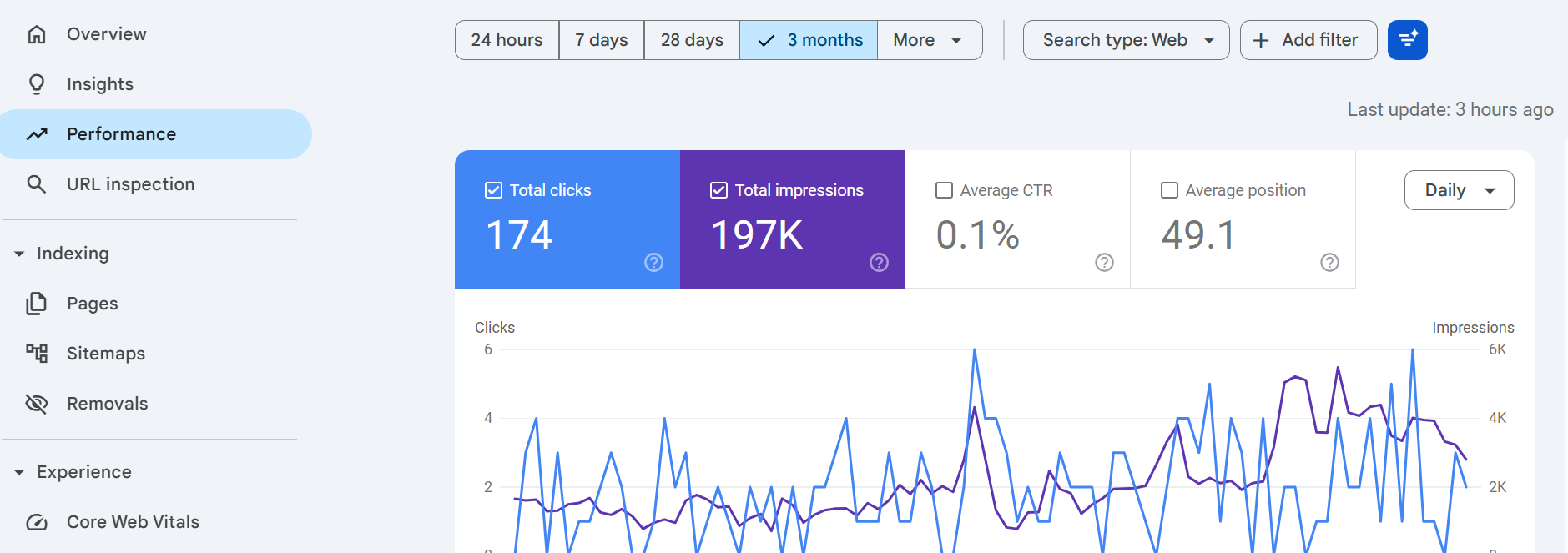
Once you are inside the performance report, change the date filter to Last 12 months.
A full year of search console performance data matters here for a few reasons. It gives you a much larger sample size to work with, which means you are seeing patterns rather than flukes. It smooths out short-term noise like seasonal spikes or one-off traffic drops.
And it helps you spot whether conversational queries are growing over time, which is exactly the kind of trend you want to track.
3. Add a Query Filter with Regex
This is where the real work happens. Follow these steps:
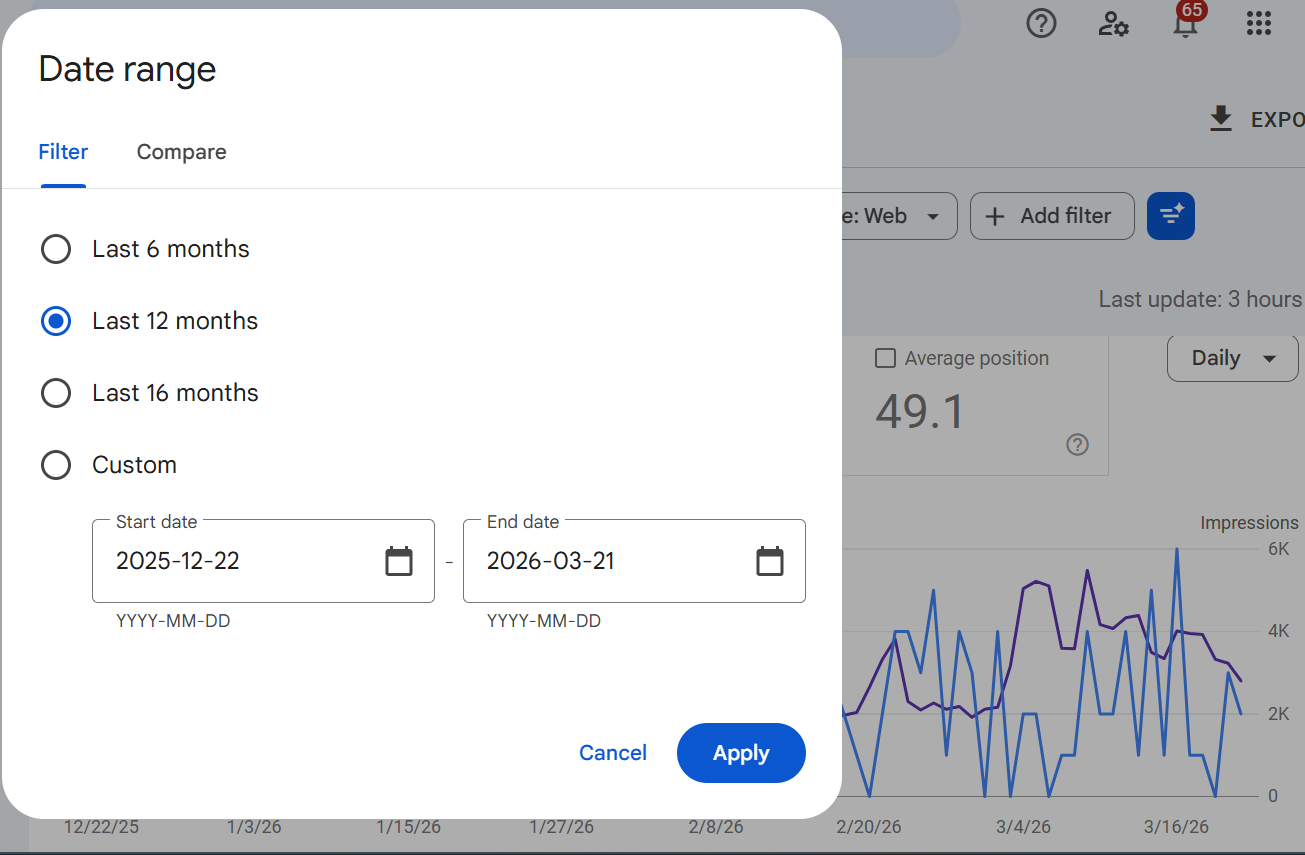
Click Add filter
Select Query
Choose Custom (regex)
Then paste in the following custom regex:
^(?:\S+\s+){9,}\S+$This regex does one specific thing. It filters queries down to only those that are ten or more words long. That threshold is where you start seeing searches that stop looking like keywords and start looking like prompts. Longer queries surface more conversational language, more context, and more of the intent behind the search.
4. Adjust the Word Count
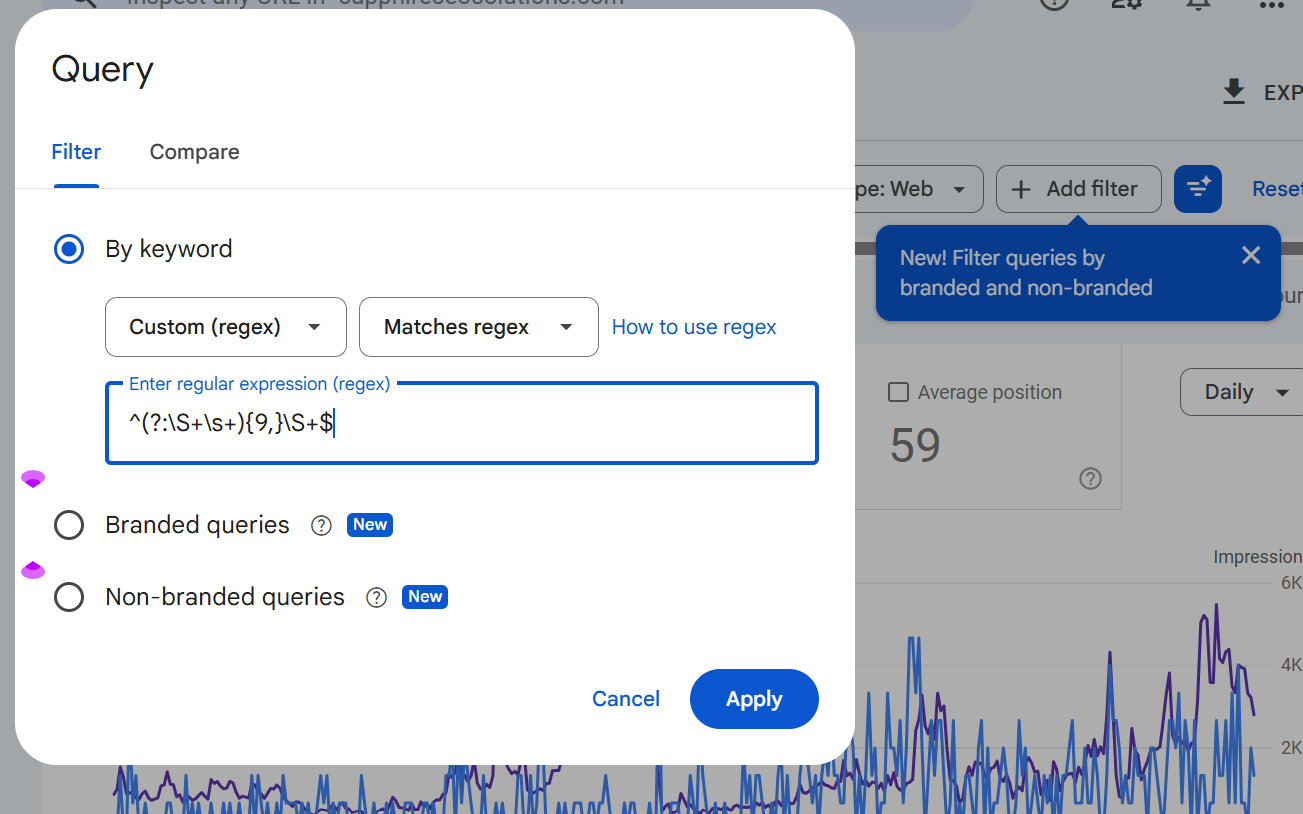
The regex above is a starting point, not a fixed rule. You can edit the number inside the expression to raise or lower the minimum word count, depending on what you are looking for.
Here is a simple way to think about it:
9+ words pull in long-tail conversational searches that go beyond typical keyword phrases
20+ words surface much more detailed, AI-style prompts that read like full instructions or scenarios
As you increase the threshold, the queries you see will start to look less like search terms and more like something a user typed into an AI tool. Full questions, multi-part requests, and highly specific scenarios become much more common at the higher end.
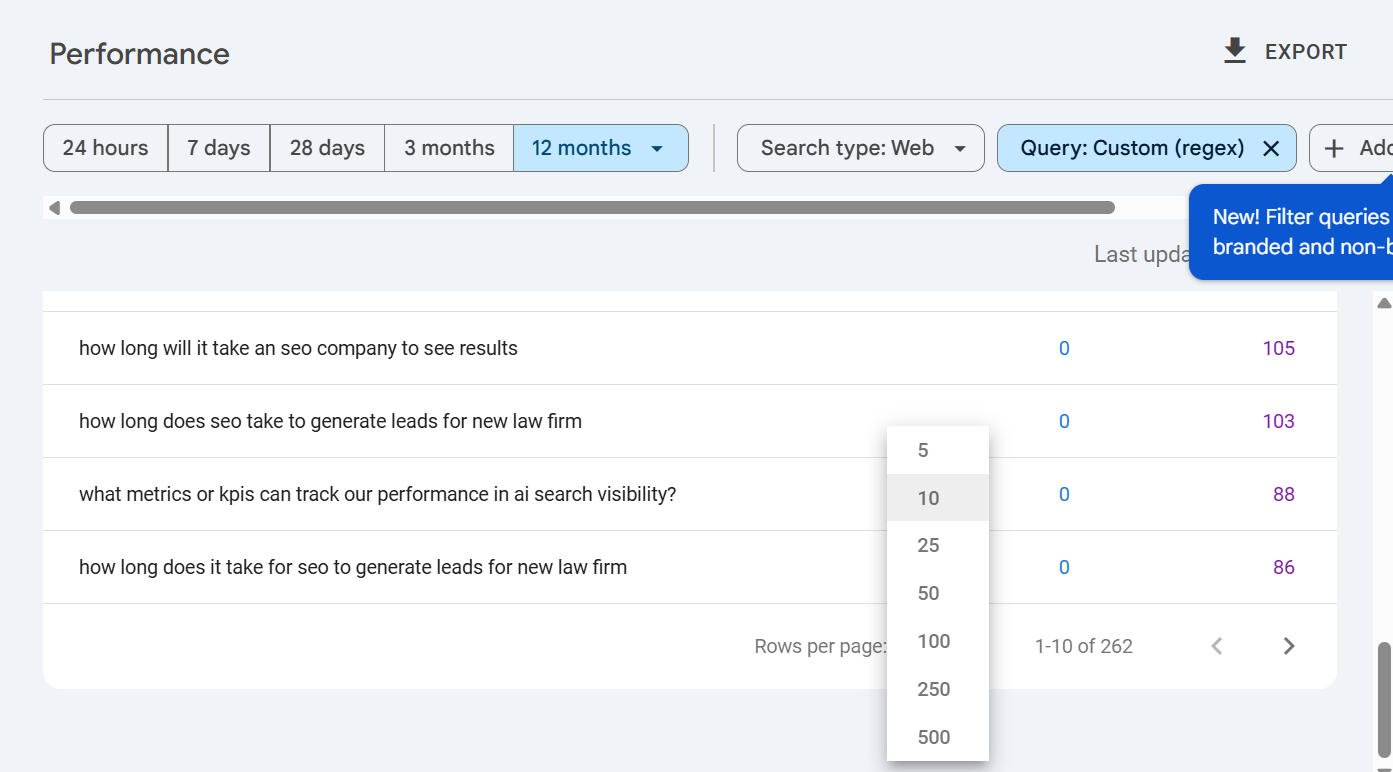
5. Increase Rows and Review Results
Before you start reading through the queries, set your rows per page to 100. This lets you review a much larger slice of the data in one view without constant page refreshing.
As you scan through the results, look for searches that follow these patterns:
Full questions starting with how, what, which, or why
Direct comparisons between products, services, or approaches
Step-by-step requests where users want a process explained
Detailed recommendations tied to a specific situation or goal
Location-specific or use-case-specific prompts that go well beyond generic searches
These are the queries worth paying attention to. They tell you not just what people want but how they are thinking about it.
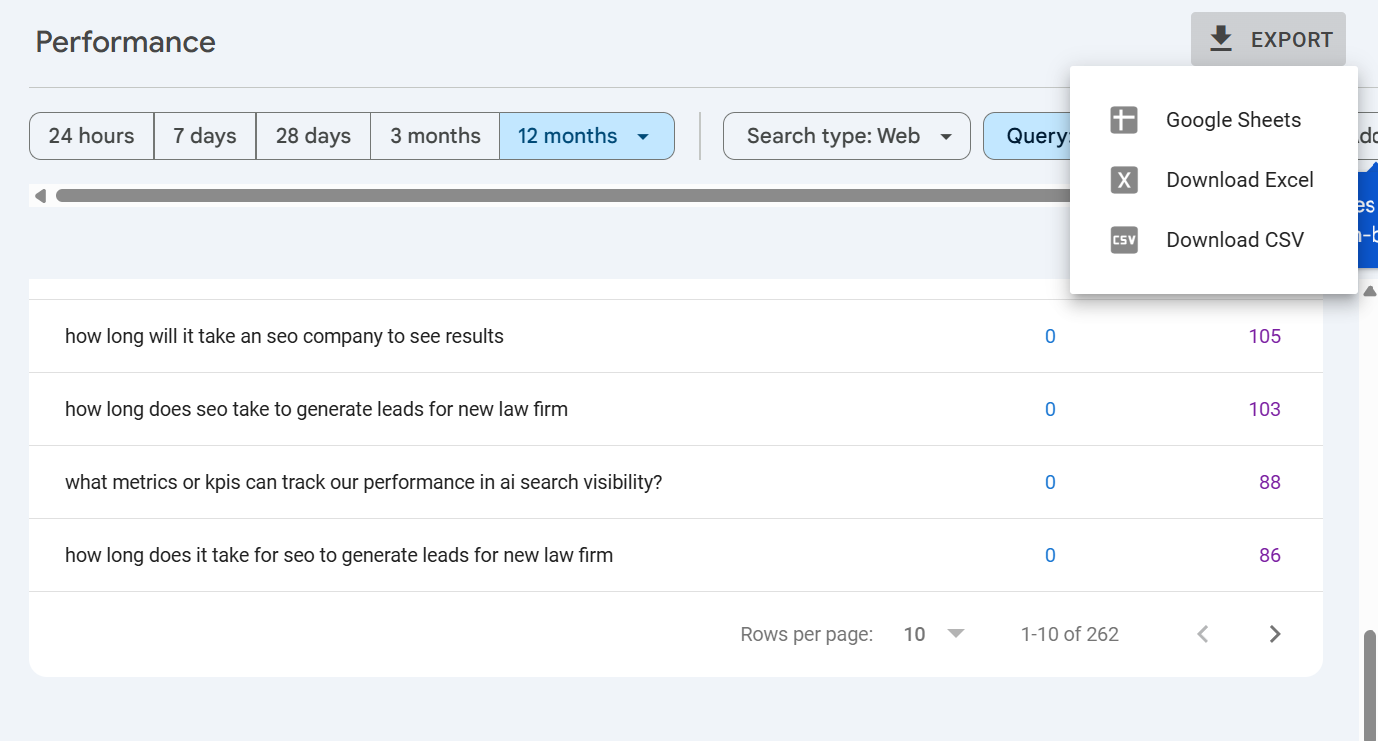
6. Export the Data
Once you have reviewed the filtered results, export everything. Search Console gives you three options:
Google Sheets
Excel
CSV
The export will include exactly what you are currently viewing with your regex filter applied, so you will not need to re-filter anything manually.
Getting the data out of Search Console and into a spreadsheet makes it much easier to sort by impressions, group queries by theme, tag them by intent, and start identifying the patterns that matter most for your content strategy.
Examples of the AI-Style Prompts You May Find
Once you apply the regex filter, the results can be surprising. Most people expect to see slightly longer versions of their usual keywords. What they actually find looks much closer to AI-style prompts than anything resembling traditional search terms.
Here are a few examples of the kinds of search prompts that tend to surface:
"How to..." searches
"How to improve my website ranking without hiring an SEO agency"
"How to set up Google Search Console for a new website"
"Best way to..." searches
"What is the best way to find keywords for a small business website?"
"Best way to improve local SEO for a service-based business"
Comparison prompts
"Which is better for local SEO, Google Business Profile or backlinks"
"Compare monthly SEO retainers vs one-time SEO audits for small businesses"
Product or service research prompts
"What should I look for when choosing an SEO agency for an e-commerce store"
"What are the most cost-effective SEO tools for a marketing team under fifty people"
Highly specific scenario-based searches
"What are the best steps to recover a website that lost traffic after a Google update"
"How do I know if my content is showing up in AI-generated search results"
Notice what these have in common. They use question words like how, what, which, and why. They compare options, describe a specific situation, and are written the way most people actually talk.
These are not edge cases. They are becoming increasingly common in search console data across industries. And the fact that they read like AI prompts is exactly the point. Whether they originated from an AI tool or simply reflect a shift toward more conversational searching, they represent how your audience is looking for answers right now.
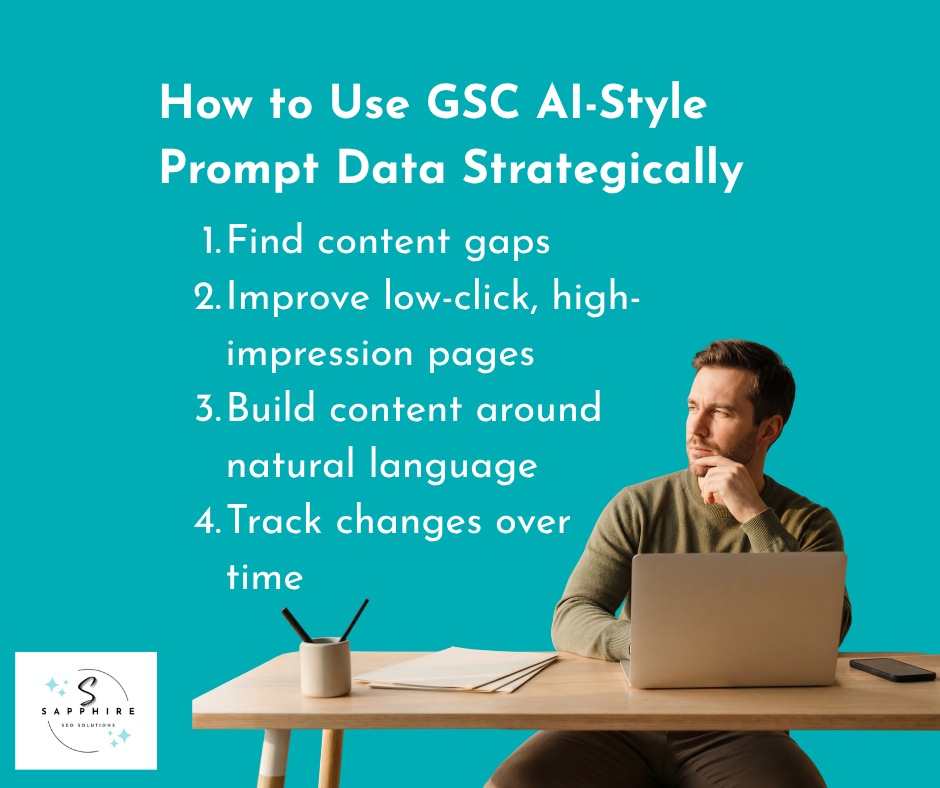
How to Use the Data Strategically
Pulling the data is the easy part. What you do with it determines whether it actually helps get mentioned by AI search. Here’s what we like to do at Sapphire SEO Solutions:
1. Find Content Gaps
Start by auditing existing content against the queries you exported. Look for questions that come up repeatedly but have no clear answer anywhere on your site. These are your gaps.
Pay close attention to topics like:
Pricing questions where users want numbers or ranges before making a decision
Alternatives and competing options that your audience is clearly researching
Comparisons between your service or product and others in the market
Specific use cases that your content does not directly address
AI-related concerns about how your product or service fits into a changing landscape
If users are repeatedly searching for something and landing on a page that does not answer it, that is a gap worth closing. Either expand an existing post or build out an entirely new topic cluster around it.
Request a free SEO audit to get started today!
2. Improve Low-Click, High-Impression Pages
Sort your exported data by impressions and look for pages that are getting visibility but very few clicks. This usually means Google sees your content as relevant to the query, but the page itself is not convincing users to visit.
A few changes that often help:
Add a clearer summary near the top of the page that directly addresses the question
Rewrite headings so they match the language users are actually using in their searches
Add an FAQ section that tackles the most common long-tail questions head-on
Make sure the page leads with a direct answer rather than burying it several paragraphs deep
Small structural changes like these and focusing on on-page SEO elements can meaningfully improve traffic without requiring a full rewrite.
3. Build Content Around Natural Language
Keyword research has experienced a bigger shift. Short keywords still matter, but they are no longer enough on their own. The query data you are pulling from Search Console shows you the actual phrasing real people use when they search. Use it.
Mirror that language in your content structure. If users are asking "what is the best way to improve local SEO for a service business without a storefront," your subheadings and page sections should reflect that framing. Write the way your audience searches, not the way a keyword tool ranks volume.
This approach also makes your content more likely to be surfaced in AI-generated answers, where natural language alignment matters more than keyword density.
Since all of this may be technical to wrap your head around, it’s best to consider working with an AI SEO agency. Read our detailed guide on “Do AI SEO Services Maximize AI Search Visibility?” to learn how such services can help your brand.
4. Track Changes Over Time
This is not a one-time exercise. Run the same regex filter every few months and export a fresh batch of data. Compare it against your previous exports and look for recurring themes that are growing in frequency.
If long-form, conversational queries are increasing in your search console data over time, that is a strong signal that your search visibility in AI-style search experiences is expanding. It gives you directional insight that is grounded in real behavior rather than platform estimates or third-party tracking tools. Use those trends to keep refining your content priorities and stay ahead of where search is heading.
Exporting your data is step one. But a spreadsheet full of long queries can be overwhelming to analyze manually, especially if you are pulling hundreds of rows at a time. This is where AI tools become genuinely useful.
Once you have your exported file, upload it directly to an AI assistant like Claude, ChatGPT, or a similar tool. From there, you can run a deeper data analysis that would take hours to do by hand.
Here are some of the most valuable things AI assistants can do with this data:
Identify recurring themes across hundreds of queries without you having to read every single one
Group prompts by intent so you can see which queries are informational, commercial, or comparison-driven
Surface common customer questions that your content may not be addressing
Flag concerns around pricing, competitors, reputation, or specific product features that users keep bringing up
This kind of analysis is especially useful for marketing teams working across multiple sources of data. Instead of trying to manually compare query lists from different time periods or different site sections, you can feed everything to an AI tool and ask it to find the patterns for you.
Some of the most useful questions to ask once your data is uploaded:
"What are customers asking about my brand?"
"What themes appear most often across these queries?"
"What problems are users trying to solve based on how they are phrasing their searches?"
"What prompt patterns should I prioritize for AI visibility tracking?"
The answers will not be perfect, and you will still need to apply your own judgment. But the speed and depth of analysis you get from combining Search Console exports with AI tools is something that used to require dedicated research time or expensive software. Now it takes a single upload and a few well-framed questions.
New Search Console AI Analysis Features
Beyond the manual regex approach, Google has been quietly building AI capabilities directly into Search Console. This is a separate feature from the regex filter technique covered above, and it is worth knowing about.
Inside the Performance > Search results area, you can now enter natural language prompts directly into an analysis field. Instead of manually building filter configurations or knowing regex syntax off the top of your head, you can simply describe what you want to see. Google responds by generating the appropriate regex-based filter for you, which you can then apply or dismiss with a single click.
Some examples of prompts the tool responds to well:
"Show question-like queries"
"Show informational queries"
"Filter queries longer than a certain length"
"Show branded queries"
For that last one, the tool performs surprisingly well. When asked to surface branded queries, it generates a regex that includes your brand name and common variations, saving you the step of building that filter yourself.
The feature goes beyond just surfacing AI-style queries, too. You can use it to run analysis across several other useful areas without switching platforms or exporting anything:
Spotting branded searches and understanding how users are finding you by name
Comparing traffic periods, such as last month versus the same month a year ago
Reviewing country-specific performance to see clicks, average CTR, and position by region
Identifying pages that lost clicks over a set time period so you can prioritize recovery efforts
It is worth noting that this feature has limitations. It works best for filters that already exist within Search Console's standard Performance reports.
If you ask it to do something outside those boundaries, like filtering by average position thresholds, it will not be able to help.
And while it makes the process faster for less experienced users, seasoned SEOs will likely find the manual regex approach more flexible and precise.
Limitations to Mention
This approach is valuable, but it is important to go in with realistic expectations. There are a few limitations worth understanding before you build a full strategy around this data.
Search Console does not confirm query origins. Nothing in your Search Console data proves that a query came directly from ChatGPT, Google AI Mode, or any other AI system. The presence of long, conversational queries in your reports is a strong signal, but it is not hard evidence.
Some of those queries may simply reflect users who have adopted a more conversational way of searching on Google itself. The data points in a useful direction, but it does not give you certainty.
The data is incomplete by nature. Search Console has always shown a filtered view of your actual query data, and that has not changed.
Not every search that leads to an impression gets reported, and AI search tools and AI platforms do not pipe their data directly into your account.
What you are seeing is a partial picture, useful for spotting trends but not comprehensive enough to treat as a complete record of how users are finding you through AI-generated answers or AI assistants.
Prompt tracking is also not there yet in terms of what it should be doing. Research has shown that users phrase the same underlying question in dramatically different ways. One study found very low similarity scores when asking different users to provide prompts for the same query. That means you will never be able to capture every variation of how someone searches for your content. The goal of prompt tracking is to find directional patterns, not exact matches.
The built-in AI analysis feature has a limited scope. The natural language prompt tool inside Search Console is helpful for generating filters quickly, but it is largely constrained to what Search Console's standard Performance reports can already do. It cannot surface data that the platform does not collect, and it cannot replace the deeper AI visibility analysis that dedicated AI platforms are built to provide.
None of these limitations makes the process not worth doing. They just mean you should treat the data as a strong starting point rather than a definitive source of truth. Use it to inform decisions, not to make them in isolation.
Best Practices to Follow
Before wrapping up, here are the core principles that should guide how you use everything covered in this guide:
Start with Search Console before spending money elsewhere. Most businesses jump straight to paid AI visibility platforms without ever mining the free data already available to them. Search Console gives you a real starting point grounded in actual search behavior. Use it first. If you exhaust what it can tell you and still need deeper AI visibility insight, then explore paid tools. But for the majority of sites, there is more than enough here to work with before opening your wallet.
Focus on patterns, not exact matches. The goal of prompt tracking is not to find the single perfect query and optimize for it. Users phrase the same need in too many different ways for that approach to scale. Instead, look for clusters of similar intent. What topics keep coming up? What concerns appear across multiple queries? Those recurring patterns are where your content investments will have the most impact.
Treat long-tail data as directional, not definitive. Long-tail query data tells you which way the wind is blowing. It is not a precise map. Use it to make informed decisions about where to focus, but combine it with your own knowledge of your audience and industry before acting on any single insight.
Use your findings to improve across multiple content areas. The queries you pull from Search Console should feed directly into improvements across your site. Specifically:
Content structure so pages lead with direct answers to the questions users are actually asking
Topical coverage so your site addresses the full range of concerns your audience has, not just the ones you assumed mattered
FAQs that mirror the exact language users use in conversational searches
Comparison content that speaks to users who are actively weighing their options
Buyer education pages that address concerns around pricing, alternatives, and fit before users have to go looking elsewhere
Moving beyond traditional keywords does not mean abandoning what already works. It means layering conversational intent on top of your existing strategy so your search visibility grows in both directions, capturing users at every stage of how they search today.
Partner with Sapphire SEO Solutions to Boost Your AI Visibility!
AI search is changing how people find information, and most marketers are still trying to figure out how to measure it. The answer does not have to start with an expensive platform or a complex new tool. It can start with Google Search Console, which you already have access to and which is already sitting on more useful data than most people realize.
While you can gain access to valuable data, analyzing and using it to create an AI search strategy for your site requires expertise, skills, and knowledge. That’s where we come in.
Sapphire SEO Solutions and our experts are here to help you explore how your audience searches and create a data-driven AI search plan for your website.
Contact us to schedule a free consultation today and start getting mentioned by AI now!

Frequently Asked Questions
How can I find AI-style search prompts in Google Search Console?
Open the Performance report in Google Search Console, switch the date range to the last 12 months, and apply a query regex filter for searches with 10 or more words. This surfaces longer, conversational queries that often read more like prompts than traditional keywords.
Can Google Search Console show queries from AI Overviews or AI Mode?
Yes, at least in part. Google says AI Mode data is counted in overall Search Console Performance totals, and Google’s AI features documentation explains that site owners may see traffic connected to AI search experiences. That still does not prove every long query came directly from an AI tool.
What regex should I use in Search Console to find long-tail conversational queries?
A practical starting regex is ^(?:\S+\s+){9,}\S+$. It filters for queries with 10 or more words, which helps isolate detailed, question-style searches. From there, you can raise the threshold to find even longer prompts and uncover richer patterns in user language.
How do I analyze long search queries in Google Search Console for content gaps?
Export the filtered queries to Sheets, Excel, or CSV, then sort them by impressions and group them by intent. Look for repeated questions about pricing, comparisons, setup, or use cases that your site does not answer clearly. That process helps reveal gaps, weak pages, and missed internal Links opportunities.
Is Google Search Console enough for AI search visibility tracking, or do I need a separate tool?
For many sites, Search Console is the best free starting point because it shows real search query data from your own property. It is useful for spotting trends and prompt-like behavior, but it is still incomplete, so dedicated AI visibility platforms may add more depth later.