

How to Delete the Google Review - 2025 Expert Guide
Google Reputation Management is the strategic process of influencing a brand’s digital perception through active engagement and technical optimization of a Google Business Profile (GBP). In 2025, Google’s AI-driven search algorithm prioritizes Review Recency and Demonstrated Experience (E-E-A-T) over static star ratings alone. Successful management requires a "Human-First" approach: responding to 100% of reviews within 24 hours to signal business activity, utilizing 720p authentic imagery to verify physical presence, and resolving conflicts through Review Edits rather than deletions to preserve local SEO signals. Businesses that actively manage these signals see an average 35% increase in revenue and significantly higher visibility in the Google Maps Local 3-Pack.
Key Takeaways
Consistent review management correlates with a 35% average increase in business revenue.
Google prioritizes profiles with high review velocity and authentic, high-resolution imagery.
Successful removal requires evidence-based appeals citing specific 2025 Google "Prohibited Content" policies.
Replying to 100% of reviews within 48 hours builds essential consumer trust.
Encourage customers to edit existing reviews to refresh your profile’s local SEO signals.
Online reviews shape how potential customers see your business. The numbers tell the story. Backlinko states that 83% of consumers check Google reviews before they visit a local business in person.
But what happens when a review goes wrong?
Maybe you wrote a heated review after a bad experience and want to take it back. Maybe someone posted a fake review about your business. Maybe a competitor is gaming the system. These situations happen every day.
Google hosts most of the reviews people read online. That makes knowing how to handle them crucial for your online reputation.
Since 2007, Sapphire SEO Solutions has helped small businesses rank higher and strengthen their digital presence. We work with clients to optimize their Google Business Profile (local SEO services) while protecting their online reputation. We know what works because we've handled thousands of review situations.
This guide gives you practical advice for both sides of the equation. You will learn how consumers can edit or delete their own reviews. You will also learn how business owners can manage and remove inappropriate reviews about their companies.
Can You Delete a Google Review?
Google is the dominant review platform, acting as the primary gatekeeper for local commerce. Its scale is unrivaled.
According to Search Engine Journal, Google hosts approximately 73% of all online reviews for businesses. This dominance creates a high-stakes environment, which means most people looking for your business will check Google first, often before they even see your actual website.
The answer to whether you can delete a Google review depends on who you are. Google draws a hard line between ownership of the business and ownership of the opinion.
If you wrote the review yourself, yes. You can delete your own review anytime you want.
Whether you’ve reached a resolution with a merchant or realized you reviewed the wrong location, the process takes about two minutes. This allows consumers to maintain an accurate digital footprint without administrative oversight.
However, if someone else wrote a review about your business, it gets complicated. This is the most common point of friction we see at Sapphire SEO Solutions.
Business owners cannot directly delete Google reviews about their companies. Regardless of your subscription level or years in business, you do not get a delete button.
We often have to clarify to clients that you cannot remove reviews just because they hurt your feelings or say something you disagree with.
Google makes this distinction for good reason. To maintain its status as a trusted utility, the platform needs to protect honest feedback from consumers while preventing businesses from hiding legitimate criticism.
This "friction" is what gives Google reviews their market value; if they were easy to delete, they would be worthless to the consumer.
But there is a path forward for businesses when the system is abused. You can request removal if a review violates Google's guidelines, specifically the "Prohibited and Restricted Content" policies.
These guidelines exist to maintain information quality and civil discourse on the platform, preventing the "Local Guide" ecosystem from becoming a weapon for harassment.
Google's policies cover several types of violations that trigger an automatic or manual takedown. Spam and fake reviews break the rules, as does "Review Gating" or incentivized content. So does malicious content like threats, harassment, or hate speech.
To maintain a safe browsing environment, reviews with illegal content get removed. So do reviews that contain personal information, conflicts of interest, or sexually explicit material.
The strategic hurdle for most businesses is that the keyword here is "violates." Google’s moderation team operates on logic, not emotion.
A negative Google review is not the same as a fake review. You might feel a critique is unfair, but a one-star rating because a customer had a bad experience does not violate Google's policies.
Conversely, an angry review from someone who never visited your business falls under "Misrepresentation."
Understanding this difference saves time and frustration. Instead of fighting a losing battle against a "mean" customer, your energy is better spent identifying the specific policy a rogue reviewer has broken.
How to Edit or Delete a Google Review You Posted (Consumer Guide)
You wrote a review. Now you want to change it or remove it completely.
Perhaps the business owner reached out to make things right, or you realized your initial feedback didn't tell the whole story. Good news. The process is simple.
However, timing is everything.
According to WiserReview, 73% of consumers only trust reviews written in the last month. This "recency bias" is a major part of Google's algorithm.
Fresh reviews matter, meaning an old, angry review from three years ago might be hurting a business more than it helps a consumer today. That makes knowing how to update your own review valuable for maintaining a fair and accurate digital marketplace.
Check out our blog on “The Role of Online Reviews in Local SEO Rankings” to learn more about the importance of online reviews and how you should respond to them.
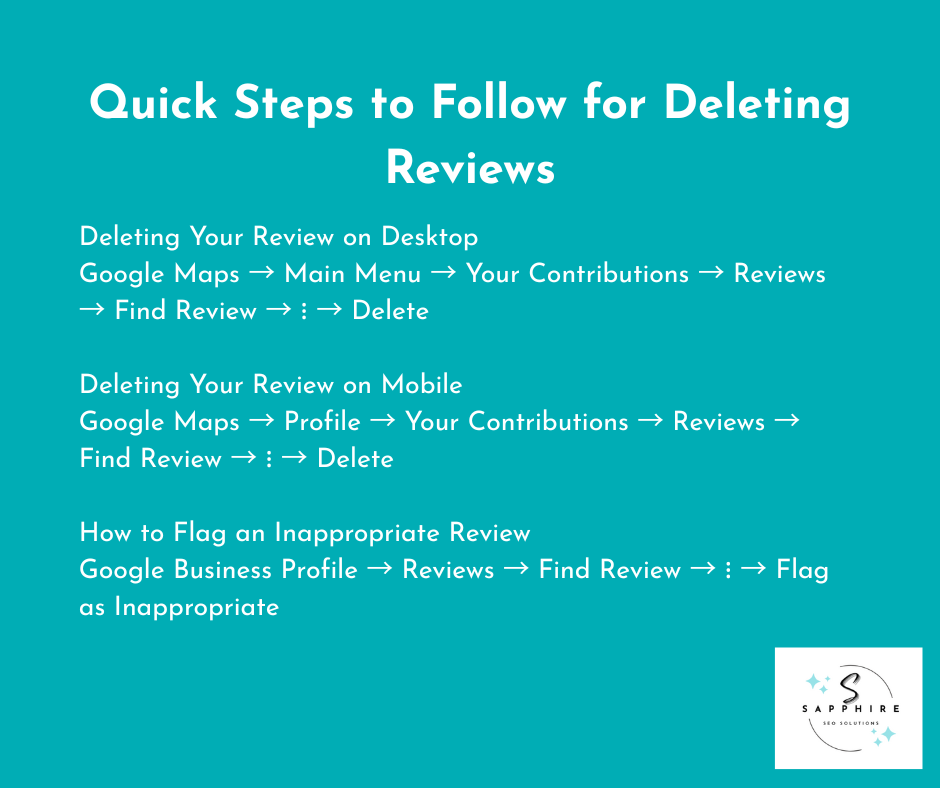
Deleting Your Review on Desktop
If you are working from a computer, follow this sequence:
Open Google Maps on your computer.
Click the three horizontal lines in the top left corner to open the main menu.
Select "Your contributions" from the menu.
Click on "Reviews."
Find the review you want to remove.
Click the three vertical dots next to it.
Select "Delete review" from the dropdown.
Done. The review disappears immediately. From our experience at Sapphire SEO Solutions, the public star rating usually updates within minutes, though cached versions may linger for a few hours.
Deleting Your Review on Mobile
On the Google Maps app:
Open Google Maps on your phone.
Tap your profile picture in the top right.
Select "Your contributions."
Tap "Reviews."
Find the review you want to delete.
Tap the three vertical dots.
Select "Delete review."
The review is gone.
Editing Instead of Deleting
Sometimes editing makes more sense than deleting. At Sapphire, we often advise users to edit because a "deleted" review loses its "Helpful" votes and historical weight.
Maybe the business fixed your problem. Maybe you were too harsh. Maybe new information changes your perspective.
To edit a review, follow the same steps above. But instead of selecting "Delete review," click "Edit review."
You can change your text, adjust your star rating, add photos, or remove old ones.
Expert Tip: In 2025, Google’s AI moderation is highly sensitive. If you edit a review to include a phone number or specific employee names, Google may "shadow-hide" the review until it passes a manual check. Keep your edits focused on the service experience.
Here is when editing works better than deleting:
Highlight positives that the business deserves credit for. If the service was slow but the product was perfect, use the edit to be specific. Did they respond well to your complaint? Say so.
Clarify resolved issues. This is the ultimate "Helpful Content" signal. If they made things right, update your review to reflect that. Other customers want to know if businesses fix their mistakes.
Adjust star ratings to match your updated experience. If a manager called you personally to apologize, a problem that got solved might deserve four stars instead of one.
Keep reviews polite and constructive. Avoid "venting." Even negative feedback helps more when you explain what went wrong without attacking anyone.
Warnings and Identity Issues You Should Know
One warning. Deletion is permanent. There is no "undo" button for a deleted opinion.
Once you delete a review, you cannot get it back. Google does not keep deleted reviews in a recovery folder. If you think you might want to reference that review later, edit it instead.
Identity is also a common hurdle. You must use the same Google account you used to post the original review. We frequently see users get frustrated when they can't find a review because they are logged into a different Gmail account.
If you posted from a work account but try to delete from your personal account, it will not work. Check which Google account you are signed into before you start.
When you own the content, the whole thing takes a few minutes at most. You are in the driver's seat. No forms to fill out. No support tickets. No waiting.
Flagging Inappropriate Reviews
When a damaging or fraudulent comment hits your profile, your first instinct is likely to look for an "undo" button.
Here is the hard truth.
Business owners cannot directly delete reviews about their companies. Google maintains a strict separation between business control and consumer feedback to ensure the platform's integrity.
There is no delete button in your Google Business Profile. You cannot remove a review just because it says something negative.
However, you are not defenseless. You can flag reviews that break Google's rules, shifting the situation from a "disagreement" to a "policy violation."
How to Flag an Inappropriate Review
The standard reporting process is your first line of defense:
Log in to your Google Business Profile.
Click on "Reviews" in the left menu.
Find the inappropriate review you want to report.
Click the three-dot menu next to it.
Select "Flag as inappropriate" from the dropdown menu.
That is it. Google receives your report and reviews it.
At this stage, your report is typically triaged by an automated system. The scale is massive.
Google revealed that it blocked or removed 170 million policy-violating reviews. That number jumped 45% from the previous year. Google takes this seriously, but its AI filters can sometimes miss nuanced or sophisticated fake content.
What Google Will Remove
Google is an arbiter of policy, not truth. Google removes reviews that violate specific policies. Understanding these criteria helps you know which reviews to flag successfully.
Spam and fake reviews get removed. These include reviews from people who never visited your business, reviews posted by bots, or reviews copied from other sources.
Offensive or illegal content breaks the rules. This covers threats, harassment, hate speech, explicit sexual content, and anything promoting illegal activity.
Conflicts of interest matter. Reviews from current or former employees, competitors, or people with financial stakes in harming your business can be removed.
Off-topic or misleading content violates policies, too. This includes a review about a completely different business or business listing, or a review that shares private information about others. A review that impersonates someone else is also a major violation.
Using the Google Business Profile Content Moderation Tool
For businesses managing multiple locations, the standard dashboard isn't enough. Google offers a specific tool for tracking reports.
The GBP Content Moderation Tool lets you check the status of reviews you have already flagged. You can see whether Google approved or denied your removal request. You can find this in your Google Business Account under the reviews section.
Before you flag a review, here’s what you should keep in mind:
Not every negative review deserves a flag. Legitimate criticism, even if it's painful, is part of a healthy profile. A customer had a bad experience and wrote about it honestly. That stays. They gave you one star because your service was slow? That stays too.
Try engaging first. Respond to the review professionally. Acknowledge the problem. Offer to make it right. At Sapphire SEO Solutions, we’ve seen that many customers update or remove negative reviews after a business responds well. Save flagging for actual policy violations like fake reviews, spammy reviews, reviews with threats or offensive language, or reviews from people who never visited your business.
What Happens After You Flag Reviews (2025 Appeal Process)
Google reviews your report. This can take several weeks. Sometimes longer. The support team looks at the review against their policies, and they make a decision.
If they agree the review violates policies, they remove it. If they disagree, the review stays.
You get notified either way through your Google Business Profile. The review shows as flagged in your dashboard while Google investigates, and other people can still see it during this time.
Expert Insight: If your request is denied, you now have the option to appeal. Google’s appeal tool will allow you to submit evidence (like CRM logs or invoices). Once you start the appeal, you often only have a 60-minute window to upload your supporting documents. Have your evidence ready before you click "Appeal."
The Google Business Profile Help Tool
The Google Business Profile Help Tool (available at manage.google.com) allows you to see a list of all reviews you've reported and their current status in one dashboard. This is the 'secret' to managing a reputation at scale.
With the GBP Help Tool, you get a centralized view of every dispute, helping you ensure nothing falls through the cracks during a high-volume attack.
Advanced Steps for Businesses When Reviews Aren’t Removed
It is a frustrating moment for any founder: Google denied your flag. The review stays up. Now what? At Sapphire SEO Solutions, we treat an initial denial as the beginning of the real work.
You have options. They take more effort, but they work in many cases where the initial automated scan was too broad to catch a specific violation.
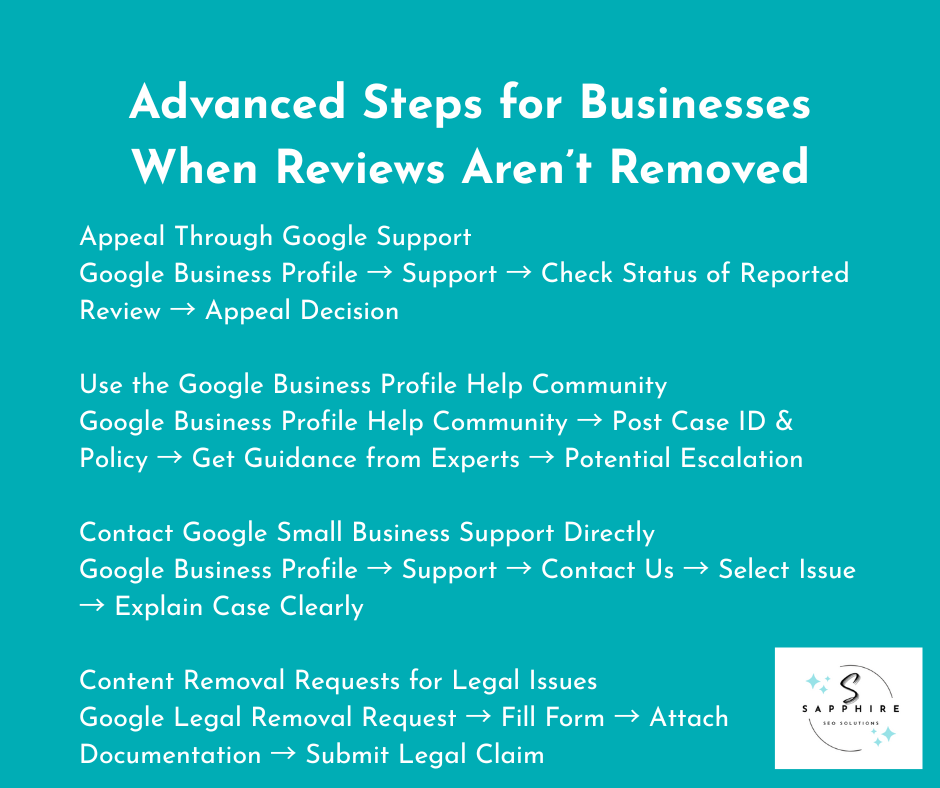
Appeal Through Google Support
If your flag was rejected, do not simply report it again. Instead, use the official Reviews Management Tool to launch a formal appeal.
Log in to your Google Business Profile.
Navigate to the support section and select "Check the status of a previously reported review."
If eligible, select the option to appeal the decision.
When you do this, you must explain why the review violates policy. Be specific. Point to exact policy language.
For example, if a reviewer mentions a "filthy bathroom," but you are a strictly digital service with no physical office, cite the "Misinformation" policy. Provide evidence, such as your service contract or a description of your business model.
Expert Tip: The Google Business Profile team reviews appeals separately from initial flags. A manual reviewer, who is different from the person who looks at your case, will evaluate your argument. Sometimes they see what the first reviewer missed, but only if you provide a logical, policy-based reason.
Use the Google Business Profile Help Community
When standard channels fail, the Google Business Profile Help Forum is an invaluable resource. This forum connects you with other business owners and Google experts known as "Product Experts."
Post your situation there, providing your Case ID and the specific policy being broken.
Community experts often provide guidance on strengthening your case. Because these experts have a direct line to Google’s internal teams, sometimes Google employees monitor these forums and escalate legitimate issues that were caught in a "denial loop."
Document Everything
The key to winning an appeal in 2025 is a "Proof Pack." Document everything and build a file with evidence before you click the appeal button.
Screenshots of the review (to prove if the user later edits it to be more abusive).
Records showing the reviewer never visited your business.
Proof of fake accounts or review schemes (if the user has left 10 identical reviews for your competitors in one day).
Documentation of threats or harassment.
Strong evidence changes outcomes. Google’s AI is trained to ignore "he-said-she-said" arguments. A vague complaint gets ignored, but a detailed report with proof gets taken seriously.
Contact Google Small Business Support Directly
If the automated tools are not reflecting the reality of a situation, the Google Small Business Support team handles escalated cases. You can reach them through your Google Business Account dashboard. Click on "Support" and select "Contact us."
Choose the issue type that matches your situation. "Review management" or "Policy violation" works for most cases.
When you get a human on the line or via email, explain your case clearly. Skip the emotion. Stick to facts and policy violations. Reference specific policy sections that the review breaks. The support team responds faster when you make their job easier. Give them everything they need upfront.
Content Removal Requests for Legal Issues
If a review is defamatory or contains private data (doxing), Google has a separate path for legal violations. This bypasses standard community moderation and goes to the legal team.
Defamation, privacy violations, and court orders are the primary drivers here. These go through a different process than standard policy flags.
Visit Google's legal removal request page. Fill out the form with your legal claim. Attach supporting documentation like cease and desist letters or court orders.
Note that this process takes longer than standard flags. While you might need a lawyer to help with documentation, it works for legitimate legal violations that standard flagging misses.
Timeline Expectations
Reputation management requires patience. Standard appeals take several weeks, while legal removal requests can take months. The support team handles thousands of cases daily, so do not expect an overnight fix.
Persistence matters. If you get denied, gather more evidence and try again. We’ve seen that some cases need multiple attempts before Google takes action.
Check your Google Business Profile regularly for updates, as Google sends updates through your dashboard. Missing a response can delay your case further.
Realistic Outcomes
A final word of expert advice: not every appeal succeeds.
Google protects honest reviews even when businesses disagree with them. This is why it is the most trusted review platform. A negative review from a real customer usually stays up no matter how many times you appeal.
Focus your energy on clear policy violations like fake reviews, reviews with threats, or reviews from competitors. These have the best chance of removal.
For everything else, responding professionally often works better than fighting for removal. A calm, factual response often makes the reviewer look unreasonable and shows your brand's maturity.
Managing Fake Reviews and Review Schemes
Fake reviews poison the well. They don’t just skew your star rating. They hurt honest businesses and mislead customers by creating a distorted view of reality.
As we move through 2025, the volume of fraudulent content remains staggering. The numbers show how bad it gets.
According to Invesp, 10.7% of Google reviews are fake, and the impact on consumer behavior is profound. Brightlocal reveals that 82% of consumers say they have read a fake review in the last year. This has led to a more cynical "verification-first" mindset among shoppers.
Detecting Fake Reviews in 2025 - Watching Out for the Red Flags
Fake reviews follow patterns. To protect your reputation, you must learn to spot them before they impact your conversion rates.
Generic language stands out. While real customers often mention specific details, such as a technician's name or a particular floor plan, fake reviews say things like "great service" or "terrible experience" without explaining what happened.
Analyze the reviewer’s profile. Anonymous reviews from new accounts raise flags. Check the reviewer's profile for "Review Velocity." Do they have a profile photo? Have they posted other reviews? Brand new accounts posting only negative reviews across different time zones or industries often come from competitors or paid "click farms."
Identify Coordinated Behavior. Spammy reviews repeat similar phrases across multiple locations. If you see the exact same complaint word-for-word on three other local listings, you are likely looking at a bot attack.
The "Spike" Effect. Timing matters too. A sudden influx of ten negative reviews posted within an hour after you rejected a customer's unreasonable demand? Not a coincidence. Similarly, reviews that have nothing to do with your business break the pattern, such as a user complaining about a mechanic on a dentist’s profile.
Reporting Review Schemes and "Review Jail"
Some businesses pay for positive reviews. Others attack competitors with fraudulent reviews. Both violate Google's policies.
In 2025, Google introduced a severe consequence commonly known as "Review Jail." When a business is caught buying fakes, Google may place a "Suspected fake reviews" warning label on its profile for several weeks, effectively scaring away all new customers.
When you spot a review scheme, report it through your Google Business Profile. Here’s how you do that:
1. Find the business buying reviews. Go to their profile on Maps.
2. Click "Suggest an edit" and select "Report a policy violation."
3. Choose "Review solicitation or gating" or "Fake Engagement."
Provide evidence where possible. Screenshots of them asking for reviews in exchange for discounts or posts on social media offering payment for five-star ratings are highly effective.
Google investigates businesses running schemes, and it can now penalize them by blocking all new reviews or removing the profile entirely.
Protecting Your Google Business Profile
Prevention beats cleanup. At Sapphire SEO Solutions, we recommend a proactive stance:
Monitor your reviews daily. Catch fake reviews fast. Use the GBP Content Moderation Tool to track your reports. The sooner you report them, the sooner they come down.
Document your customer interactions. Keep records of actual customers (via invoices or CRM logs) to help prove when someone never visited your business.
Enable review notifications in your Google Business Profile. Ensure you get alerts when new reviews appear. This lets you respond quickly to both real and fake feedback.
Google's Automated Systems: SpamBrain
Google uses automated spam detection powered by SpamBrain AI. This system filters out obvious fake reviews before they go live by spotting unusual posting behavior or geographic impossibilities (like a user reviewing ten businesses in ten different states in one day).
However, the system misses things too because sophisticated fake review operations adapt their methods to mimic organic growth. That makes human reporting crucial.
When you flag a fake review, you teach Google's system to recognize that specific new tactic, improving the tool for every business owner.
Impact of Fake Reviews on Your Business
Fake reviews damage real businesses. A wave of fake negatives tanks your rating, which scares away potential customers who trust what they read online.
Fight back strategically. Report every fake review you find. Build evidence. Stay persistent. But also focus on getting more real reviews. Volume helps. When you have 200 honest reviews, ten fake ones matter less. They get buried in the legitimate feedback.
Tips for Responding to Negative Reviews
Negative reviews sting. But ignoring them hurts worse. Unaddressed criticism is seen by both customers and Google’s AI as a "dead profile."
The gap between expectation and reality is massive. Exploding Topics reveal that 53% of customers expect a business to respond to a negative review within one week, yet 63% say they never get a response. This is your opportunity to demonstrate Experience and Trustworthiness by being the exception to the rule.
Why Responding Matters
A negative review without a response tells potential customers you do not care. A thoughtful, balanced reply signals that you are an active, professional business.
Forbes reveals that 97% of people read business responses. You are not just writing to the critic; you are writing a marketing script for the next 100 people who visit your profile.
The "Prominence" Factor: Google’s 2025 algorithm rewards "Response Rate." SOCi states that businesses that reply to at least 25% of their reviews see a 4.1% average increase in conversion rates.
Speed is the new standard. Reply within 24 to 48 hours when possible. Quick responses show you monitor feedback and prioritize the customer experience.
How to Respond Effectively
Start with acknowledgment. Thank the reviewer for their feedback. Yes, even if you suspect they are wrong.
"Thank you for sharing your experience" is a neutral, professional bridge.
Address specific concerns. This is where you prove you aren't a bot. The reviewer mentioned slow service. Talk about slow service. Generic "I'm sorry" scripts are ignored.
A high-E-E-A-T response looks like this: "We apologize that your order took 45 minutes during our lunch rush, which is longer than our usual 20-minute standard." This shows you actually read the review.
Apologize when appropriate and offer a solution. Own your mistakes. "You are right, we should have handled that better." Invite them to contact you offline. "Please call me at 555-1234 so we can make this right." moves the fire away from your public storefront.
Keep it short. Three to five sentences is the sweet spot. Long, defensive essays often backfire and make the business owner look unhinged.
Sample Response Templates
For service issues: "Thank you for this feedback. You deserved better service than you received. We have addressed this with our team. Please reach out to me directly at [contact info] so we can make your next visit a positive experience."
For product problems: "We appreciate you letting us know. This does not meet our quality standards. We would like to send you a replacement. Please email us at [contact info]."
What Not to Do
Never attack the reviewer. You lose the moment you get hostile. Even when they lie, stay calm. The public is watching your reaction, not the original complaint.
Skip the legal threats. Mentioning "defamation" or "lawsuits" in a public response is a "Trust" killer and often invites a "review dogpile" from the community.
Avoid copy-pasting. If every one of your responses is identical, Google’s spam filters may flag your engagement as automated.
Your Goal Should Be Towards Ensuring a "Review Update"
One of the most powerful SEO signals is when a user edits their negative review into a positive one after you've resolved the issue. When a user updates a review, Google refreshes the "Recency" signal, giving your profile a fresh boost.
Encouraging Positive Reviews
The best defense against negatives is more positives. To keep your rating in the 4.2–4.5 "Trust Sweet Spot", you must ask happy customers to leave reviews consistently.
Make it easy: Send a direct link via SMS or email immediately after the service.
Never incentivize: Do not offer discounts for five stars. This violates Google's anti-spam policies and can lead to a profile suspension.
Build volume consistently: Aim for a "rolling" window of fresh reviews. 73% of consumers only trust reviews written in the last 30 days.
One negative review does not define you. How you handle it does. At Sapphire SEO Solutions, we believe professional engagement is the ultimate "Trust" signal. Respond professionally, fix problems, and learn from criticism.
When to Edit vs. Delete a Review (For Customers)
You posted a review. Now you need to decide whether to edit it, delete it, or leave it alone. Your review history contributes to your overall "User Trust Score" on Google. The choice depends on why you want to change it.
When to Edit Your Review (For Customers)
From an expert SEO perspective, editing is often superior to deleting because it maintains "Review Recency" without wiping the slate clean. Edit when the situation changed, but your original experience was real.
Conflict Resolution: If the business fixed your problem after you gave them one star, don't just delete it. If they reached out, apologized, and made things right, you should update your review to reflect that. Change your rating. Add details about how they resolved the issue. This provides a "Full Circle" story that is incredibly helpful to other shoppers.
Perspective Shift: You were too harsh in the moment. Emotions ran high. If you calmed down and realized your one-star rant was unfair, use the edit tool to provide a nuanced critique. Edit it to something more balanced.
Detail Enrichment: You left out important context. Maybe you forgot to mention the manager who went above and beyond, or maybe you did not explain that your issue happened during a staff shortage. Add that information.
Operational Updates: Your circumstances changed. If you criticized a restaurant for not having vegan options, but they added a full vegan menu after seeing your feedback, update your review so other vegans know.
Accuracy Corrections: You made a factual error. If you blamed the business for something that was not their fault or you got details wrong, you should fix the mistakes while keeping the review up.
Editing preserves your review history and keeps your "Local Guide" badges active. It shows you are fair. It helps other customers make informed decisions based on accurate information.
When to Delete Your Review (For Customers)
Delete when the review should not exist at all. A deletion is an act of data hygiene.
Clerical Errors: You reviewed the wrong business. If you meant to review the pizza place on Main Street but accidentally reviewed the one on Oak Street, an edit won't fix the geographical error. Delete it.
Lack of Personal Experience: You never actually visited the business. Maybe a friend asked you to leave a review as a favor, or maybe you posted based on someone else's experience. Delete it. Google’s 2025 anti-spam filters look for "Experience" (the first E in E-E-A-T); individual reviews should come from real experiences.
Malicious Intent: The review was fake or malicious. If you left a bad review for a competitor or you posted angry feedback to hurt someone, the ethical (and safe) choice is to delete it and do better.
Technical Redundancy: You posted duplicate reviews. If you left the same review multiple times by accident, delete the extras.
Security Breaches: Someone else posted the review from your account. If your kid grabbed your phone or a coworker used your computer, delete reviews you did not actually write.
When Deletion Is Required (For Consumers)
Some situations are not optional; they are violations of Google’s "Prohibited and Restricted Content" policy.
Doxing: Your review contains private information about others. If you named employees (in a harassing manner), shared personal details, or included contact information, delete it immediately.
Community Standards: Your review violates Google's policies. Threats, harassment, offensive content, and spam will eventually get your account banned. These need to go completely.
Policy Prohibited Behavior: You were part of a review scheme. If someone paid you to post or you got incentivized with discounts, delete those reviews and stop participating in schemes.
The Gray Areas That You Should Know About (For Customers)
Here’s what you need to know when things get tricky:
Fact vs. Fiction: You had a terrible experience, but the business claims it never happened. Your memory might be faulty, or they might be lying. If you genuinely believe your experience was real, keep the review. If you have doubts, consider removing it.
New Eras: Your old review might hurt a business that has completely changed ownership. With new owners, new management, and new staff, your 2-year-old review may no longer be helpful. You could delete the old review and post a fresh one about the current business, or edit your existing review to note the change in ownership.
Honest Friction: A few negative reviews do not ruin a business if they are honest. Even great businesses get occasional bad reviews. That is normal. Do not feel guilty about leaving honest feedback just because it is negative.
At Sapphire SEO Solutions, we advocate for a clean, data-driven local map. Keep your review history honest and helpful. Other consumers rely on your feedback to make decisions.
Edit when you can improve accuracy. Delete when the review should not exist. But do not delete honest negative reviews just because a business asked you to.
Your reviews matter. They help other customers, hold businesses accountable, and reward good service.
Choose based on truth and fairness. That makes the review system work for everyone. Individual reviews build into a bigger picture.
When everyone posts honestly, consumers get reliable information. Businesses get fair feedback. The system works. Make your choice based on what serves truth and helps other customers decide wisely.
Best Practices for Maintaining a Healthy Google Business Profile
Your Google Business Profile (GBP) puts you in front of a sea of customers. "Set it and forget it" is a recipe for invisibility.
Google now prioritizes "Popularity over Authority," meaning the most active, engaged profiles rank higher than older, static ones.
Monitor and Engage with Your GBP on a Daily Basis
Check your reviews every day. Daily activity is a primary signal of a healthy, "live" business.
The 24-Hour Rule: A customer complaint gets a response within hours, not days. Data shows that businesses responding to all reviews within 24 hours see a significant boost in local search rankings.
Emoji Reactions: You can now react to reviews with emojis (❤️, 👍, 🙏) on mobile. This makes engagement faster and more human, showing your brand has a "personality."
WhatsApp Integration: Google has introduced direct WhatsApp buttons for many profiles. Enable this to let customers move from "searching" to "chatting" instantly.
Optimize for "AI Freshness"
Google's AI-powered search (SGE) looks for active businesses. If your profile hasn't changed in 90 days, Google assumes you may be closed.
The 3-Month Post Rule: Google Posts (updates, offers, events) now "expire" from prominence after 3 months. To stay relevant, post updates regularly (ideally once a week).
Service Menu Deep-Dive: Don't just list categories. Fill out every section completely, including the Services and Products editors. Use natural language descriptions (not keyword stuffing) to help Google's AI understand exactly what you do.
Attributes for 2025: Update your Sustainability and DEI (Diversity, Equity, Inclusion) attributes. Badges like "Women-led," "Black-owned," or "Eco-packaging" are prominently displayed and are becoming key decision factors for Gen Z and Millennial shoppers.
Visual Authority Is Crucial (Say No to Stock Photos!)
Use your own business photos. Google’s AI can now distinguish between a stock photo and an authentic one. Using stock images is a major "Trust" penalty.
720p Resolution: All fresh photos and videos must be high-resolution (at least 720p).
Video Previews: Use the new 30-second video update feature. A video of your team working or a "walk-through" of your office provides the Experience (the first E in E-E-A-T) that photos alone cannot.
Geotagged Content: Uploading photos directly from your business location allows Google to verify your physical presence via GPS metadata.
Protect Your "Verified" Status
In 2025, Google increased re-verification sweeps to combat fake profiles.
Video Verification: Be prepared to provide a continuous, unedited video of your location, your tools, and your "manager-only" access (like opening the door with a key) to prove you are a real-world entity.
Avoid Abrupt Changes: Do not abruptly change your address or primary category unless absolutely necessary, as this often triggers an automatic suspension and a manual re-verification process.
Track Your "Human" Metrics
In 2025, "Clicks" are down, but "Interactions" are up. Don't just look at how many people saw your profile; look at:
Booking & Messaging: Are people using the "Book Now" button or the WhatsApp link?
Keyword Insights: Look at the GBP Insights to see which search terms (e.g., "emergency plumber near me") are actually driving phone calls.
Competitor Benchmarking: Compare your Review Velocity (how many new reviews you get per month) against your top three local competitors.
Why This Strategy Works
At Sapphire SEO Solutions, we’ve seen that the businesses winning in 2025 are the ones that treat their Google Profile like a social media feed: constant, visual, and interactive. The businesses that win online manage their presence consistently and professionally.
The time investment pays back in visibility, trust, and revenue. By following these "Expertise" driven steps, you ensure that Google views your business as a pillar of the local community.
Let Experts at Sapphire SEO Solutions Handle Your Google Business Profile
Managing your online reputation takes time and expertise. In today’s market, your Google Business Profile (GBP) is often the only thing a customer sees before deciding to call you or your competitor.
To maintain a high ranking, you need to monitor reviews daily, respond quickly, flag violations correctly, and navigate Google's policies. All while tracking results and staying consistent.
Most small business owners do not have hours to spend on this every week. That is where professional help makes sense.
Sapphire SEO Solutions has managed Google Business Profiles and online reputations since 2007. We don’t just "manage" accounts. We provide a strategic defense for your most valuable digital asset. And here’s how we do that:
Evidence-Based Appeals: We know which reviews Google will remove and which arguments waste your time. We don't just "flag" a review. We provide the documentation and policy citations that Google’s manual reviewers require for removal.
The "Review Velocity" Strategy: We know how to build positive review volume that drowns out the occasional negative. We help you implement ethical, automated systems to capture the "silent majority" of happy customers.
Daily Operational Defense: We handle the daily monitoring. We spot "review bombs" or coordinated attacks from competitors before they can tank your rating.
Conversion-Focused Responses: We respond to reviews professionally. Our responses are written for the 97% of shoppers who read business replies before buying.
Algorithmic Optimization: We optimize your entire Google Business Profile so you rank higher in Google Search and Google Maps. We ensure your "Freshness" signals and "Experience" markers are always green.
The cost of ignoring your online reputation is real. In 2025, a single star is not just a rating. It’s a financial metric.
Revenue Loss: Harvard Business School research shows that a one-star increase on a business profile can result in a revenue boost of up to 9%. Conversely, every fake review that stays up costs you customers.
Conversion Barriers: 87% of customers won't even consider a business with less than a 4-star rating. Every negative review without a response damages trust and turns away leads.
Algorithm Decay: Every day your profile sits incomplete, your competitors gain ground. Google's AI favors active, highly-rated profiles in the "Local 3-Pack."
Professional reputation management saves you time. It also saves you money by preventing revenue loss from reputation damage.
Want to see what proper Google Business Profile management looks like? Contact us today. We don't use "black hat" tricks or temporary fixes. We will audit your current profile, identify problems, and show you exactly how we can improve your online presence.
Your reputation is too important to leave to chance. Let us handle it while you focus on what you do best. Visit our website to get started. Your business deserves a reputation that reflects its true quality.

Frequently Asked Questions - How to Delete the Google Review
How can I delete a Google review I wrote?
To remove a review you authored, open Google Maps, tap your profile picture, and navigate to "Your contributions" and then "Reviews." Locate the entry, select the three-dot menu, and click "Delete review" to remove it permanently. You must use the exact Google account that posted the review; while the removal is immediate, remember that in 2025, deleting a positive review also removes the "Recency" signal you previously provided to that business.
Can a business owner delete a Google review?
No, business owners cannot directly delete customer reviews. Your only direct path is to flag reviews that violate Google's policies via the three-dot menu, which triggers an AI-driven moderation check. Beyond flagging, your most effective reputation tool is a professional public response, as 97% of consumers read business replies to gauge a company's reliability and "Human" element (the first E in E-E-A-T).
How long does it take for Google to remove a flagged review?
Google's automated systems typically provide an initial decision within 3 to 7 business days, though complex cases can take longer. You can track the real-time status of your request using the Google Business Profile Review Management Tool; if a request is denied, you have a specific window to file an Appeal, where providing "hard evidence" (like invoices or timestamps) can overturn the initial decision.
What types of reviews will Google delete?
Google removes content that violates its "Prohibited and Restricted Content" guidelines, specifically targeting spam, fake reviews, hate speech, harassment, and "Conflicts of Interest" (such as reviews from employees or competitors). Google’s 2025 AI is particularly aggressive against deceptive content and reviews containing private information, but it will not remove honest negative feedback simply because it is critical of your service.
Can I edit a Google review instead of deleting it?
Yes, editing is often superior to deleting because it maintains your "Reviewer Authority" while updating the facts. By selecting "Edit review" in your contribution history, you can adjust your star rating, update the text, and add fresh photos. This is highly recommended if a business has resolved your issue, as a "corrected" review provides a powerful trust signal to other users.
What should I do if Google refuses to remove a fake review?
If a flag is rejected, you must move to the Dispute and Appeal stage via the Reviews Management Tool. You have a 60-minute window once the appeal form is opened to attach evidence, such as official business licenses, tax certificates, or utility bills, to prove the reviewer was never a customer. Persistent, evidence-based appeals are the only way to bypass automated filters and reach a human moderator.
How can I report a competitor posting fake reviews?
To report a competitor for "Review Gating" or buying fake ratings, use the "Report a policy violation" link on their profile. Google’s 2025 "Fake Engagement" algorithm can now trigger a "Suspicious Activity" warning banner on profiles that show unnatural spikes in reviews. Providing documented proof of their review-buying schemes to the Google Business Profile Help Community can lead to more severe penalties for their listing.
Can deleted Google reviews be recovered?
No, once you or Google deletes a review, it is permanently purged from the database and cannot be recovered. If you are unsure about removing feedback, we recommend editing the text to a "placeholder" instead. For business owners, it is vital to keep local screenshots of removed policy-violating reviews, as Google provides no historical archive for deleted content.
Why can't I see my Google review after posting?
Your review may be "Shadowbanned" or held in a pending state if it triggered Google’s Gemini AI spam filters. This often happens if the review contains URLs, phone numbers, or repetitive "trigger words," or if it was posted while you were not physically at the business location. Check your email for a moderation notice; usually, editing the review to be more "experience-focused" and removing links will allow it to go live.
Is it better to respond to negative reviews instead of trying to delete them?
Yes, because responding is a proven revenue driver. Responding to 100% of reviews correlates with a 16.4% conversion improvement. While you should flag clear lies, a thoughtful response to a genuine complaint shows Transparency and Expertise. In the eyes of both Google and your customers, a business that takes accountability is far more trustworthy than one that tries to scrub its history clean.