

Why is my business not showing up on Google? Usually, it’s one of three problems. Google hasn’t added your pages to its database yet, a step called indexing. Or your website is in there but doesn’t come up for the searches your customers type. Or your Google Business Profile, the listing that appears on the map, isn’t showing in local results.
Having a website or a profile doesn’t guarantee you’ll appear for every search. Google says indexing isn’t guaranteed, even for pages that follow its guidelines. And your Google visibility depends on the exact words someone types and where they’re standing when they type them. A search from your driveway can look nothing like one from across town.
This guide walks you through a four-step check using Google Search Console and your Business Profile. Both are free. Find the real problem first because the right fix depends on it.
Key Takeaways
You’re usually facing one of three problems: unindexed pages, weak service rankings, or a Business Profile missing from local results.
Diagnose first: check indexing, rankings, local presence, and lead tracking in order, so each step rules a problem out.
Ranking for your business name isn’t enough. New customers search for services, so check non-branded searches in Search Console.
Service-area businesses get one profile, should hide the address if customers don’t visit, and can’t count on virtual offices qualifying.
Distance can’t be edited. A verified, accurate profile can still miss Maps results for searches far from your location.
Skip shortcuts. Fake reviews, bought links, and copy-paste city pages risk penalties, and no one can guarantee first place.
Visibility isn’t leads. Track real calls and inquiries separately, because profile call counts only record button taps.
AI results use the same SEO basics: indexed pages, original content, accurate business details. No special files needed.
First, Identify Where Your Business Is Missing on Google
Before chasing causes, work out which situation you’re in. Check both Google Search and Maps on a mobile device and a computer, since results can differ.
Your Website Isn’t Appearing in Google Search
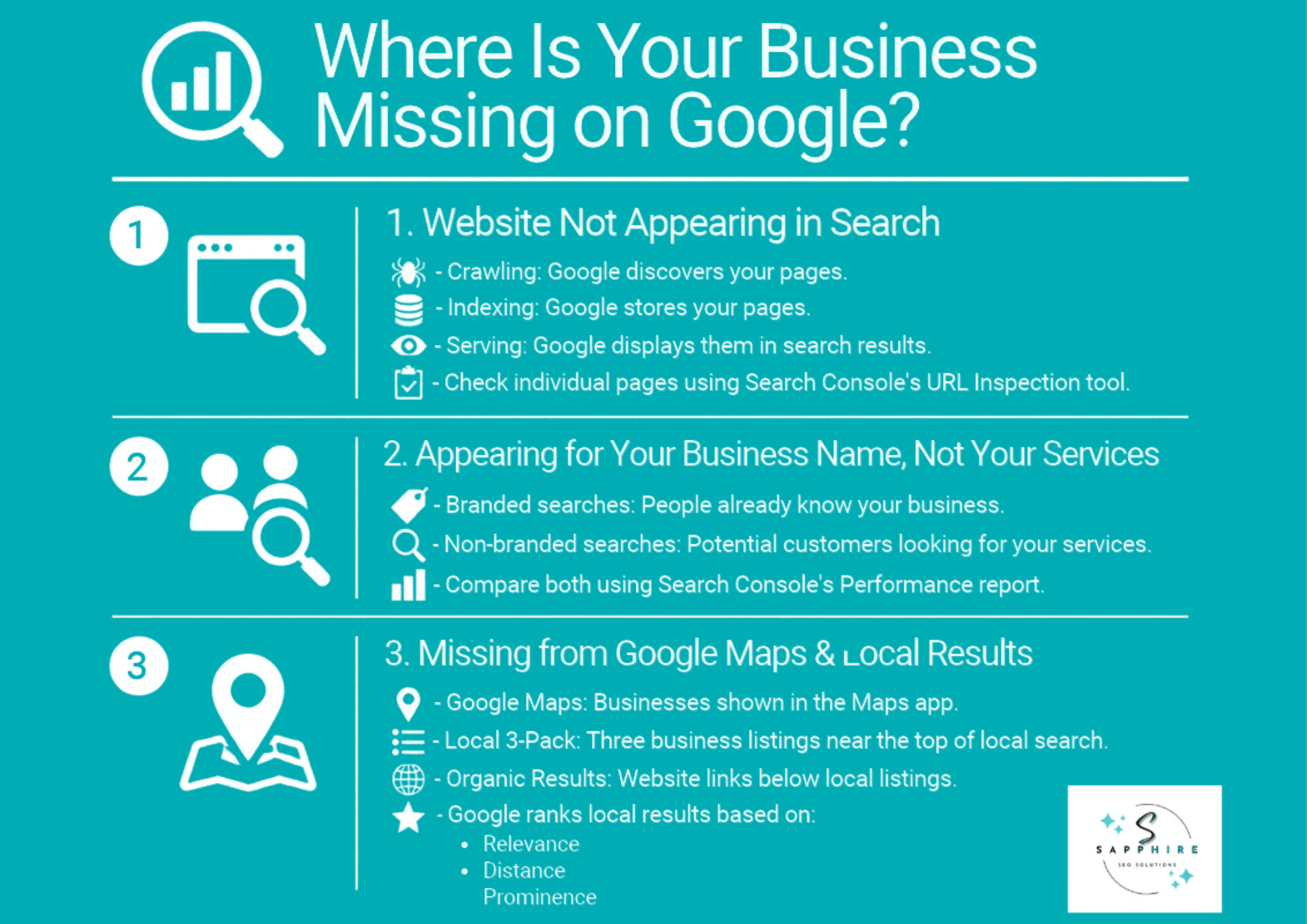
Picture a three-step trip. Google finds your page (crawling), files it in a giant database (indexing), then pulls it out when someone runs a Google search (serving). A page can stall at any step, and it can be the whole site or a single page. Paste a page’s address into Search Console’s URL Inspection tool to check. An indexed page still won’t appear for every search, though. Google chooses what to keep, and it can’t keep what it can’t reach.
Your Website Appears for Your Business Name but Not Your Services
Search “Miller Roofing,” and you’re first. Search “roof repair company near me,” and you’re gone. Branded searches come from people who know your name. Non-branded ones come from people who search online for a fix and haven’t heard of you yet. Those are your new customers. Search Console’s Performance report has a branded queries filter that splits the two, though it only shows up for eligible sites with enough search data.
Your Business Isn’t Appearing in Google Maps or Local Search Results
Google Maps is the app. The local 3-pack is the trio of businesses with a map near the top of the page. Organic results are the website links below. Your Google listing (the Business Profile) feeds the first two. Google builds local search results mostly on relevance, distance, and prominence (how well known you are). A customer across town may see a different list. A verified profile doesn’t guarantee a spot in any local search, and one search proves nothing. Test from several places.
Why Is My Business Not Showing Up on Google? 8 Common Causes
These eight causes run from the most basic to the most competitive. Work through them in order. There’s no point polishing your Business Profile if Google can’t find your website in the first place.
1. Google Hasn’t Discovered or Indexed Your Website Yet
Search engines find pages by following links or by reading an XML sitemap, a file that lists the pages you want Google to know about. A new site with few links pointing to it can sit unnoticed for a while. So can a service page you published last week.
Getting your business online is one step. Getting every page filed is another. A homepage can be indexed while your “emergency roof repair” page isn’t, and that’s the page that brings in jobs.
Paste any website URL into Search Console’s URL Inspection tool. It shows whether Google has crawled the page, when it last visited, and whether the page is indexed. “Discovered” means Google knows the page exists. “Indexed” means it’s actually filed. Different things.
You can request indexing there, but it won’t force Google’s hand. Neither will a sitemap. Often the fix is simpler: link to the page from your homepage.
2. Technical SEO Problems Are Preventing Google From Accessing or Indexing Your Pages
Sometimes your site is telling Google to stay away. Usually by accident. Common technical SEO problems include:
A “noindex” tag, which tells Google not to list a page, left on after the site was built.
A robots.txt file, a set of rules for visiting crawlers, blocking pages it shouldn’t.
A canonical tag (it names the “main” version of a page) pointing at the wrong page.
Server errors, broken addresses, or hosting or domain-name trouble that keep Google from loading the site.
Redirects set up wrong after a website redesign.
Pages whose main content Google can’t load or read.
One broken page isn’t a sitewide crisis, though. A single 404 usually means nothing.
Robots.txt and noindex aren’t interchangeable. Robots.txt controls whether Google visits a page. Noindex controls whether the page gets listed. Block a page in robots.txt, and Google may never see the noindex tag on it, so the page can still show up in results. Two different switches.
3. Your Website Has a Manual Action or Security Problem
This one is rare, so don’t start here. A manual action means a person at Google reviewed your site and decided it broke the company’s spam rules, like hidden text or paid links. That’s different from an ordinary ranking dip. Check Search Console’s Manual Actions report. If it says no issues, you don’t have one.
The Security Issues report covers something else: a hacked site, or code that could harm visitors. Both are worth a quick look, though neither is likely.
Most drops are neither. A ranking decline isn’t automatically a penalty, and an algorithm update isn’t one either. A sudden drop deserves a look. It doesn’t deserve a guess. Narrow it down first. Is it one page or the whole site? Did anything change on the website? Did competitors drop too?
If you do find a manual action, fix what the report names, then select Request Review. Google will respond in Search Console. Be patient.
4. Your Website Isn’t Targeting the Searches Your Customers Use
You can rank fine for your own name and still miss potential customers. They search “roof repair,” not “Miller Roofing.” Google tries to match the user intent behind a search, which is what the person actually wants. Someone typing “how long does a roof last” is reading. Someone typing “roof repair company near me” wants to hire.
A business can show up for the reading searches and never appear for the hiring ones. Open Search Console’s Performance report and check which queries you already get.
Choose relevant keywords the way a buyer in your local market would phrase them for your business type. Search volume isn’t the test. A phrase 50 people search that leads to a job beats one 5,000 people search that leads to nothing. Look at what other businesses rank for, too. Then make sure your title tags and meta descriptions describe each page. Google may rewrite them, though.
You may not need more traffic. You need online visibility on searches that bring new customers, which is where more customers and more sales come from.
5. Your Service and Location Pages Don’t Provide Enough Useful Information
Google wants pages that carry real business information, not filler. A lot of small business sites don’t have it. The service page says “We offer great roofing” and stops. That reads as low quality and gives Google nothing to set you apart from the next roofer.
A useful service page answers what a nervous homeowner would ask:
What happens on day one
What changes the price
Your licenses, insurance, and other business details
Photos from real jobs, with dates
Location pages go wrong differently. Copy one page, swap “Dayton” for “Kettering,” publish. Google’s spam policies call out pages made mainly to rank for similar searches, and swapped-city pages fit. When you serve customers in a town, say something true about it:
The materials that suit the weather
The permits the city requires
A job you actually finished on a named street
Keep your business info and service areas matching your Google profile. And mention repeat customer relationships as proof.
6. Your Website Structure Makes Important Pages Difficult to Discover or Understand
Think of the Yellow Pages. Every business sat under one clear heading, so you found it in seconds. Your website needs the same order. If a service page has no links pointing to it, Google may never find it. That’s an orphan page. So is a page buried deep in the menus.
Link your service pages, location pages, and posts to each other using plain words. Keep your menu up to date, and double-check that every service has its own link.
Overlap causes a different mess. Two pages for the same service in the same town are like duplicate listings for the same business. Google may group them and pick one itself, and your canonical tag (the label naming the main version) is only a suggestion. Some call this keyword cannibalization, meaning your own pages compete for one search. It isn’t a penalty, though. In Search Console, inspect each page, see which URL Google chose, and ask whether the pages truly serve different customers.
7. Your Google Business Profile Is Missing, Ineligible, Unverified, or Incorrectly Configured
Your Google Business Profile, once called Google My Business, can fail in four ways:
Missing: nothing exists for your business on Google.
Unclaimed: a listing exists, but nobody owns it, or the wrong Google account does.
Unverified: an unverified Google Business Profile can’t be fully edited. The verification process uses video, phone, or a postcard verification code, and Google picks the method.
Ineligible: it breaks Google’s rules, like an online-only business or a mailbox address.
Check the details, and update listings when they change. A wrong address, old phone number, bad business hours, keyword-stuffed business name, or the wrong business category all cause trouble.
Service businesses need extra care. If you visit customers at their locations, you generally get one business profile for your main business location. Hide the business address if customers don’t come there. A virtual office doesn’t automatically qualify. Multiple listings or duplicate listings for one location break Google’s rules.
Fill in the business description, use Google Posts, and add photos, including high-quality photos and high-quality images of real jobs. None of it guarantees a spot in the local 3-pack.
8. Your Business Isn’t Competitive for the Local Searches You’re Targeting
A perfect profile can still lose. Local SEO rests on three things Google names: relevance (how well your categories and details match the search), distance (how far you are from the searcher), and prominence (how well known you are, based on online listings, links, articles, and reviews).
Distance is the one you can’t edit. A verified, accurate, well-reviewed roofer can still miss Maps results for searches far from the shop. A service-area setting tells Google where you work. It doesn’t widen your local search rankings across that area. Maps and regular website results can differ, too.
Google reviews matter, but they’re one piece. More reviews and positive reviews can help prominence, and there’s no magic number. Ask satisfied customers to leave reviews, and manage reviews by replying to each. Only authentic reviews count, so no incentives and no fakes.
Paying for Google Ads won’t buy better organic local rankings. Google says you can’t request or pay for one.
How to Find Out Why Your Business Isn’t Showing Up on Google: A Practical Diagnostic Checklist
This is the Google Visibility Diagnostic. It’s four steps, in order, and each one rules a problem in or out so you stop guessing. You’ll need Google Search Console, a free tool that shows how Google sees your site, and your Business Profile.
Step 1: Check Whether Google Has Indexed Your Important Website Pages
Open Google Search Console and paste your homepage into the URL Inspection bar. Then check each important service page, one at a time. Look at the indexing status, the last crawl date, whether crawling and indexing are allowed, and which version of the page Google chose as the main one. The Page Indexing report shows wider patterns. Check Manual Actions and Security Issues if the whole site looks off.
“URL is on Google” only means the page is stored. It doesn’t guarantee it shows up for any search. A passing live test doesn’t prove indexing, either. Skip the repeated Request Indexing clicks until you know the cause.
Understanding Google Indexing Status
| What You See | What It Means |
|---|---|
| URL is not on Google | Read the reason Google gives. |
| Crawling is blocked | Check robots.txt and access settings. |
| Indexing is blocked | Look for a noindex tag. |
| Google picked another main version | Check for duplicate pages and canonical tags. |
| URL is on Google | Move on to Step 2. |
Step 2: Find Out Whether Your Website Appears for Relevant Customer Searches
Open the Performance report in Google Search Console. Use the branded and non-branded filters if you have them, then check the Queries and Pages tabs. Do your service and town searches get impressions (times you appeared), clicks, and a healthy click-through rate? Compare a few months, not one week.
No impressions for service searches? Look at keyword targeting, demand, indexing, and competition. Plenty of impressions but few clicks? Check your ranking and whether your titles match the search. Average position is an average, not the exact spot every person sees. Two pages showing for one search? That’s overlap. Good traffic but few calls? The site isn’t turning visitors into customers.
Step 3: Check Whether Your Google Business Profile Is Eligible and Visible
Search your exact business name and town, then check Google Maps separately from regular results. Confirm ownership and verification, and look for suspension, duplicate listings, or a wrongly marked “closed” status. Review your category, address, and service-area setup.
Missing for your exact name: check whether a profile exists, who owns it, and whether it’s verified or restricted.
Shows for your name, not your services: look at relevance, distance, and prominence.
Shows in one area, not another: that’s geography and competition.
Marked closed or suspended: use Google’s own edit or reinstatement process.
Don’t create a replacement profile after a suspension, and skip fake-location tricks.
Step 4: Measure Local Visibility and Customer Actions
Open your Business Profile’s Performance report. It shows views, calls, website clicks, and direction requests. Compare month to month, and don’t judge a trend from one week. Then search your key services from a few real spots in your area and see which competitors show up.
Views and customer actions measure different things. The call count only tracks taps on the call button, so keep your own log of real inquiries. A business with decent visibility and few leads has a different problem from one that doesn’t appear at all.
What Your Diagnostic Findings Actually Mean
What to Prioritize After Your SEO Audit
| What You Discover | Your Next Priority |
|---|---|
| Important pages aren’t indexed | Fix discovery, crawling, and indexing first. |
| Pages are indexed but don’t rank for services | Make your pages more relevant and competitive. |
| Your website ranks but your profile is missing | Check profile eligibility and restrictions. |
| Your profile shows for its name, not your services | Work on local relevance and prominence. |
| You’re visible but inquiries are low | Look at conversions and lead tracking. |
How to Improve Your Business’s Visibility on Google
Fix things in this order. Technical problems come first, because nothing else works if Google can’t index your pages. Ranking and local work come next. Measuring runs through all of it.
Fix Indexing and Technical Problems Before Working on Rankings
Fix only what the diagnostic confirmed:
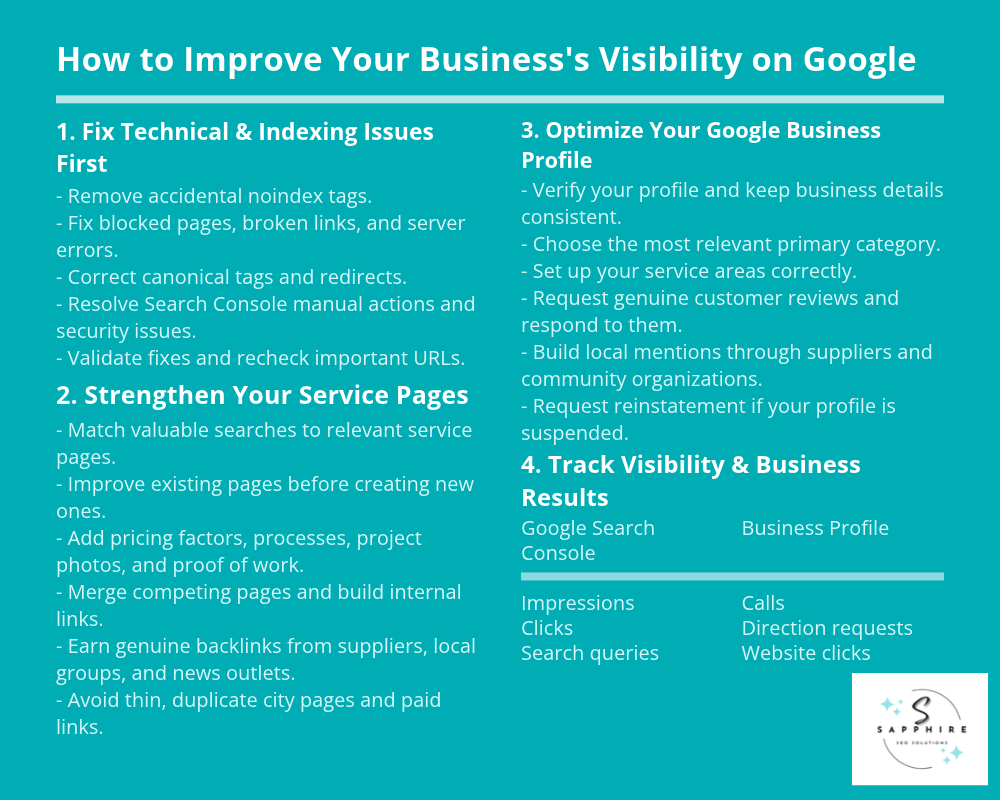
Remove accidental noindex tags.
Unblock pages that robots.txt shuts out.
Point canonical tags and redirects at the right pages, especially after a redesign.
Repair important broken pages and server errors.
If Search Console flagged a manual action or security issue, fix what it names, then request a review.
Then use Validate Fix. Fix every affected page first, because validation stops if Google finds one still broken. It can take about two weeks. Requesting indexing won’t force Google to list a page. Recheck your key URLs a few weeks later.
Improve Your Service Pages and Organic Search Relevance
Match each search that brings jobs, like “roof repair near me,” to one strong page. Improve the pages you already have before writing new ones. Add what a customer wants to know: your process, price factors, real project photos, and proof of your work. Make your phone number easy to find. Merge pages that compete for the same search, and link your service pages to each other.
Earn links the honest way, from suppliers, local groups, and news mentions. Buying links or swapping them in bulk breaks Google’s spam rules. Skip city-name copies, too. A few real pages beat hundreds of thin ones.
Strengthen Your Google Business Profile and Local Presence
Work through the profile in this order:
Verify it, and match your name, address, phone, and hours to your website.
Choose the category that fits your main service. Set up your storefront or service area correctly.
Ask every customer for a review with a direct link, and reply to them. No discounts or gifts for reviews, and no filtering out unhappy customers.
Earn local mentions from chambers of commerce and suppliers.
If Google suspended the profile, use its reinstatement request. Never start a new one.
But profile work alone can’t promise Maps rankings.
Track Visibility and Measure Business Outcomes
Check Search Console monthly for impressions, clicks, and the queries behind them, and your Business Profile for calls, direction requests, and website clicks. Compare similar periods. Then track real calls and inquiries separately, since traffic isn’t the same as customers.
Go back to your diagnosis. Did the thing you fixed change the number you expected? Don’t judge average position without context, and don’t expect leads the week after a technical fix.
Does Your Website’s Google Visibility Affect Its Chances of Appearing in AI Search Results?
Yes. Google’s AI Overviews and AI Mode pull their supporting links from the same Search index. A page has to be indexed and eligible to show with a snippet. Search Console also has a setting that can exclude your site from these features, though it’s included by default. But meeting those conditions guarantees nothing. Google says indexing and serving aren’t promised, and AI Overviews often don’t appear at all.
Google also says there are no extra requirements. No special schema, no llms.txt file (a text file written for AI bots), no rewriting pages for AI. What helps is the usual work: original, helpful content backed by real experience, and accurate business and service details, including an up-to-date Business Profile.
Showing up in an AI answer isn’t the same as winning a customer. And be wary of third-party AI tools that promise results or claim to use Google’s internal data. None has that access.
When Should You Hire a Local SEO Expert to Fix Your Google Visibility Problems?
Many local businesses can fix a lot of this alone, and Google says so. But some problems need a specialist, and knowing which ones saves months.
Signs Your Business Needs Professional SEO Help
Call a specialist if:
Key pages stay unindexed after the obvious fixes
Searches that bring jobs rarely show you
Competitors outrank you, month after month
Your Business Profile is suspended or keeps hitting problems
Maps visibility is weak despite an eligible profile
Traffic isn’t turning into inquiries
You lack the time or know-how to prioritize
What Should a Professional Local SEO Audit Investigate?
A real SEO audit checks how Google crawls and indexes your site, technical problems, keyword targeting, and the quality of your service and location pages. It reviews site structure, internal links, and competitors. On the local side, it covers Business Profile eligibility, local prominence, and references from other sites. And it tracks leads, so you can see whether visibility turns into calls.
What Should You Expect From an SEO Agency?
Expect plain explanations of what’s wrong, with evidence, and fixes ranked by business impact. You should get a written scope, realistic timelines, and honest reports. No one can guarantee first place on Google, so walk away from anyone who does, or who claims a “special relationship” with Google. Ask for references, and ask them to explain every change they make. For an audit, give read-only Search Console access.
Not appearing where customers search? Sapphire SEO Solutions’ local SEO services help small businesses find what’s holding back their Google visibility. Contact us to schedule a free consultation with an SEO specialist or request a free SEO audit today!

Frequently Asked Questions
Why Isn’t My Business Showing Up on Google Even Though I Have a Website?
Having a site doesn’t put it on Google. Google has to find and index each page, and it can skip some. A leftover noindex tag or a robots.txt block can keep it out. Even an indexed page may not rank for your searches, because indexing only means it’s filed. Check each page in Search Console’s URL Inspection tool. Requesting indexing again and again won’t fix the cause.
Why Is My Business Not Showing Up on Google Maps?
Start with eligibility. Google needs a real business with a real address or service area, so online-only businesses and mailbox addresses don’t qualify. Then check verification, suspension, and duplicate profiles. After that, Maps comes down to relevance, distance, and prominence. A closer or better-known competitor can outrank a perfect profile. And a verified profile still isn’t guaranteed a spot.
How Long Does It Take for a New Business to Show Up on Google?
Nobody can promise a date. Google decides when to find and index a new site, and it doesn’t commit to a timeline. A Business Profile needs verification first, and a postcard code usually arrives within 14 days. Appearing also isn’t ranking well. A new business can show up fast and still sit far down the results.
Why Does My Competitor Show Up on Google but My Business Doesn’t?
Often they’ve given Google more to work with. Their service pages match what customers search and show real jobs. They may also be closer to the searcher, or better known through reviews and mentions. Pages that explain the work in detail help too. Search from a few places in your area and compare their pages and profile to yours.
Can I Make My Business Show Up on Google for Free?
Yes, to a point. A Business Profile and Search Console cost nothing, and neither does appearing in organic results. Keep your business details accurate and write useful service pages from real experience. Google never takes money for organic rankings. But the work takes time and know-how, and free doesn’t mean fast. Some owners handle it themselves, and others hire help for the tricky parts.