

How to Create SEO Location Pages That Rank and Convert
A homeowner in Marietta is typing "roof leak repair" into Google right now. She doesn't care much about brand names. She wants someone who works in her area and can get out there soon.
A lot of contractors see a search like that and think the fix is easy. Copy the service page, swap in "Marietta," publish, then do it again forty more times. It's tempting. It's also how a website ends up packed with pages nobody needs.
Our take is simple. Build a page when a market deserves one, not because a city happens to have a keyword attached to it. The rest of this guide covers how to create SEO location pages that earn their spot and how to find out whether they're bringing in calls or just sitting there.
Key Takeaways
Earn the URL. Build a page only when the market earns it. If it exists just to catch searches, skip it.
Proof beats wording. Swapping city names isn't localization. Show local proof instead: finished jobs, real reviews, customer questions, and neighborhoods you serve.
Fix before you delete. Every existing thin page gets one call: improve, consolidate, or remove. Never redirect everything to the homepage.
Volume isn't the goal. More pages isn't the goal. Google says a high quantity of pages doesn't make a site better or more relevant.
Stay honest about where you work. Service-area businesses should show where they actually work. Fake addresses and unstaffed virtual offices put your Business Profile at risk.
A page isn't a map ranking. No page guarantees map results. Google says local results rest on relevance, distance, and prominence, and rankings can't be bought.
AI search has no shortcut. AI search has no secret formula. Google says it's still SEO: indexed pages, real first-hand content, no special schema needed.
Measure customers, not rankings. Rankings are an input. Business outcomes are the destination. Track calls, qualified leads, and revenue, not just position or traffic.
What Are SEO Location Pages?
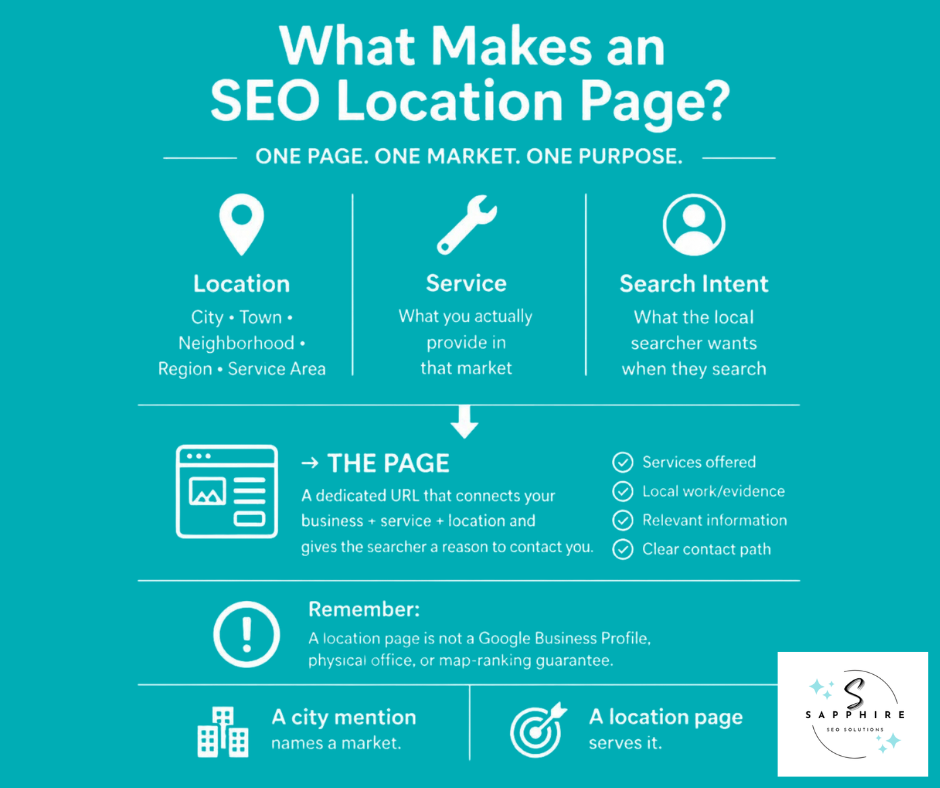
An SEO location page is a page on your website built for one specific place. That place could be:
A city
A town
A neighborhood
A region
A service area
An SEO location page gets its own URL, its own content, and one job: giving someone in that market a reason to call you.
Three things meet on every one of these pages: the business, the service, and the location. Add search intent, which is just what the person actually wants when they type something into Google, and you have the whole picture. Someone searching "plumber in Roswell" wants a plumber who works in Roswell. Your page should say so, and prove it.
Think of pages like Plumbing Services in Roswell, GA, Roofing Contractor in Marietta, GA, or Landscaping Services in Alpharetta, GA. Each one is a location-specific landing page, a place a searcher from that town can land and find what applies to them.
That's different from a line on your service page that says "we also serve Marietta." A mention names a city. A page gives that city something. It shows the services you offer there, the work you've done nearby, and how to get in touch. Among all the website pages a local business can build, location pages are the ones that speak to a single market.
A location page lives on your website, and that's all it is. It isn't a Google Business Profile, which is the listing with your reviews, hours, and map pin. It isn't a physical office. It can't replace a profile, and it can't promise you a spot in the map results. It's a page. A useful one if you build it right.
Do You Actually Need an SEO Location Page?
Not every city on your service map needs its own page. Some do. Some should share one. And some shouldn't exist at all. Sorting your markets into those three buckets is the most important decision in this guide, so it's worth slowing down here.
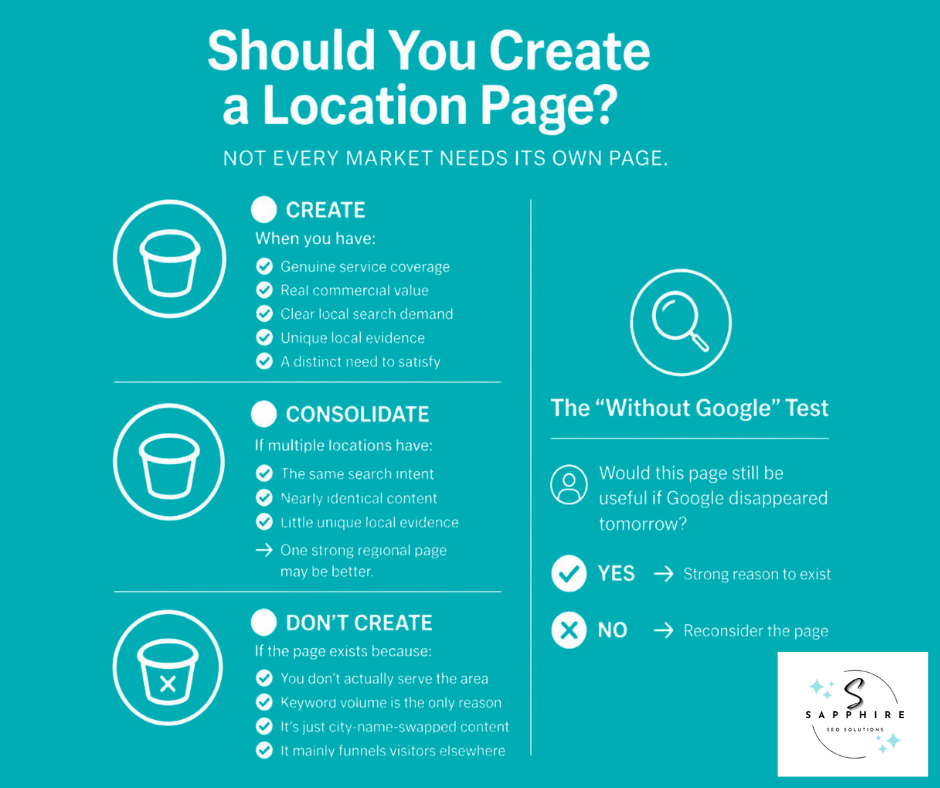
Create the page when:
You genuinely work in the area.
The market is worth real money to your business.
Local searchers are looking for something specific, like a plumber who can come out this week.
You have real information to put on it, such as completed jobs, photos, and customer questions.
It answers a need that no other page on your site already covers.
Consolidate when several pages are chasing the same thing. Say your Marietta, Kennesaw, and Smyrna pages read almost the same. One strong page for the whole area will probably serve your local customers better than three thin ones.
Don't create the page when:
You don't actually serve the area
Keyword volume is the only reason
It would be one city name swapped into the same text
The same goes for a page that mostly exists to push visitors somewhere else.
One test cuts through a lot of the fog. Would this page exist without Google? Picture search engines vanishing tomorrow. Would someone in that town still find the page useful? If yes, you're onto something. If it only makes sense as a way to catch searches, that's a warning sign.
Think of it as earning the URL. A location gets its own page when a few things line up: commercial opportunity, search intent, business relevance, local evidence, and value to the reader. One missing piece doesn't always sink the idea. But when most are missing, the page isn't ready. Local relevance comes from that substance, not from a city name in a headline.
Google is direct about this. Its spam policies list pages targeted at specific regions or cities that funnel users to one page as an example of doorway abuse. Separately, it defines scaled content abuse as many pages generated for the primary purpose of manipulating search rankings, not helping users, and names using generative AI tools to generate many pages without adding value as one example. Sites that break these policies may rank lower or not appear in results at all. So fewer pages that hold up will do more for your local visibility than a pile of near-copies.
Location Pages vs. Service-Area Pages vs. Service + Location Pages
People toss these terms around like they mean the same thing. They don't. Each page type does a different job, and most businesses only need one or two of them. Sorting out which is which keeps your local pages from turning into a mess.
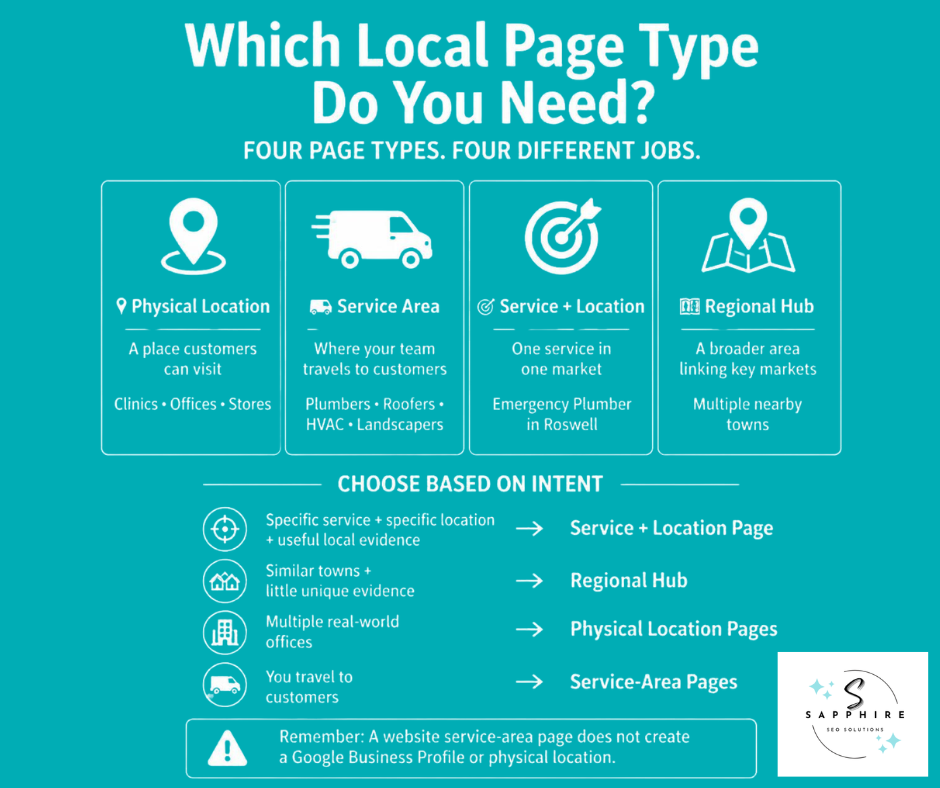
Physical location page - Represents a real place customers can visit, like a clinic, restaurant, retail store, or office. A business with a single location may need just one. A business doing multi-location SEO usually gives each real site its own page.
Service-area page - Represents a service area your crew drives out to. Plumbers, HVAC companies, roofers, landscapers, electricians, and cleaners all fit here. Nobody visits you. You visit them. Pages for these local services should say where you go, not where you sit.
Service + location page - Targets one specific service in one specific place, like Emergency Plumber in Roswell, GA.
Regional hub - A broader page that covers a whole region and links out to the markets that matter most.
Service + location pages make sense when people really do search for that service in that place, and you have something useful to say about it. Emergency plumbing in Roswell might qualify. But five services across eight cities gives you forty URLs, and plenty of them will say nearly the same thing. That's how sites bloat. Check the intent before you build.
A regional hub is often the better call when several nearby towns have similar needs and thin proof. It covers the area in one place and points to the towns that earn their own page.
A quick word on Google Business Profile, since people mix it up with all of this. Google says service-area businesses can only have one profile for the whole area they serve. If your service business has separate locations, each with its own service areas and its own staff, each location can have its own profile. Google also says you can't set a service area as a radius. You have to specify it by city, postal code, or another type of area.
So a service-area page on your website doesn't create a profile. It doesn't create a location either. It's a page.
Research Which Locations Are Worth Targeting
Start with your own numbers, not a keyword tool. Your books know things no tool ever will.
Which towns bring in the most revenue?
Where do most of your leads come from?
Which jobs actually made you money, and which ones ate a full day of driving for a small check?
Where have you already finished projects and collected reviews?
Where do you want to grow, and can your crew handle it?
A town with plenty of searches but no crew nearby isn't a market yet. Once you know where the business wants to go, do your local keyword research. Regular keyword research just means finding the words people type when they need what you sell. The local version adds a place. Try patterns like these:
Plumber Roswell
Plumber in Roswell
Plumber near Roswell
Water heater repair Roswell
No hot water Roswell
Those are your local keywords, and the last one is a problem-based search. Someone with a cold shower often types the problem, not the trade. Type each one into the Google search box yourself and see what comes back. Keep the relevant keywords, meaning the ones that match work you really do there.
When a search doesn't name a place, Google works out distance from what it knows about the searcher's location. So the same local queries can look different depending on where someone is standing.
Next, check search volume, which is how often people search for something. In Google's Keyword Planner, average monthly searches means the average number of times people searched a keyword and its close variants, based on the location you select, averaged over 12 months by default. You can set that location to a city. Your own Search Console data helps too. It's free, and it lets you filter queries that contain a town's name, so you can see which markets already show your site in results.
Then look at the results page for each priority town. Who ranks? Are they pages built for that town, general service pages, or directories? Is there a Local Pack, the map box with a few businesses near the top? What are competitors telling people, and what are they leaving out? A gap is your opening.
After that, score each town on business value, search opportunity, competition, your local evidence, and whether you can handle the work. Nothing fancy. A simple 1 to 5 in a spreadsheet does the job. Start with the towns that score high on value and evidence.
Don't rank towns by volume alone. Difficulty scores from tools are estimates, not verdicts. A big city doesn't automatically deserve a page, and neither does every suburb around it. Check first. Publish second.
Analyze the Search Intent and SERP Before Writing
Two searches can look almost the same and want completely different things. Before you write a word, figure out what the person typing actually wants. That's search intent, and it decides what your page needs to say.
Take these five, all about the same town:
Plumber in Roswell: wants to hire someone local, still comparing
Emergency plumber Roswell: water everywhere, wants a phone number fast
Water heater repair Roswell: knows the problem, needs to hear you fix it
Plumbing cost Roswell: researching prices, probably not ready to call
Best plumber near Roswell: wants reviews and proof before choosing
Words like "emergency," "near," and "best," paired with a town name, are local intent keywords. They signal local intent, meaning the person wants a business in a specific place. Google gives its human reviewers a manual for judging result quality, and that manual sorts searches into four types: Know, Do, Website, and Visit-in-Person. Plenty of local searches blend more than one.
Google also says no single rating can directly change where a page ranks, so that manual isn't a ranking cheat sheet. But it shows what Google is trying to get right.
Now run the Google search yourself and study the search engine results page, which is just the page that loads after you hit enter. The search results show what Google thinks people want when customers search this way. Look at the page types, how deep the content goes, which services get the spotlight, what local details show up, and whether there are calls to action, FAQs, reviews, and location information. If the top search engine results are all dedicated service pages with reviews and pricing, a thin city page is a mismatch.
Then give your page one job. "Plumber in Roswell" is a broad hiring page. "Water Heater Repair in Roswell" is about one specific problem. Different pages, different jobs. Trying to cover both usually means doing neither well.
Related searches help you cover a topic fully. Think price ranges, how long a repair takes, and which areas you serve. Use them to answer real questions, not to manufacture keyword variations. "Plumber Roswell," "Roswell plumber," and "plumbers in Roswell" are one intent, so they get one page. Don't stuff the variants into headings. And don't assume the biggest search always wins. Sometimes a smaller one brings better customers.
Build a Location Page Content Brief
A content brief is a short list of answers you gather before anyone writes a word. It's also the most practical part of any seo strategy for location pages, because it puts real business knowledge on the table early.
Fill these in first:
From your research
Location
Primary service or topic
Primary search intent, pulled from your local keyword research and your look at the results page
Secondary services worth mentioning
Target customer
From the business
Areas and neighborhoods you genuinely serve
What customers in that market need
Local proof you can show, like reviews, projects, and photos
What sets you apart
Gaps competitors leave open
For the page
Call to action
Internal links
Unique information only you can add
Now the part that matters. Most generic city pages start with a bad question: "How can I make this city page different?" That sends writers hunting for synonyms. Ask this instead: What does this business know, do, and experience in this market that's useful to the customer? If the brief can't answer that, the page isn't ready.
Google's own self-check for content asks whether a page provides substantial value when compared to other pages in search results. That's what the competitor gaps line is for. And Google says it has no preferred word count, so don't set a length before the research is done.
Keep the brief tight. It isn't a keyword dump. And don't hand it to an AI tool to fill in without real answers from the business. A tool can't know what your crew saw on Tuesday.
The best local SEO tips rarely come from an SEO. They come from the crew lead who knows which neighborhoods have the oldest pipes. Ask them.
Find the Local Evidence That Makes the Page Valuable
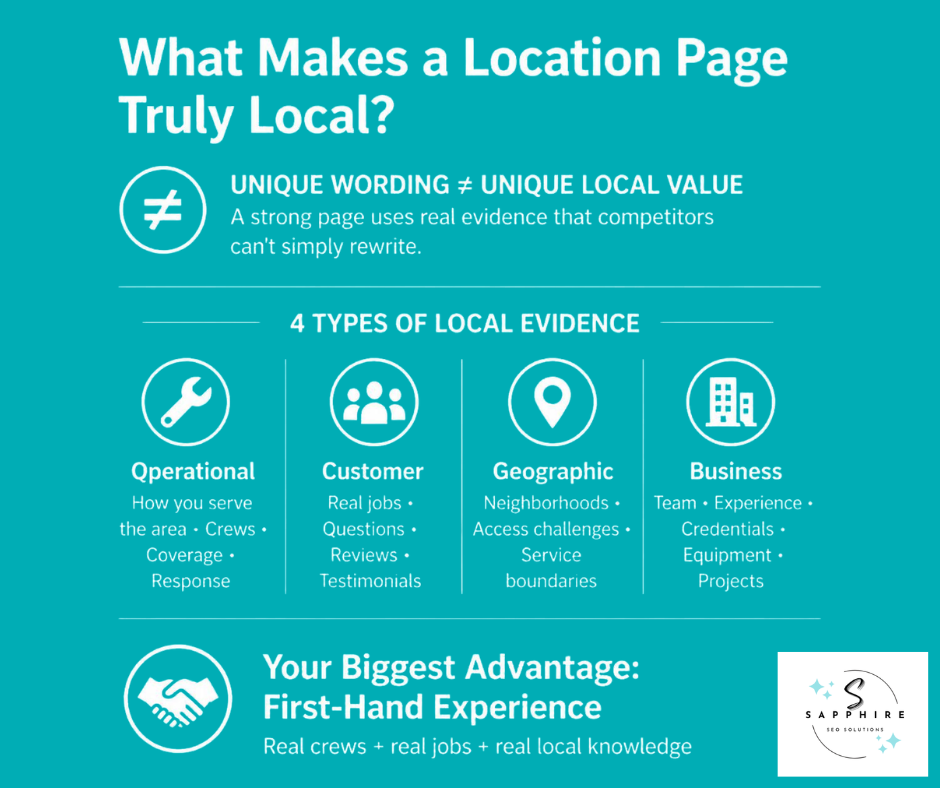
Unique wording is not the same as unique information. Take "We proudly serve customers throughout Roswell, Georgia." Rewrite it five ways, and you've still said nothing a reader can use.
Now think about what a Roswell homeowner actually wants to know:
What jobs you've finished nearby
What problems come up in homes like theirs
Which neighborhoods you cover, and how quickly you can get there
That's information. And a line about a real job, say the water heater you swapped in an older Roswell home last spring and why the install ran long, tells a searcher more than a page of adjectives. Competitors can't copy it, either.
Local evidence comes in four kinds.
Operational evidence is how you really serve the market. Which crews work that area, what happens when someone calls, and what you handle there and what you don't.
Customer evidence is what customers hand you: questions they ask, jobs you've done, testimonials, and local reviews. Google says prominence is based partly on how many websites link to your business and how many reviews you have, and that more reviews and positive ratings can help your local ranking. So feature positive reviews that name the town, with the customer's permission. But keep it honest. Google requires that reviews reflect a genuine experience, and it prohibits offering incentives, like free or discounted services, in exchange for reviews.
Geographic evidence covers the neighborhoods you work in, tricky access, and where your service area ends. Think older subdivisions with tight garages, gated communities, or steep driveways, if that's what your crews run into there.
Business evidence is your experience, credentials, equipment, team, processes, and past projects. Who leads the crew out there? How long has the team worked the area?
Some proof lives off your own site. Did you sponsor a youth team or pitch in at one of the local events? The local websites covering it, like a school, a neighborhood association, or the chamber, may link to you. Those local backlinks work like referrals, with other sites in town vouching for you. Trade groups and industry-specific directories you truly belong to do the same. Earn these. Don't chase them.
Then there's first-hand experience, which is your biggest advantage. Google's people-first guidance asks whether content clearly demonstrates first-hand expertise and a depth of knowledge (E-E-A-T), with visiting a place as one example. It also treats mainly summarizing what others have to say without adding much value as a warning sign. Your crews have been to the place. A writer with a search tab open hasn't.
One last check: the "Could this be true anywhere?" test. Read each paragraph and swap in a different city name. Still true? Then it isn't adding local value. Fix it or cut it.
The same goes for copied "about the city" blurbs, trivia added to hit a word count, and AI-written local facts. And never invent a project or claim experience you don't have. A made-up job is worse than no job.
How to Structure an SEO Location Page
Think of on-page SEO as everything you control on the page itself, from the headline to the links to the button at the bottom. The order below works well for most location pages. But treat it as a starting point, not a template. A page that reads the same in every city is exactly the problem this guide is about.
Title tag - This is the clickable headline in Google's results. Google says a good title is unique to the page, clear and concise, and accurately describes the contents, and it can include the business name and location. Something like "Plumbing Services in Roswell, GA | Smith Plumbing." Put your business name at the end, and don't repeat words. Google says stuffing keywords into a title can make results look spammy.
H1 - The H1 is the big headline at the top of the page. Make the topic obvious: Plumbing Services in Roswell, GA. Google uses several sources to build title links, including the main visual title and heading elements, and it can get confusing when several headings carry the same weight. One clear H1 avoids that.
Opening section - Answer four things fast: who you are, what you do, where you work, and why the visitor should keep reading. Two or three sentences will do. Use your name exactly as customers know it. Google's Business Profile rules say a business name should reflect your real-world name, used consistently on your storefront, website, and stationery.
Services available there - List what you actually do in that market, starting with what people ask for most. Not what you do somewhere else.
Local service experience - Say what you do there in plain words. Real jobs, common problems, the crew that works the area.
Why customers choose you - Use real differentiators and proof. A generic "Why Choose Us?" box full of "fast, friendly, affordable" could sit on any website, so skip it.
Local service coverage - Name the neighborhoods and communities you truly cover, where it helps. A short list beats thirty names. If you travel to customers, explain where.
Local proof - Reviews, project photos, testimonials, case studies. Real ones only, and close to the top, not buried at the bottom.
FAQs - Answer questions locals actually ask, like whether you cover their neighborhood and how soon someone can come out. Write them for the visitor, not for a search feature. Google's changelog says FAQ rich results stopped showing in Google Search on May 7, 2026. Those were the dropdown answers that used to appear under a listing, so there's nothing to chase.
Call to action - Give one clear next step: call, request a quote, or book.
Contact details need a clear spot, near the top and again at the bottom. If customers visit you at this location, show the address, phone number, and your business hours. If you travel to customers, skip the address. Keep the phone number, and say when you answer or cover emergencies.
For your Business Profile, Google says to use a local phone number instead of a central call center number whenever possible. For separate locations, it says to provide a phone number that connects to the individual location, or a website that represents it. So that profile's website link can point right to this page.
Weave in internal links too. Those are links from this page to other pages on your own site, like the matching service pages. Google says good anchor text is descriptive, reasonably concise, and relevant to both the page it's on and the page it points to. Anchor text is just the clickable words. "Water heater repair" beats "click here."
Skip the automatic map embed unless it truly helps people find you. Don't add a section because a competitor has one, and don't stretch the page to hit a word count. Every part should help a visitor answer one question: Can this business solve my problem in my area, and what should I do next? If a section doesn't, cut it.
How to Make Multiple Location Pages Genuinely Different
Different pages need different substance. Swapping "repair" for "fix" doesn't count.
The common version looks like this: same introduction, same service list, same benefits, same FAQs, same CTA. Different city. That's template localization, and it's easy to spot. Google's spam policies list scraping content to generate many pages, including through automated transformations like synonymizing, as scaled content abuse when little value reaches the reader. It also says that abuse applies no matter how the content is created. So the question isn't whether a person or a tool wrote it. It's whether the page gives the reader anything new.
Evidence-based localization flips the approach. Each page carries its own:
Local customer needs
Service priorities
Project examples
Customer proof
Operational details
Local coverage
Questions customers actually ask
Then run the remove-the-city-name test. Take two pages and delete the town name from both. Can you still tell them apart? If not, ask whether both deserve to exist. Google isn't forgiving about this either. It says that when multiple pages seem the same, or their primary content is very similar, it clusters them and picks one as the canonical. Google also says some duplicate content on a site is normal and isn't a spam violation. But duplicate URLs aren't usually shown in search results, so your second page may never get seen.
Standardize the parts that don't carry information: design, navigation, breadcrumbs, CTA buttons, basic contact blocks, and brand elements. Breadcrumbs are the little trail at the top, like Home > Locations > Roswell. Consistent structure also helps search engines understand how your pages fit together. But the substance has to earn its place.
Skip the rules of thumb, like "40% unique content" or "500 words of unique content." Google's spam policies don't set a percentage or a word count. They ask whether pages help users. And don't count on metadata to rescue copies. Google says the primary source of a search snippet is the page content itself, so a fresh meta description on a copied page changes very little. (A snippet is the short text under a result's title.)
One last shortcut to leave alone: listing every neighborhood you can think of. To avoid keyword stuffing, remember Google's own example: blocks of text that list cities and regions that a web page is trying to rank for. That's keyword stuffing, which means filling a page with keywords to manipulate rankings. What search engines understand about your pages comes from what's actually on them.
Optimize the Location Page for SEO and Conversions
A ranking doesn't pay anyone's bills. A phone call does. So this section treats search engine optimization, which just means helping Google find and understand your page, and conversion, which means turning visitors into customers, as one job. Everything here happens on your own website, the one place you fully control.
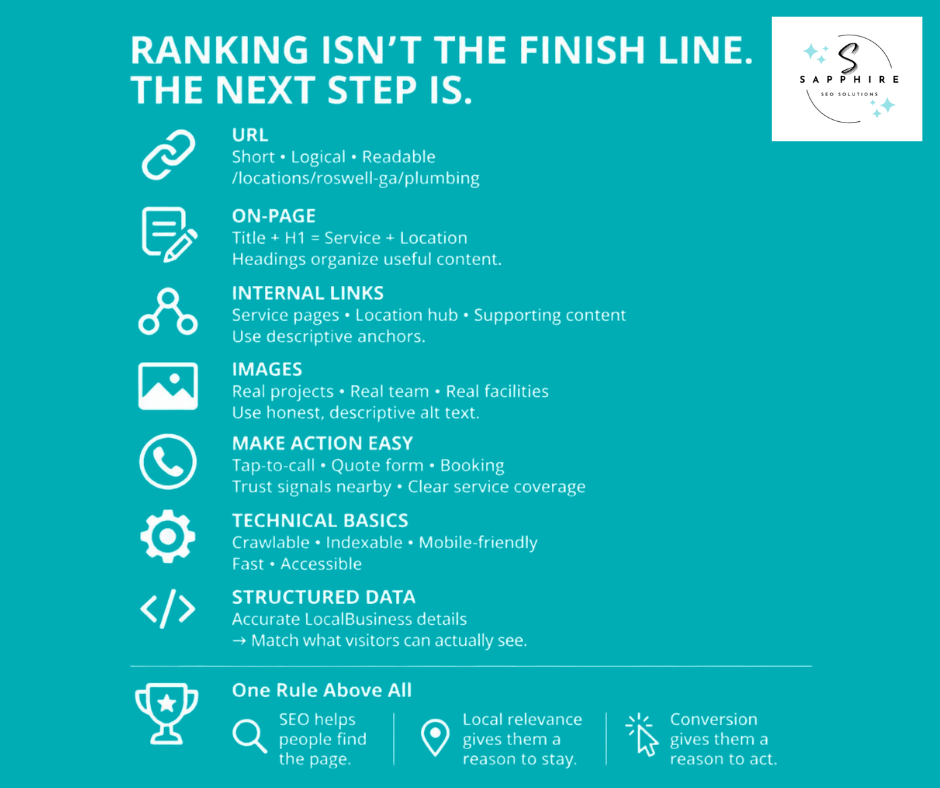
URL: Keep it logical and plain, like /locations/roswell-ga/plumbing. Google says to use readable words rather than long ID numbers and to separate words with hyphens. It also advises long-term, persistent URLs, so pick one and stick with it.
Title tag, H1, and headings: The title tag and H1 should say what the page is and where, once each, as we covered above. Headings then organize useful information. They don't need the city in every one.
Links: Link from the page to your matching service pages, your location hub, and any supporting content. Google says every page you care about should have a link from at least one other page on your site. Then there are external links, which point from your page to someone else's site, like the city's permit office. Google says linking to other sites isn't something to be scared of, and external links can help establish trustworthiness, such as when you cite sources. Use them where they help the reader.
Images: Use real projects, real staff, and real facilities. Describe each one honestly in the alt text, the short description that screen readers read aloud. Google says to focus on useful, information-rich alt text and avoid filling it with keywords. "Water heater replacement in a Roswell garage closet" beats "plumber Roswell best plumber Roswell GA."
Make it easy to act: A visitor should find these quickly:
A phone number they can tap
A short quote or request form
A booking option if you offer one
Trust signals nearby, like reviews and licenses
A clear note on whether you serve their area
Skip pop-ups that block the page: Google lists avoiding intrusive interstitials as part of a good page experience.
Technical basics: Technical SEO is important. The page needs to be crawlable and indexable, meaning Google can find it and store it. It should work on phones, load fast, and be accessible to everyone. Google says there's no single page experience signal, and that beyond Core Web Vitals, other page experience aspects don't directly help a site rank higher. Core Web Vitals are Google's measures of loading speed, responsiveness, and visual stability. But Google also says it always seeks to show the most relevant content, even if the page experience is sub-par. So polish never replaces local relevance.
Structured data: Schema markup is code that labels details on the page, like your name, address, and hours, so machines can read them. Google says it uses structured data to understand the content of the page. Use LocalBusiness markup, keep it accurate, and match what visitors see. Google says don't add structured data about information that isn't visible to the user, even if it's accurate. It's a label, not a shortcut.
Build the Internal Linking and Location Architecture
Your location pages shouldn't float on their own. Google says it uses links as a signal when determining the relevancy of pages and to find new pages to crawl. So how you connect your pages matters. Picture this shape:
SEO Location Page Architecture
The Hub
Then connect pages in context. A location page should link to the services you offer there. A service page should link to the markets where that service is actually available. Blog posts can link into both, like a post about frozen pipes pointing to your Roswell plumbing page. Keep the anchor text natural, though. If it feels like you're forcing keywords into the anchor text, it's probably too much. "Plumber in Roswell GA" in every link reads robotic.
The hub is one page that lists the areas you serve and links to the ones with their own pages. It helps visitors find their town. It also helps crawlers, the programs Google uses to scan sites, see how your geography is organized. And there's a Google angle. Its spam policies list creating substantially similar pages that are closer to search results than a clearly defined, browseable hierarchy as doorway abuse. A clean hub is the opposite of that.
Don't multiply pages just because you can. Ten services across twenty cities is 200 URLs. Ask whether each combination has its own search intent and its own local evidence. Emergency plumbing in a town you serve every week might. Drain cleaning in a town you rarely visit, with nothing to say, doesn't.
A few things to skip:
Giant footer lists of every city, which run into the same stuffing problem we covered earlier
Orphaned location pages, meaning pages nothing links to
Linking every city page to every other city page, since there's no magical ideal number of links a page should contain, but if you think it's too much, it probably is
Pages created only to hand out more internal links
Internal links are half the picture. Link building means getting other sites to link to yours, and each linked website works like a referral.
For local businesses, that often starts with local directories, like a chamber of commerce or trade association list. Directory listings can help when they're relevant directories that check who they list. But Google names low-quality directory or bookmark site links as an example of link spam, along with buying or selling links for ranking purposes. It does say buying and selling links is a normal part of the web as long as they're qualified with a nofollow or sponsored attribute. So earn links where your business truly belongs. Don't buy a hundred listings in a day.
Location Pages and Google Business Profile: What They Actually Do
Two different things get mixed up here, and plenty of guides blur them. A location page is a page on your website, and it works toward showing up in regular search results. A Google Business Profile is your business listing, the one with the pin, reviews, and hours that shows up on Google Maps and in Search. They support each other. But neither creates the other.
If customers visit you, a good location page can carry your address, hours, directions, services, local proof, and contact details. Keep the name, address, and phone matching your profile. Google says it decides how to display your address using your business information and information from other sources, so matching location data gives it fewer reasons to guess.
If you travel to customers, the page explains where you go, what you handle there, and how you serve that market. Google says service-area businesses should hide their business address from customers, and its example is a plumber who runs the business from a home address.
Now the limits. Google says local results come down to three things: relevance, distance, and prominence. Distance is how far each business is from the customer who's searching. And if a customer doesn't share where they are, Google uses what it knows about their location. Prominence is how well-known a business is. On top of that, Google says there's no way to request or pay for a better local ranking.
So a website page can't do four things:
Create a physical location
Create a Business Profile
Manufacture proximity
Guarantee a spot in the local pack, the box with a map and a few businesses near the top of results, also called the local map pack
Don't try to cheat the distance part with a made-up address. Google says a rented mailing address you don't operate out of is a virtual office, and it isn't eligible for a Business Profile. More profiles aren't the answer either. Google says there should only be one profile per business, with an exception for separate locations that have their own staff and service areas.
How to Create Location Pages for Service-Area Businesses
Plumbers, roofers, landscapers, HVAC companies, electricians, pest control crews, and general contractors share one trait. Customers don't come to them. They go to the customer. So a location page works differently here. There's no storefront to show off and no front door to point to. The page has to prove something else: that you really work in that town.
Google says that when someone searches for a business near their location, they'll find local results on Google Maps and Search. That's local search. Your page can't change how close you are to nearby customers, and it can't decide who lands in the local search results. But it can show a searcher you're the right call once they find you.
A strong service-area page shows:
That you actually serve the city
Which services you offer there
Local projects you've finished
What customers in that area tend to need
Where your service area starts and stops
Reviews and proof from nearby jobs
How to reach you, whether by phone, form, or booking
On that boundary point, Google says a Business Profile's overall service area shouldn't extend farther than about 2 hours of driving time from where your business is based, though larger areas can make sense for some businesses. Treat that as a gut check for pages too. Don't build one for a town you'd never drive to. And don't treat every town you serve the same. A town where you work every week has more to say than one you visit twice a year.
Now, what the page should never suggest. No fake storefront. No fake office or local address. No made-up employees, projects, or testimonials. Google says if you hide your business address, your Business Profile will only show your service area. It also says service-area businesses can't list a "virtual" office unless that office is staffed during business hours. Your page should be just as honest about where you work.
Compare "We are Roswell's #1 plumber" with a page that explains exactly what you do in Roswell, which services you provide there, what work you've completed, which neighborhoods you cover, and how to request service. The first is a claim anyone can make. The second is something a searcher in Roswell can actually use.
One last thing to watch. Storefronts track direction requests, since people drive to them. For you, the numbers that matter are calls, quote requests, and bookings. A page that brings in calls is doing its job, even if nobody ever asks for directions.
How to Scale Location Pages without Creating Low-Value Content
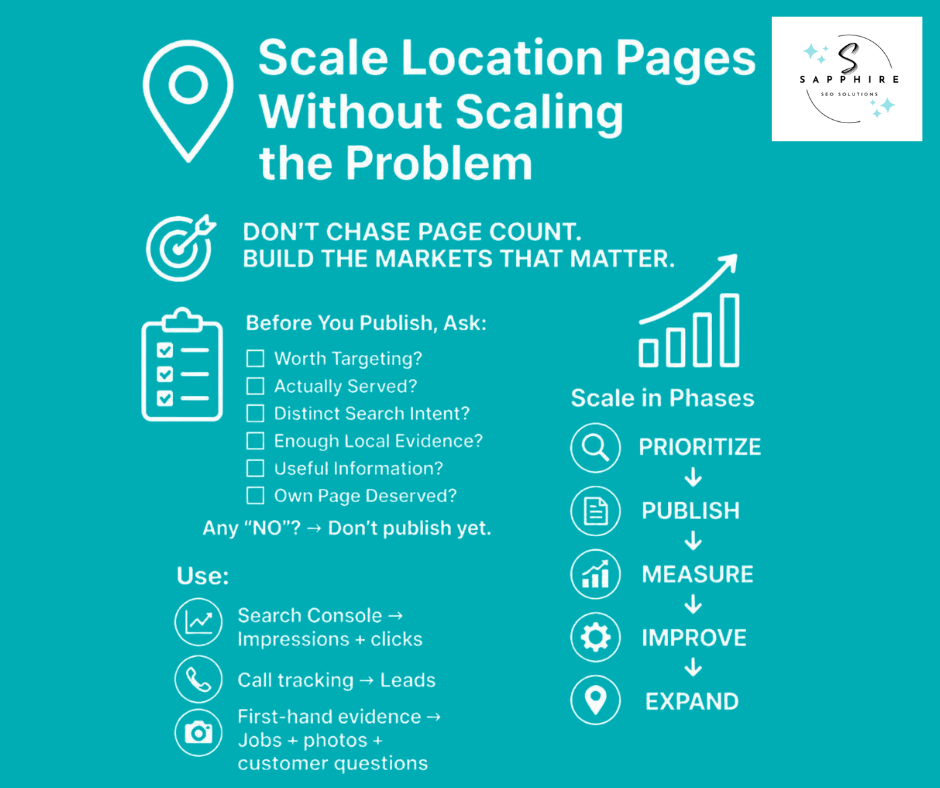
Somewhere around now, a thought shows up: great, I'll make 100 city pages. Hold that thought. A hundred pages that say the same thing don't give search engines or customers anything new. They just give you a hundred things to maintain.
Start with the markets that scored highest in your research. The ones where you actually work, where the money is, and where you have real proof. Build those first.
Before publishing the next page, run it through six questions:
Is the market worth targeting?
Do we genuinely serve it?
Is there a distinct search intent?
Do we have enough evidence?
Is there useful information to share?
Is there a reason for this page to exist on its own?
If any answer is no, the page isn't ready.
Then work in phases. Publish the priority pages. Measure what happens. Improve what's weak. Only then expand. Search Console, the free tool where Google shows how your pages perform, will tell you which pages are getting impressions and clicks. Your call tracking tells you which ones bring in leads. Add pages to your own site when the first ones prove the market, not before.
AI can help along the way. Google says generative AI can be particularly useful when researching a topic and adding structure to original content. Think research notes, content briefs, outlines, gap spotting, editing, and quality checks.
But Google also says using generative AI tools to generate many pages without adding value for users may violate its spam policy on scaled content abuse. Dozens of barely different city pages from a tool are exactly that. Google's helpful content self-check adds a warning sign too: using extensive automation to produce content on many topics. Used well, AI saves time. Used as a page printer, it creates a mess you'll clean up later.
The first-hand part has to come from your team. The jobs, the photos, the customer questions. A tool can't invent those honestly. And don't fill pages with local facts scraped from other sites. Google lists stitching or combining content from different web pages without adding value as scaled content abuse, too.
So skip "50 pages this month" and any publishing setup with no quality checks. For local SEO, the goal is customers, not page count. Ten pages that bring in calls beat a hundred that bring in nothing.
What to Do with Existing Thin or Underperforming Location Pages
Plenty of readers land here with pages already published. Some are thin. Some are near-copies. Don't panic, and don't mass-delete. Every page gets one of three calls: improve it, consolidate it, or remove it.
Improve it when the location has real business relevance, a meaningful search intent, and some useful content already, plus room for stronger local evidence. Then fix the weak spots: local information, intent match, proof, service details, internal links, and the path to a call or quote.
Consolidate when several pages chase the same intent, read almost the same, and don't each earn a URL. Merge the best parts into one strong page and point the old URLs to it. Google says if you've consolidated content from multiple pages into one new page, you can redirect the older URLs to it, and it suggests keeping redirects for as long as possible, generally at least 1 year.
Remove it when the page has no purpose, targets somewhere you don't serve, offers nothing unique, and has no better intent to take its place. And skip the homepage redirect. Google says redirecting many old URLs to one irrelevant destination, like the home page, can confuse users and might be treated as a soft 404 error, which means Google handles it like a missing page. Letting a page go beats sending visitors somewhere unrelated.
Check the numbers first. Google Search Console is the free tool where Google shows how your site performs. Its Performance report shows clicks, impressions, click-through rate, and average position, and the default view covers the past three months. Look at traffic, impressions, and search rankings for each page. Then check the Links report to see who links to it, and the Page indexing report to see if Google has it stored. Add your own numbers too: calls and form fills, plus which pages link to it internally.
A key thing to remember is that Google says the position in that report is an average across all searches, and your own search can differ because of things like your search history and location. So don't judge local search rankings by Googling yourself from the office.
Don't assume every low-ranking page is hurting you. Some quietly bring in calls. But don't keep a weak page just because it's indexed, either. If it brings in nothing and has no future, let it go.
How to Make Location Pages More Useful in AI Search
There's no secret formula for AI search visibility, and anyone selling one is guessing. Google says its generative AI features are rooted in its core Search ranking and quality systems, and that working on visibility in generative AI search is still SEO.
To appear as a supporting link in AI Overviews or AI Mode, the AI-written answers Google shows in search, a page must be indexed and eligible to be shown in Google Search with a snippet. Meeting every requirement still doesn't guarantee anything. Google says indexing and serving aren't guaranteed.
So make the basics obvious. Say who you are, what you do, and where you work, then back it up with proof. Business, service, location, evidence. A page that says you replace water heaters in Roswell, then shows jobs, reviews, and a crew photo, leaves nothing to guess.
Use clear headings, direct answers, and specific details. Google says people appreciate pages organized into sections with headings. But you don't need tricks. Google says there's no requirement to break content into tiny pieces, and you don't need to write in a specific way just for generative AI search.
And claims need proof. "We are the leading roofing company in the area" is something anyone can type. Experience, projects, and customer stories are things you can show.
The bigger win is content nobody else can copy. Google calls content built on common knowledge, the kind that could come from anyone, commodity content. Non-commodity content gives unique expert or first-hand takes. Google says creating content people find unique, compelling, and useful will likely influence your presence in generative AI search in the long run more than any other suggestion in its guide. For you, that means real jobs, real customer questions, and how your crew actually handles work in that market.
Then skip the gimmicks. Google says structured data isn't required for generative AI search, and there's no special schema.org markup you need to add. Don't stuff FAQs. Don't repeat one answer in five formats. And don't add an "AI section" to a page and expect it to show up. Google does say Google Business Profiles can help your services be visible in AI responses, so keep yours accurate. Search Console also has a Generative AI performance report for tracking results.
How Many SEO Location Pages Should You Create?
There's no magic number. Anyone who says every business needs 25 location pages is selling something. Or guessing.
The right count depends on your own situation. How many markets truly matter to you? How much work can your crew handle? What is each market worth, how much search demand is there, and how stiff is the competition? How much local evidence do you have? And can you keep every page accurate over time? That last one gets forgotten. A page with last year's service area and a phone number nobody answers is worse than no page.
So aim for the smallest useful location footprint that covers the markets worth pursuing. Not one page per city. A roofer who gets most of her work in four towns may need four pages and a hub, with everything else covered there.
Google backs the "fewer, better" idea. It says a high quantity of pages doesn't make a website higher quality or more relevant to users. Even its own profile tool has a ceiling: you can have up to 20 service areas on a Business Profile. That's a limit for the profile, not a goal for pages. But it's a fair reality check.
Build in tiers. Tier 1 is your highest-value markets, where you work often and have proof. Tier 2 is secondary opportunities, built after Tier 1 shows results. Tier 3 is markets that need more evidence first, so they wait.
And please don't track page count as a win. Pages published is a to-do list. Calls, jobs, and revenue are the results.
How to Measure Location Page Performance
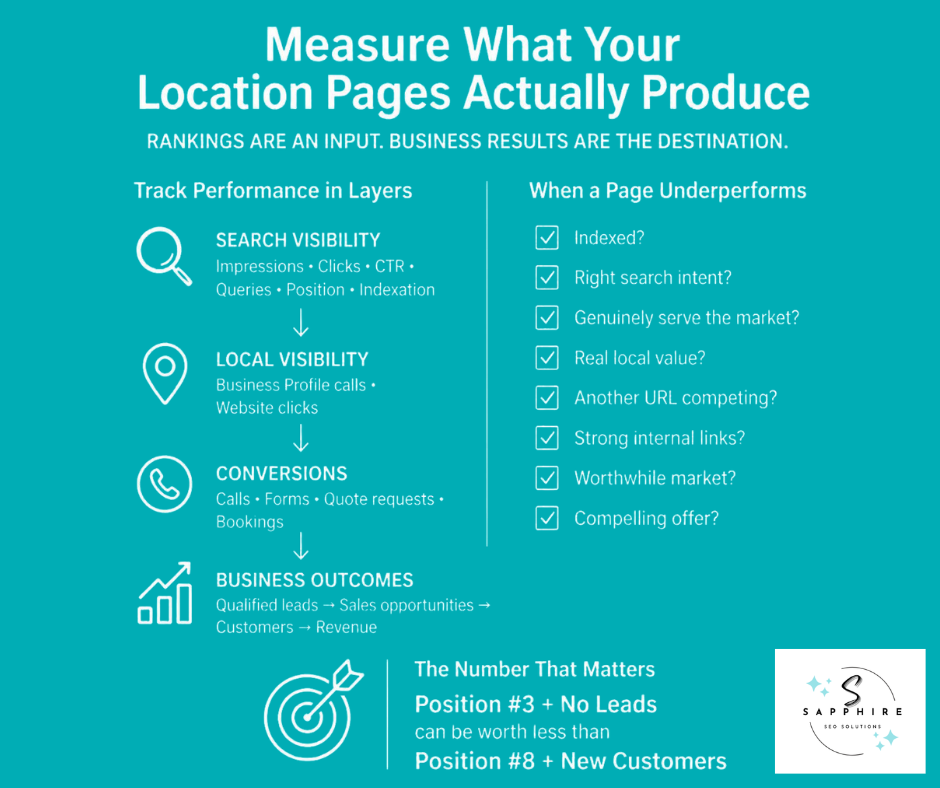
Rankings are an input. Business outcomes are the destination. That doesn't make rankings pointless. It means a page that ranks well and brings in nothing hasn't finished its job. So measure in layers, from search results all the way to revenue.
Here’s how you can measure location page performance:
Search visibility: Search Console shows impressions, clicks, CTR, and queries for each page. CTR is just clicks divided by impressions. Google defines clicks as the number of times a user clicked your site from Google Search results, and impressions as how many times your site appeared in them. Average position is the average position of the topmost result from your site. Check indexation too, meaning whether Google has the page stored at all.
Local visibility: Where it applies, watch your Business Profile performance report. Google says it counts calls as the number of times a customer clicked the call button on your profile, and website clicks as the number of times people clicked the website link. The data is only available for verified Business Profiles. Notice what that leaves out: calls to the number on your website. That's where call tracking earns its keep.
Search Console: Be wary of third-party tools that claim inside numbers, since Google says no third-party tool has access to its internal ranking or AI systems.
Conversions: Track what visitors do on the page: calls, form fills, quote requests, bookings. Google Analytics calls these key events.
Business outcomes: Go past the website. How many were qualified leads? How many became sales opportunities, customers, and revenue? Ask your team which jobs came from which page.
Here's why that matters. A page at position 3 with no qualified leads can be worth less than a page at position 8 that books jobs.
When a page underperforms, ask:
Is it indexed?
Is the intent right?
Do we genuinely serve this location?
Does the page offer real local value?
Is another URL competing with it?
Is internal linking strong?
Is the market worth the effort?
Is the offer compelling?
Skip two traps. Don't treat ranking position as your only number, and don't treat traffic as the goal. And be wary of anyone who promises results by a fixed date, like page one in 90 days. Nobody controls that.
Case Study: Improving Local Search Visibility for a Property Management Company
Client Industry
Property Management
The Challenge
Sapphire SEO Solutions has been creating location pages for clients since 2007. Over the years, we’ve worked with businesses across a wide range of industries, from carpenters and electricians to law firms and medical providers.
In this case study, we’ll look at a recent location page project that delivered significant results for a property management client. For privacy reasons, the client’s name has been withheld.
Based in Minnesota, the client manages hundreds of properties in Minneapolis, making the city one of its most important service areas. The company already had a dedicated Minneapolis location page, but it was struggling to gain visibility for valuable searches such as “Minneapolis property management” and “property management in Minneapolis.”
The page was, at best, ranking on the second page of Google for these important commercial queries.
Because Minneapolis was a priority market, the client wanted to improve the page’s rankings, attract more qualified local traffic, and ultimately generate more property management leads.
Previous efforts had failed to produce the desired results, so the client turned to Sapphire SEO Solutions for help.
Our Analysis
Our SEO manager began by conducting a detailed analysis of the existing Minneapolis location page and the search results for its target queries.
The analysis uncovered a key issue: the page lacked the depth, local relevance, and demonstrated expertise needed to compete effectively with the pages already ranking on the first page.
We then analyzed the competitors ranking for the client’s most important Minneapolis property management queries. While keyword targeting and on-page optimization played a role, one factor stood out: the strongest competing pages did a better job of demonstrating real-world expertise and establishing their businesses as credible property management providers in Minneapolis.
The client’s existing page did not communicate that expertise effectively.
The Strategy
Rather than simply adding keywords or rewriting the existing content, we recommended a complete revamp of the Minneapolis location page supported by a relevant topic cluster.
We first spoke with the client to understand the property management issues and challenges most relevant to Minneapolis property owners. Those insights were incorporated into a detailed content brief designed to ensure the new page was genuinely useful to local property owners while clearly demonstrating the client’s experience.
The strategy focused on several key areas:
Local relevance: Addressing property management considerations specific to Minneapolis.
Demonstrated expertise: Highlighting the people responsible for managing properties in Minneapolis, along with their relevant experience and credentials.
Client experience: Showing how the company helps property owners navigate challenges associated with managing properties in the Minneapolis market.
Commercial intent: Structuring the page around the questions and concerns of property owners actively evaluating property management companies.
SEO optimization: Improving the page’s targeting, structure, content depth, and overall relevance for its most valuable search queries.
AI search visibility: Creating clear, authoritative information that could also help the business establish greater visibility in AI-powered search experiences.
The goal wasn't to create another generic city page filled with keywords. It was to build a location page that gave Minneapolis property owners a compelling reason to trust the company.
Building Supporting Content
The location page was only one part of the strategy.
After identifying the topics most relevant to Minneapolis property management, our SEO manager developed a supporting topic cluster designed to strengthen the location page and establish broader topical relevance.
The supporting content addressed related questions and issues relevant to property owners while creating meaningful internal links back to the Minneapolis location page.
This allowed the location page to serve as the central commercial asset while supporting content provided additional topical depth and opportunities to demonstrate expertise.
The Result
After the revamped Minneapolis location page was published and the supporting content strategy was implemented, the page began gaining visibility in the search results.
Within a few weeks, the page started climbing the SERPs and eventually reached the first page of Google for its target queries.
The result was more than a ranking improvement. The new page provided a stronger representation of the client’s actual expertise, gave Minneapolis property owners more useful information, and created a stronger commercial pathway from search to potential lead.
What Made the Difference
The success of the project wasn't simply the result of adding more keywords to an existing page.
The biggest improvement came from changing the way the location page approached local SEO.
Instead of treating the page as a city-specific version of a generic service page, we built it around the business, the market, the service, and the evidence that demonstrated why the company was qualified to serve that market.
By combining genuine local relevance, demonstrated expertise, commercial intent, SEO optimization, and supporting content, we transformed an underperforming location page into a much stronger search asset.
The takeaway: A location page shouldn't exist simply because a business wants to rank for a city's name. It should exist because the business has something valuable and relevant to say about serving customers in that market.
SEO Location Page Checklist
Run every page through this before it goes live. Work top to bottom, and stop at Strategy if a box stays empty. A page that shouldn't exist doesn't need better headings.
SEO Location Page Checklist
Not every box weighs the same. Strategy and Trust carry the most. A perfect Technical score can't rescue a page that fails either one.
Google says to choose categories that are as specific as possible, but representative of your main business, and to use as few categories as possible to describe your overall core business. Think "this business IS a plumber," not "this business HAS a drain service."
More Resources on Local SEO to Explore
To learn more about local SEO for your business, here are some guides you can go through:
When Should You Hire a Local SEO Agency for Location Pages?
Before anything else, a fair note. Google says if you run a small local business, you can probably do much of the work yourself. Plenty of owners can build a handful of strong pages with this guide. But some situations are different. Outside help starts to pay off when:
You serve many markets
Your existing location pages aren't performing
Your pages are nearly identical
Several pages compete for the same intent
You don't know which locations to prioritize
Your site has weak local architecture
Organic traffic isn't producing qualified leads
You want to expand into new markets
A serious engagement covers more than writing. Market prioritization, local keyword research, results page analysis, and location architecture come first. Then comes content strategy, local evidence, internal linking, technical fixes, Business Profile alignment, local authority, conversion work, and performance measurement.
At Sapphire SEO Solutions, we put it this way: effective location-page SEO isn't about publishing the most city pages. It's about identifying the markets worth pursuing and building pages that give those markets a genuine reason to choose your business.
That's the thinking behind our local SEO services. We start with which markets deserve a page, then build only those. And we won't promise you a number one spot, because Google says no one can guarantee a #1 ranking on Google. It also says that if an SEO guarantees first place, find someone else.
Ask any agency, us included, the questions Google suggests: ask to see examples of previous work, and ask how they measure success. If you'd like help sorting your markets, we're glad to talk. Contact us to schedule a free consultation!

Frequently Asked Questions on SEO Location Pages
What are SEO location pages?
Pages on your website built for one specific place, like a city or neighborhood, with their own URL and content. Each gives searchers in that market a reason to call you.
How do I create a location page for SEO?
Confirm the market is worth it and you really serve it. Check what Google shows for the search, gather local proof, build the page, link it in, and track calls.
Do location pages help with local SEO?
They can help your website show up in regular results for local searches. But they don't create a Business Profile or guarantee map results.
What should an SEO location page include?
A clear title and headline, a short intro, services offered there, local proof, real local FAQs, and one obvious next step.
How unique should location pages be?
Unique in substance, not wording. Remove the city name from two pages. If you can't tell them apart, one page probably does the job.
Are location pages considered doorway pages?
Not by themselves. But Google's spam policies list pages targeted at specific regions or cities that funnel users to one page as an example of doorway abuse. A page with real local substance is a different thing.
Should every city have its own location page?
No. Give a city a page when it earns one. Cover smaller markets on a hub page, or skip them.
What's the difference between a location page and a service-area page?
A location page represents a place customers can visit. A service-area page represents where you travel to customers.
Can a service-area business create location pages?
Yes. Just describe where you actually work and skip any made-up office. Google says service-area businesses can only have one profile for the whole area they serve.
Can I create a location page if I don't have a physical location there?
Yes, if you serve the area. Explain how you serve it, and don't list a fake address. Google says a rented mailing address you don't operate from is a virtual office, and it isn't eligible for a Business Profile.
How many SEO location pages should a business have?
There's no universal number. Build the smallest set that covers the markets worth pursuing. Google says a high quantity of pages doesn't make a website higher quality or more relevant to users.
Should every location page target a different keyword?
Not for its own sake. Give each page a distinct search intent. Variations of the same intent belong on one page.
How do I improve a location page for Google?
Add real local information, a descriptive URL, a clear title and H1, helpful internal links, honest image descriptions, and a fast mobile page.
Can AI help create location pages?
For research, outlines, and editing, yes. Google says generative AI can be particularly useful when researching a topic and adding structure to original content. But using it to generate many pages without adding value for users may violate its spam policy on scaled content abuse.
How do I measure location page SEO?
Use Search Console for impressions, clicks, and queries. Then track calls and form fills, and tie them to real customers and revenue.