

You have a website. Your Google Business Profile is set up. But you're still not getting any calls from potential customers, or you're getting calls, but from people you can't help.
Usually that’s not one big problem. It’s several small ones, hiding in places nobody has checked in a while. A local SEO audit is a check-up on all of them: your search visibility on Google and Maps, your business details, your website, and whether visitors trust you enough to call.
Most local businesses skip that check-up. Use this local SEO audit checklist to find the issues, confirm they’re real, and decide what to fix first.
The goal isn’t a trophy ranking. It’s reaching potential customers and turning them into real inquiries. Fair warning, though. An audit only finds problems. Results depend on your fixes, your competitors, and a few things nobody controls.
Key Takeaways
A failed check is a reason to investigate, not proof of the cause. Record evidence before you change anything.
Check your Business Profile first. Keep the name exactly your real business name, with no added keywords or cities.
Google bases local results mainly on relevance, distance, and prominence, but no single fix guarantees a ranking.
Build a location page only when you can say something true and useful. Fewer, stronger pages beat many thin ones.
Reviews and links must be earned. Buying either, or asking only your happy customers for reviews, breaks Google’s rules.
A click isn’t a lead. Test your forms on a real phone and track which inquiries become jobs.
Fix what’s closest to the money first: broken forms and blocked pages come before cosmetic edits.
Test AI answers every month or two with real customer questions. Results vary, and no tactic guarantees a mention.
Local SEO Audit Checklist at a Glance
Below is the local SEO checklist in short form. Work down the list and mark each area Pass, Needs improvement, Fail, or Not applicable. Not every item fits every business, so skip what doesn’t apply.
Local SEO Audit Checklist
Evaluate your website's local SEO performance across these 10 essential areas. Select one rating for each area to identify strengths, weaknesses, and opportunities for improvement.
| Area | Pass | Needs Improvement | Fail | N/A |
|---|---|---|---|---|
| Google Business Profile | ||||
| Local keywords and search intent | ||||
| Website on-page SEO | ||||
| Service and location pages | ||||
| Business information and citations | ||||
| Reviews and reputation | ||||
| Local backlinks and authority | ||||
| Technical SEO and indexability | ||||
| Mobile experience and conversions | ||||
| Competitors, performance, and lead tracking | ||||
| AI search visibility |
Audit Summary
A fail is a reason to investigate, not proof it caused a ranking drop. Plenty of things move rankings, and a local SEO audit only shows you where to look.
How to Conduct a Local SEO Audit
You don’t need a technical background for this. Small business owners can audit their own business with six steps and a spreadsheet.
Establish a baseline: Write down your main services, the areas you want work in, your website address, your Business Profile status, and any numbers you already have, like calls or form fills.
Inspect each area: Work through the checklist above. Look at your website, your Google listing, your business details, and what a customer goes through when trying to reach you.
Record evidence: For every problem, save the page address, profile field, search phrase, or screenshot that shows it. No proof, no finding.
Assess the effect: Ask what the problem touches: whether customers can find you, whether search engines can read the page, whether visitors trust it, or whether it stops them from calling.
Prioritize fixes: Sort problems into critical ones, useful improvements, and optional polish.
Measure the outcome: After each fix, note the date and what changed. Then watch the numbers that matter to you.
Keep it all in one simple worksheet with six columns: finding, evidence, business impact, priority, recommended action, and status. A basic spreadsheet is plenty. And not every finding explains a ranking problem, so don’t force it. Some just cost you calls.
Google Business Profile Audit
Your Google Business Profile is what shows up in the local pack, the map, and the short list of businesses at the top of a local search and on Google Maps. Many customers see it before they ever see your website. So check it first.
Work through these eight checks:
Ownership: The profile is verified and controlled by your business’s own Google account. Google allows one profile per business, so hunt down any duplicates.
Name: Your business name should match your truck, invoices, and website. No added keywords, taglines, or cities. Google can suspend profiles that add them.
Categories: Your primary category should say what you are, like Roofing Contractor. Add secondary categories only when they describe your core business. Google asks for as few as possible.
Contact details: Address or service area, phone, website, hours, and holiday hours. The phone number must be one your business controls.
Description and services: Your business description and service list should match your actual services. No links, prices, or promotions.
Photos and videos: Clear, current, and real. Your crew, your trucks, finished jobs.
Problems: Look for unexpected edits, restrictions, or verification you never finished.
Performance: Open the Performance tab to see search terms, calls, and website clicks. Call counts reflect taps on the call button, not every call you get.
Storefront or service area? Storefront businesses welcome customers at a location with signage. Service area businesses travel to customers instead. Google allows them one profile with a defined service area, and tells those working from home to hide the address. Virtual offices and rented mailboxes don’t qualify. The area also generally shouldn’t stretch past about two hours of driving from where you’re based.
Say a roofer runs jobs from his house. He should confirm his home address is hidden, his service area lists the towns he actually covers, and no mailbox address is attached.
Google says Google’s local results rely mainly on relevance, distance, and prominence, meaning how well known you are. A complete profile helps. But it doesn’t guarantee a top spot, and nobody can pay for one.
Need the full setup? See our Google Business Profile optimization guide.
Local Keyword and Search Intent Audit
A keyword is just the words someone types into Google Search. Search intent is the reason behind them. “How to fix a leaky faucet” probably wants a tutorial. “Plumber near me” wants to hire. Your pages should win the second group first.
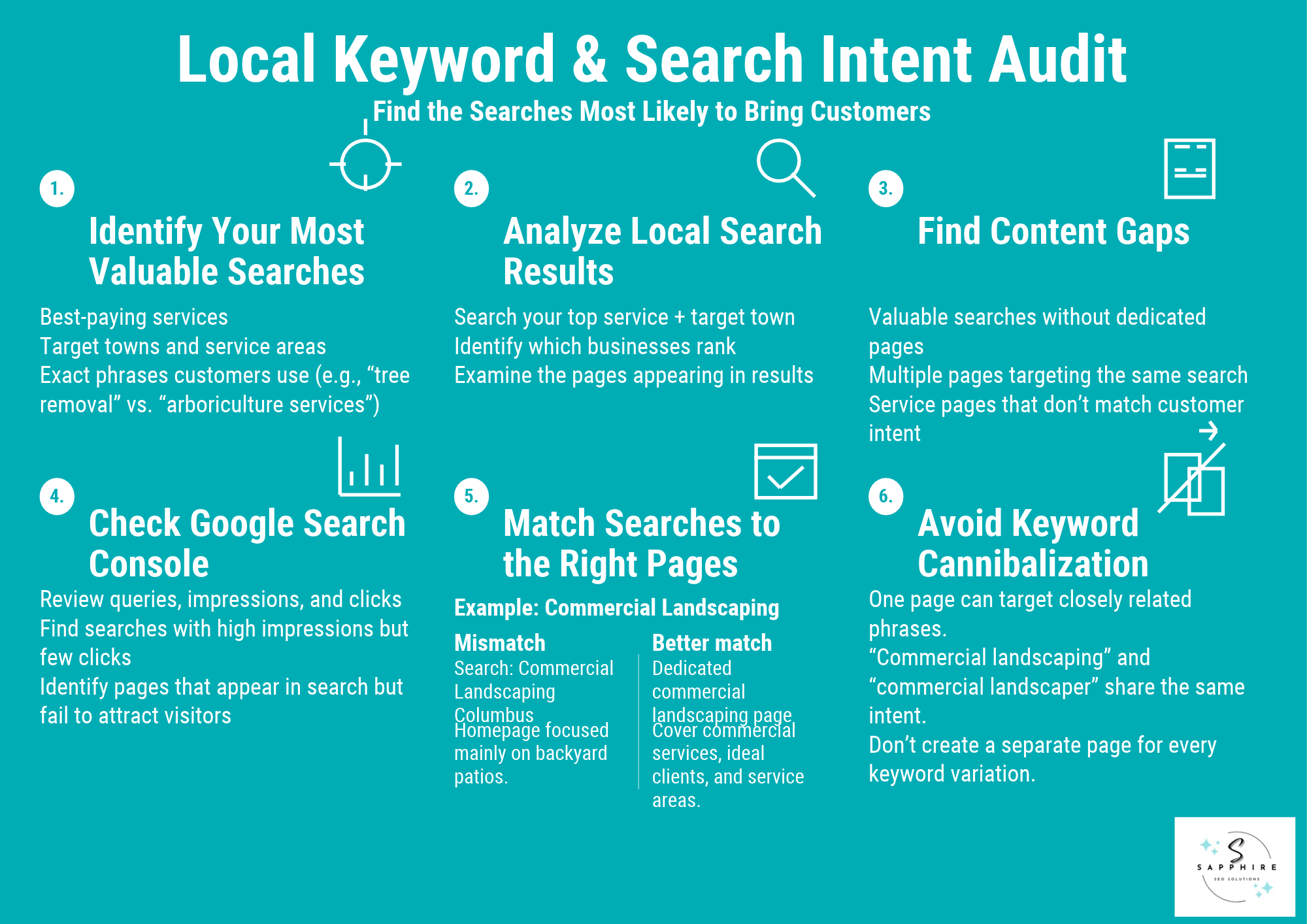
Every service business has a short list of searches that pay the bills. Write down your best-paying services and the towns where you want work. Then check:
Does your site use the words customers use? “Tree removal” may beat “arboriculture services.”
What shows up for local searches like your top service plus a town? Note who ranks and with what pages.
Does any valuable search lack a page?
Do two of your pages chase the same search?
Next, open Google Search Console, Google’s free tool that shows how your site does in search. Its Performance report lists the queries that showed your site, how often people saw it (impressions), and how often they clicked. Look for searches with lots of impressions and few clicks. Those pages get seen but don’t convince. Google suggests weighing impressions and clicks more than average position.
Take a landscaper who wants more commercial work but only has a homepage. A search like “commercial landscaping Columbus” lands on a page mostly about backyard patios. A dedicated commercial page fixes that, covering what’s included, who it serves, and where.
But don’t build a page for every variation. “Commercial landscaping” and “commercial landscaper” are the same need, so one page covers both. And volume isn’t everything. A small search from someone ready to hire can beat a big one from browsers.
Want more? See our local keyword research guide.
Website On-Page SEO Audit
On-page SEO is everything you control on your website pages: what they say, how they’re labeled, and how easy they are to use. Done well, it helps Google understand the page and helps a customer decide to call. Both matter.
Check your homepage and each key service or location page against these:
Title and description: The title tag is the headline shown in search results. Make it unique, clear, and accurate for every page. The meta description is the summary under it. Google may use it for the snippet, but it isn’t a ranking factor.
Main heading: A clear H1, the big headline on the page, plus sensible subheadings. None of them should contradict the title.
Content: Does the page say what the service is, who it’s for, and what happens next? Mention the service and town where it clarifies the subject. Don’t repeat them in every heading.
Internal links: Your website structure should make key pages easy to reach. Use website links with descriptive text like “drain cleaning services,” not “click here.”
Contact and trust: Phone number, reviews, licenses, and a clear call to action should be easy to spot.
Problem pages: Flag anything thin, duplicated, outdated, or overlapping.
Images: Relevant photos with plain alt text, a short description for screen readers and search engines.
Take a plumber’s drain cleaning page. The vague version says, “We offer drain services. Contact us.” The useful version names the problems you fix, says who you serve (homeowners, landlords, property managers), walks through what happens on the visit, and ends with a simple way to ask for a quote.
And there’s no word count to hit. Google says length alone doesn’t determine rankings. Write what the customer needs, then stop.
Service and Location Page Audit
Your service pages explain what you do. Your location pages explain where you do it. A page that exists only to catch a search doesn’t help anyone, so each one should earn its place on your site.
Start with one test. It echoes Google’s own warning about content made mainly to attract search visits:
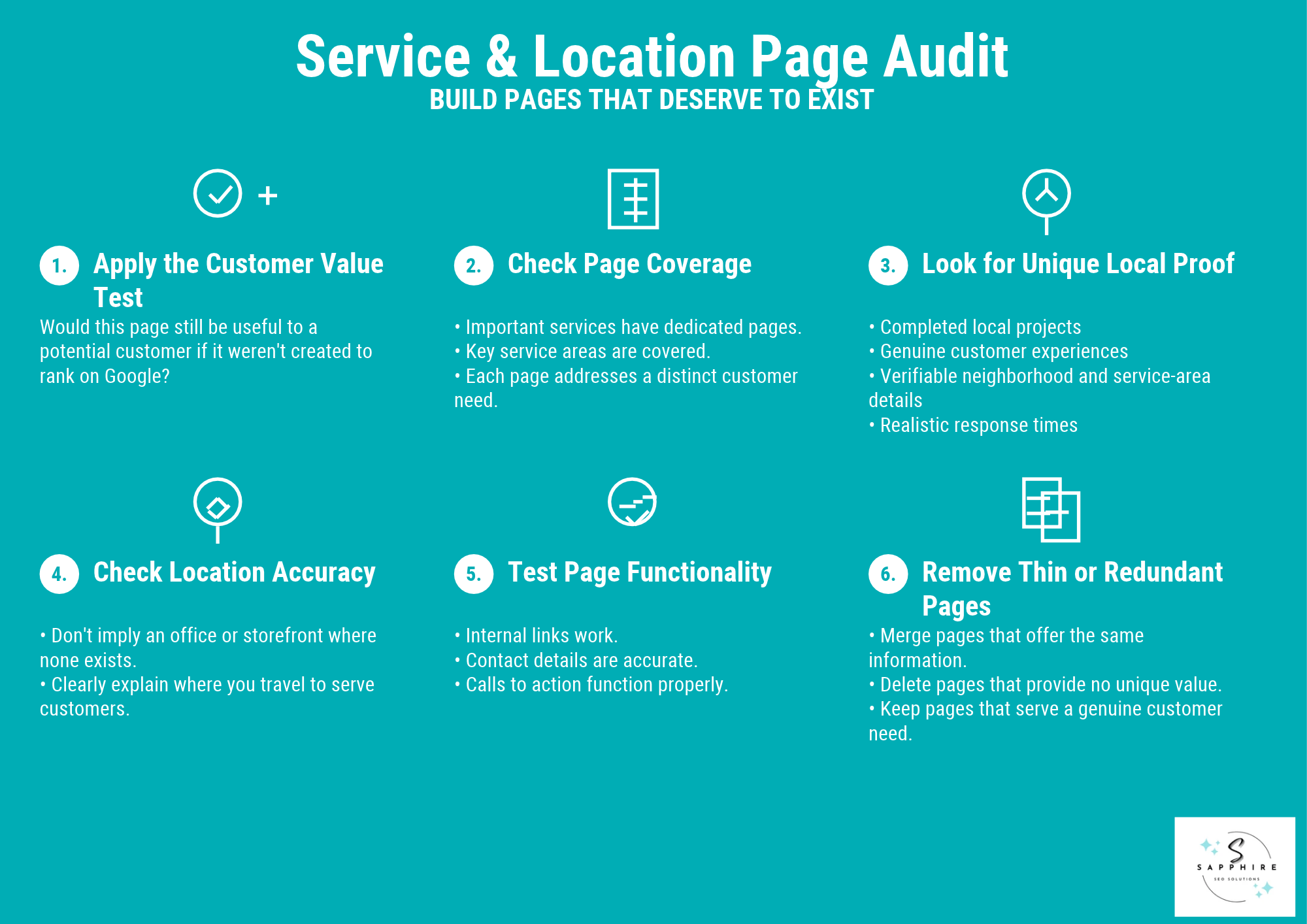
Would this page still be useful to a potential customer if it were not created to rank in Google?
Then check each page:
Do your important services, and the towns you really serve, have pages?
Does each page answer a different need, or just swap in a new city name?
Is there local proof? Finished jobs, customer experiences, or area details you can verify. Never invent them.
Does it imply an office or storefront where you only travel to customers?
Do the links, contact details, and calls to action work?
Could you delete the page and lose nothing? Then delete it, or merge it into a stronger one.
A weak page for Dayton reads exactly like the one for Toledo. A stronger one describes a real job you finished there (with the customer’s permission), the neighborhoods you cover, and how fast your crew can arrive.
And you don’t need a page for every city. Build one when you can say something true and useful about that place. Google’s spam policies call out near-identical city pages that funnel visitors to one page as doorway abuse, and lists of cities crammed onto a page as keyword stuffing. Fewer, stronger pages beat many thin ones.
Business Information and Local Citation Audit
Local citations are mentions of your business name, address, and phone number on other websites. Think of them as the modern phone book. Google says how well-known you are draws on information from across the web, directories included. And customers read those pages too, so wrong business details cost you calls.
Check your business information here:
Core details: Name, address if customers visit you, phone, and website. Your contact details should match your Google profile everywhere.
Major business listings: Google, Apple Maps, Bing, and Yelp. Apple now runs Maps listings through Apple Business, which replaced Business Connect in 2026.
Your trade: Look at industry-specific directories and local groups, like your chamber of commerce.
Problems: Hunt for duplicate listings, old phone numbers, former addresses, and links to the wrong website.
Fix credible, relevant listings first, starting with industry directories that real customers use. Skip bulk submissions to low-quality business directories. “Ste.” instead of “Suite” is harmless. A dead phone number isn’t.
Local SEO research firm Whitespark says consistency no longer moves rankings much, but it still matters on sites where real people look. No citation count guarantees a ranking. Recheck every few months, since hours and numbers change.
New to this? Read our What Are Local Citations? guide.
Online Reviews and Reputation Audit
Customers often read online reviews before they call. Google also says review count and score factor into local rankings. But no rating or review total guarantees a position, so treat reviews as proof of trust first and a ranking signal second.
Check these:
Where you stand: Read your Google reviews and any other sites your customers use. Note your average rating, how recent the reviews are, and what people keep mentioning.
Complaints: Repeat complaints, like late arrivals or unreturned calls, point to fixable gaps. A lone one is just one customer’s bad day. Google itself says negative reviews aren’t necessarily a sign of poor business practices.
Replies: Are yours polite and specific? Google says you needn’t thank every reviewer, and you shouldn’t pitch deals. Never paste the same canned reply everywhere.
Requests: Google lets you ask for reviews with a link or QR code. It bans discounts or freebies in exchange, and asks only your happy customers. Ask everyone the same way, and ask for honest feedback, not five stars.
Suspicious reviews: Report fake or rule-breaking ones. A harsh but honest review usually doesn’t qualify.
Build a habit, not a campaign. Ask at the end of each job and check your reviews monthly. And stay clean: the FTC bans fake reviews and review suppression, and can seek civil penalties.
Local Backlink and Authority Audit
A backlink is a link from other websites to yours. Think of it as a referral. A recommendation from a trusted local group counts for more than ten from strangers. Google has called links one of its best-known signals, but quality beats quantity.
Here’s what to check:
Existing links: Open the free Links report in Search Console and see who links to you. Good sources include your chamber of commerce, trade associations, partners, local news outlets, local bloggers, and industry news sites.
Broken links: A link to a page that no longer exists does nothing for you. Redirecting it to the right page can recover it.
Competitors: A backlink checker can show which sites link to the businesses outranking you. Look for realistic matches, like a local association.
Odd patterns: A sudden flood of links from unrelated sites deserves a look. But low-authority links aren’t automatically harmful. Google says most sites never need its disavow tool, a way to tell Google to ignore certain links.
Earn local links by showing up. Sponsor or volunteer in your local community, or publish something useful and original like a seasonal care guide for your area. Skip bought links, mass link swaps, and automated link services. All of them break Google’s link spam rules. And no link count guarantees a ranking.
Technical SEO and Indexability Audit
A technical SEO audit checks whether Google can reach, read, and store your pages. Three steps matter, and people mix them up. Crawling is Google finding a page. Indexing is Google filing it in its catalog. Ranking is where it shows up for a search. A page can pass the first two and still rank nowhere, and Google guarantees none of the three.
Start with your money pages, the key service and location pages:
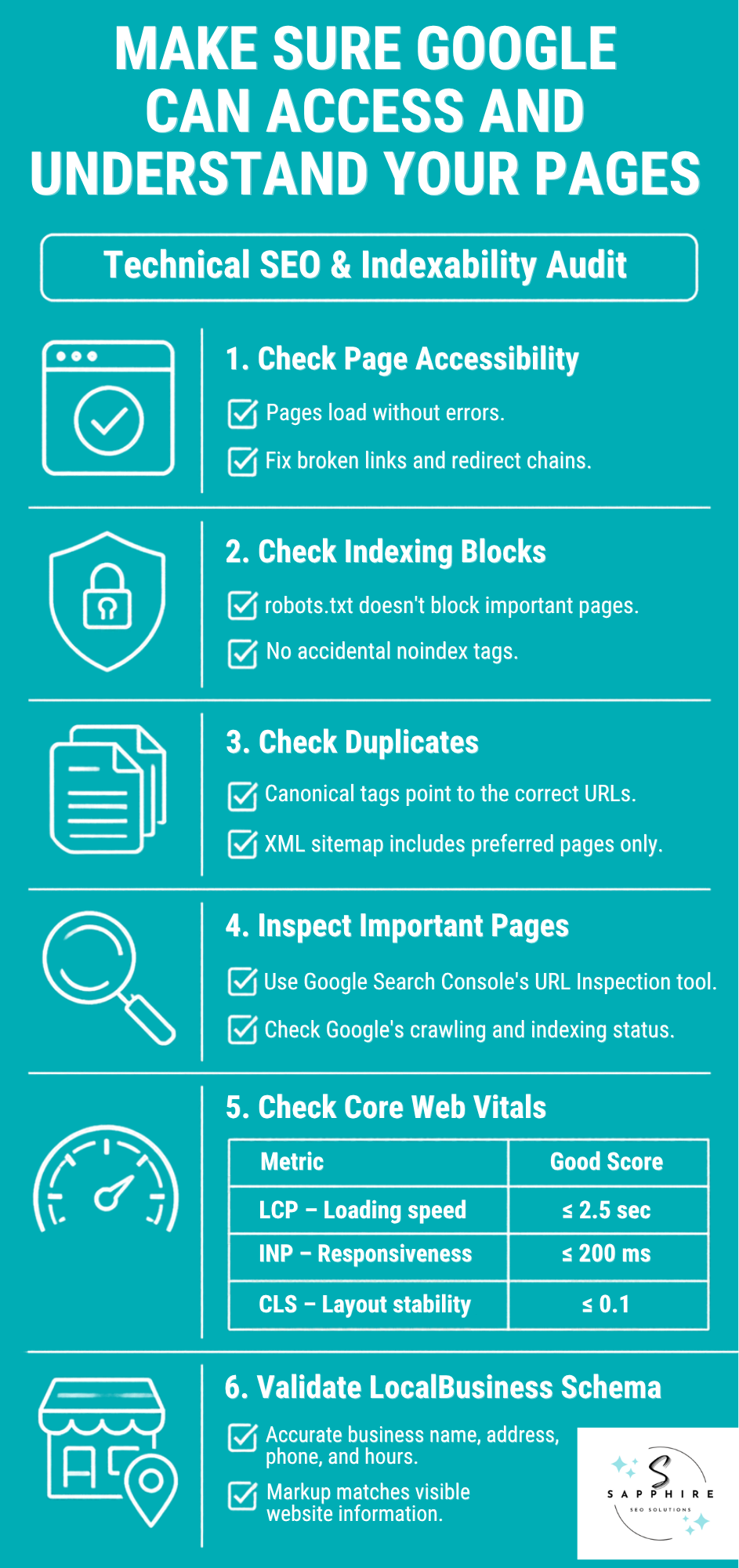
Status: Each should load normally, not show an error. Fix broken links that point to dead pages, and trim long chains of redirects.
Blocks: A robots.txt file can tell Google not to visit pages, and a noindex tag tells it not to list them. Set by mistake on an important page, either one can prevent search engines from showing it.
Duplicates: A canonical tag tells Google which version of similar pages is the main one. Make sure it points to the right page. Your sitemap, the list of pages you want found, should include only those.
Spot checks: Search Console’s URL Inspection tool shows how Google sees a single page.
Then look at speed. Core Web Vitals are Google’s three measures from real visitors: how fast the main content loads, how quickly the page responds, and whether it jumps around. Google’s “good” marks are 2.5 seconds, 200 milliseconds, and 0.1 (a jumpiness score). Good page speed helps. But Google says passing scores don’t guarantee top rankings.
Local business structured data (schema markup) is code that spells out your name, address, phone, and hours for search engines. Google’s documentation calls the markup LocalBusiness structured data, and it must match what’s visible on the page. It can help Google understand you. It won’t guarantee rankings or special search features.
Not every warning is urgent. Fix what’s actually blocking an important page first.
Mobile Experience and Conversion Audit
Google mostly uses the mobile version of your pages, and plenty of customers are on phones. So test on an actual mobile device. Google retired its Mobile-Friendly Test and Mobile Usability report in 2023, but mobile usability still matters, and your own phone is the best tool left.
Pick your key landing pages and try to be the customer:
Calls: Is your number easy to spot, and does tapping it start a call?
Forms: Fill out every quote, booking, and contact form from start to finish. Then confirm the message actually arrives.
Clarity: Can a visitor see what you do, your hours, your service area, and why to trust you, without pinching or zooming?
Friction: Hunt for dead buttons, pop-ups covering the page, confusing menus, and needless steps.
Next step: Each page needs one clear action, and should deliver what the search result promised.
Feel: Speed numbers live in the technical audit. Here, just notice whether mobile page speed drags on cell data.
Picture a roofer who ranks well for “roof repair” in his town. Visitors arrive. But the quote form’s submit button does nothing on iPhones. Traffic looks healthy, and the phone stays quiet. Only a real test on a real phone would catch it.
Don’t treat every bounce as a failure. Someone who spots your number and calls has done what you wanted. And skip copying another business’s form or button. What converts for an emergency plumber may not suit a landscaper.
Competitor, Performance, and Lead Tracking Audit
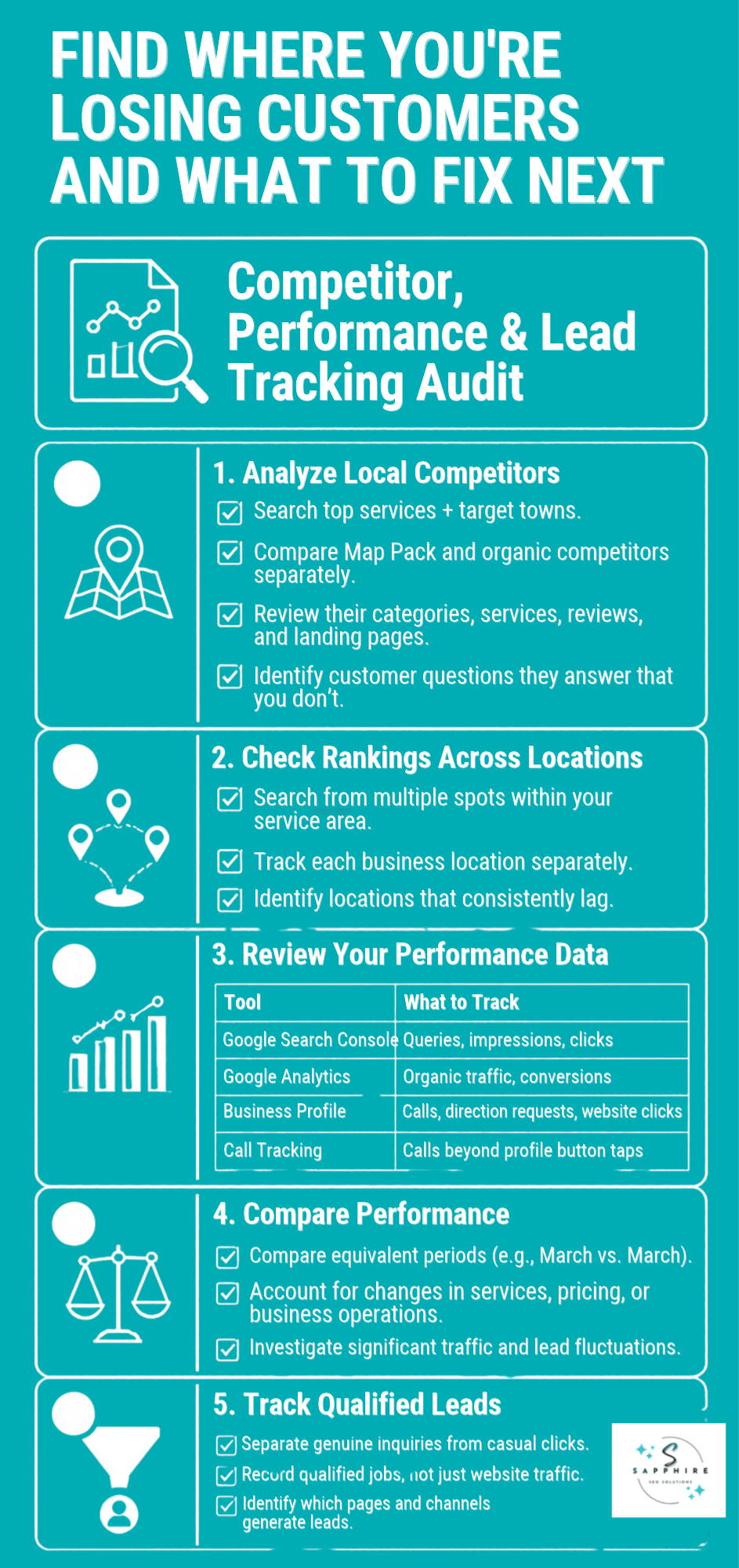
Competitor research and performance data answer one question: where are you losing jobs, and what should you fix next? So look at both together.
Start with your local market. Search your top services plus your towns. Note who shows up in the map listings, and who shows up in the organic search results below them. Keep those two lists apart. Then compare those rivals’ Business Profile categories, reviews, services, and landing pages, and look for customer questions they answer that you don’t. But a competitor’s tactics don’t prove what Google rewards, and matching their review count won’t guarantee you outrank them.
Local search results shift with where the searcher stands because Google counts distance. So check from a few spots around your service area, not just one. Tracking local rankings this way beats trusting a single search. Check each location on its own, too. For multi-location businesses, compare multiple locations against each other to see which one lags. And local search rankings alone never prove a page brings in work.
Then pull your numbers:
Search Console: queries, impressions, and clicks for your key pages.
Google Analytics: how many users came from organic search, and how many took actions you’ve set up as key events (Analytics’ name for conversions).
Business Profile Performance: calls, direction requests, and website clicks.
Call tracking: Profile call counts only reflect taps on the call button, so a tracking number can catch the rest.
Together they tell your local traffic story. Compare like with like, this March against last March, and note big changes like a new service or a price hike.
A click isn’t a lead. Mark which inquiries were real, qualified jobs. And don’t blame SEO for every dip. Report a number only when it points to a decision, like fixing a page or adding a call tracker.
AI Search Visibility Audit for Local Businesses
Customers now ask conversational search queries in AI tools, like “who fixes a dishwasher in Dayton on weekends?” Voice search works the same way. An AI answer might mention you. Or it might mention your competitor.
So test your AI SEO. Pick a small set of real questions your customers ask, say 10 to 15, covering your services and towns. Run them in Google’s AI Overviews and AI Mode, plus any other AI tool your customers use. For each one, log the question, the tool, the date, whether you were mentioned or cited, and which competitors appeared. Rerun them every month or two. Answers change from query to query and day to day, so a few tests are a sample, not a score.
Google says its AI features are rooted in its core Search ranking and quality systems, so the basics still apply. Check these:
Clear pages: Does your site plainly say what you do, who you serve, where, and which problems you solve?
Proof: Are your claims, credentials, and project examples true and backed up?
Access: Is your content readable text that Google can crawl, and linked from relevant pages?
Consistency: Do your website, Business Profile, and trusted listings agree? Google says Business Profiles can help local visibility in AI responses.
Skip the shortcuts. Google says you don’t need llms.txt files (plain-text files made for AI tools), special markup, or chopped-up content to appear, and chasing fake mentions isn’t likely to help. But no tactic guarantees you’ll show up in an AI answer. Treat this as an extension of everything above, not a separate job.
How to Prioritize Local SEO Audit Findings
An audit leaves you with a list. And if every line gets the same attention, you'll spend a weekend rewriting title tags while a broken form quietly eats your leads.
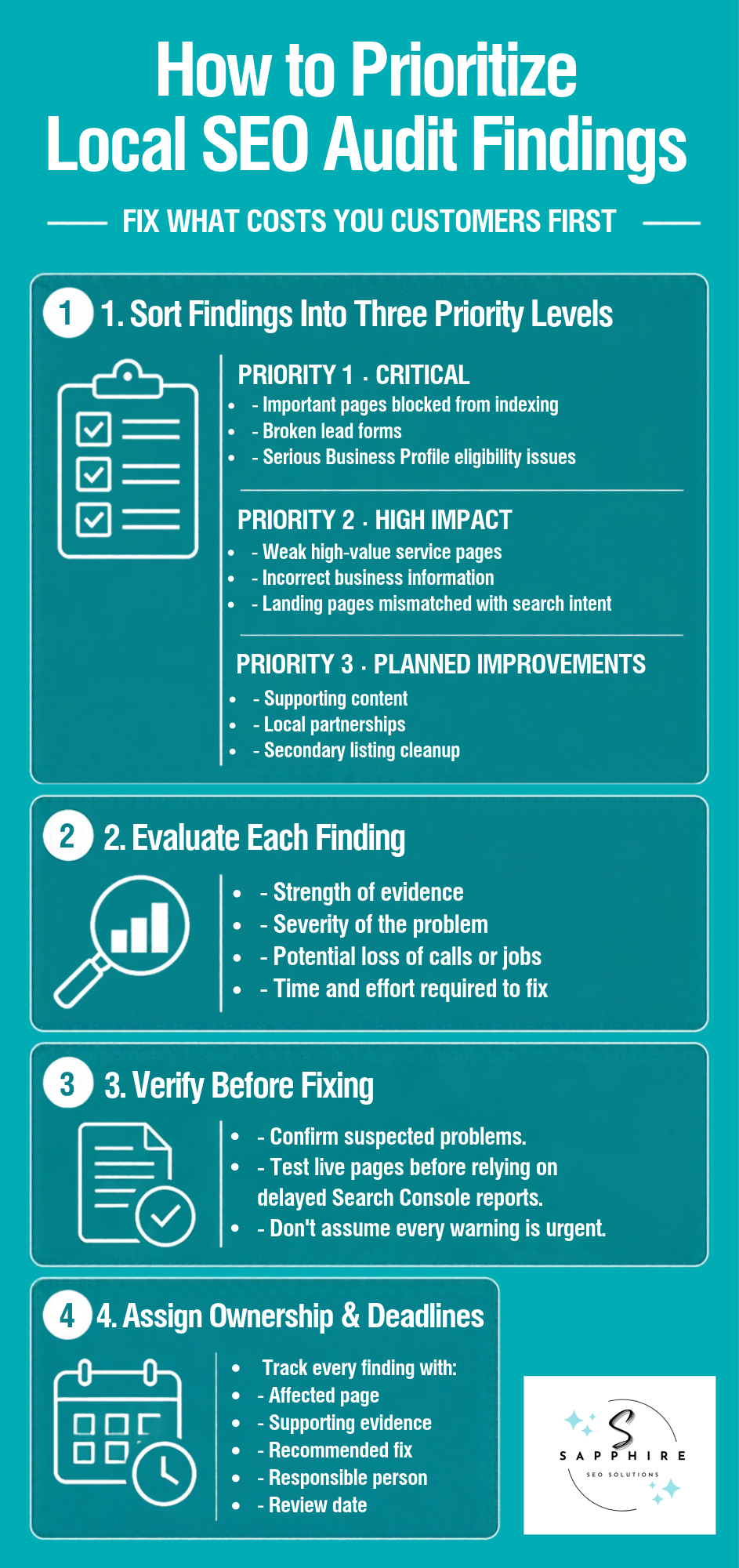
Sort findings into three levels instead:
Priority 1, Critical: Important pages accidentally excluded from indexing, a broken lead form, or a serious Business Profile eligibility problem.
Priority 2, High impact: A weak page for a high-value service, wrong business information, or a landing page that doesn't match what people searched for.
Priority 3, Planned improvements: More useful supporting content, local partnerships, and cleanup of secondary listings.
Before placing anything, weigh the evidence, the severity, the likely cost in calls or jobs, and the work the fix takes. A suspected problem is only a suspect until you've confirmed it. Search Console's reports can lag, so test the live page first.
Nobody outside Google knows exactly how much each of the local ranking factors counts. Google names relevance, distance, and prominence but doesn't publish weights. So your business sets the order, not a formula. A roofer after a hailstorm needs different things than a landscaper in January.
For each finding, log the affected page, the evidence, the fix, an owner, and a review date. Every fix gets a name and a deadline.
Picture an HVAC company that wants to rewrite its About page. Nice idea. But its quote form hasn't sent an email in three weeks. The form comes first, because that's where people ready to hire are giving up. The rewrite can wait.
Free Tools for Conducting a Local SEO Audit
You don't need a software budget to run this audit. Seven free tools cover most of it.
Google Search Console: Google's free report on how your site shows up in search: the queries, clicks, and impressions, plus which pages are indexed.
Google Business Profile: Update your business details and check calls, direction requests, and website clicks.
Google Analytics: What visitors do on your site, including the key events you've set up.
PageSpeed Insights: Tests a page's speed and stability, using a simulated run plus real visitor data from the past 28 days.
URL Inspection: A Search Console feature. Its live test checks whether Google can index a page as it stands today.
Rich Results Test: Checks structured data for errors. A pass means the markup is valid, not that you'll get a special listing.
A spreadsheet: Holds findings, evidence, priorities, and fixes.
No free tool covers every local ranking factor. Search Console says nothing about your reviews, and Analytics can't see your citations.
Paid tools earn their keep once free ones stop answering your questions. Tracking rankings from many spots, cleaning up listings on dozens of sites, or comparing links with competitors gets tedious by hand. Until then, skip the subscription.
The tools only collect evidence. Reading it correctly and deciding what to fix first is the real work.
Common Local SEO Audit Mistakes
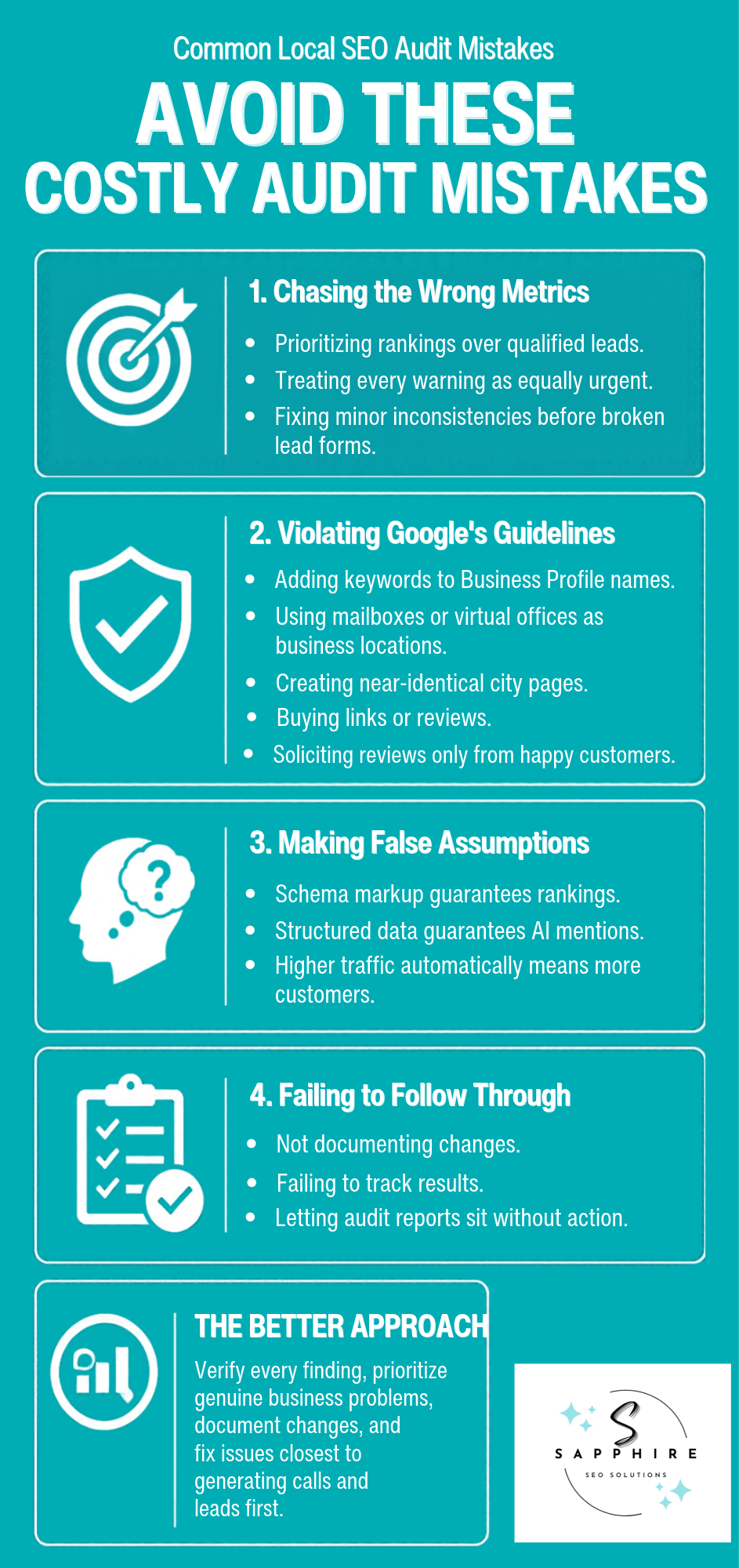
Most audit mistakes aren't technical. They're judgment calls that go sideways.
Some come from misreading the data. Owners chase rankings and traffic without asking whether the calls turn into real jobs. Every warning gets the same urgency, so a harmless "Ste." versus "Suite" mismatch eats the hour a broken form needed.
Others are shortcuts Google's rules don't allow. They include:
Adding keywords to a Business Profile name
Listing a mailbox or virtual office as a location
Publishing the same city page forty times with the town swapped
Buying links, paying for reviews, or asking only your happy customers
Assuming schema markup guarantees a ranking or an AI mention
Google says markup won't guarantee a special listing, and that AI answers need no special markup at all.
The last group is not following through. Changes go unlogged, so nobody can say what worked. Or the audit sits in a folder, because a report fixes nothing on its own.
Slow down instead. Collect the evidence, confirm the problem is real, and fix what sits closest to the phone first.
More Resources on Local SEO to Explore
If you want to improve your site’s local SEO, here are some comprehensive guides to explore:
Find Out What's Holding Back Your Local Search Visibility with a Free Local SEO Audit
You've got the checklist. Now comes the harder part: working out which problems matter most, and which one to fix first. That's tough to judge from the inside.
Request a free local SEO audit from Sapphire SEO Solutions, a local SEO agency that works with local service businesses. You'll also get a free consultation with an experienced local SEO specialist. They can point to opportunities in your Google Business Profile optimization, how well your website matches local searches, where you show up in local results, and what happens between a search and a qualified inquiry.
Send us your website, your primary services, and the town or service area you want to work in. We can't promise rankings, and nobody honest can. But we can help you see what's worth fixing first. Contact us to schedule your free consultation with a local SEO expert today!
Want help with local SEO? Our affordable local SEO services handle all of your online visibility problems, create a high-performing local SEO strategy, and help you compete with your competitors in the digital space.

Frequently Asked Questions About Local SEO Audits
What does a local SEO audit include?
Eleven areas, from your Business Profile and website to reviews, links, technical health, and lead tracking. The checklist above walks through each one.
How do I perform a local SEO audit?
Write down a baseline first. Then check each area, save proof of every problem, and sort the fixes by what's costing you calls. Make the changes, note the date of each one, and watch the numbers.
Can I conduct a local SEO audit for free?
Yes. The free tools above cover a first pass. But a tangled technical problem, or several locations that each need their own check, may call for extra software or an expert.
How long does a local SEO audit take?
It depends on your site's size, how many locations you have, and how much data you can pull. A single-location business with a small site is a different job than a dozen locations and hundreds of pages.
What are the most important local SEO ranking factors?
Google says local results rest mainly on relevance (how well you match the search), distance (how far you are from the searcher), and prominence (how well known you are). You can't move your shop, so most of the work lands on the other two. And no single checklist item guarantees a higher spot.
How can I tell whether my local SEO is working?
Look past rankings. Check whether more searches show your pages in Search Console, whether calls, direction requests, and website clicks climb in your Business Profile, and whether visitors complete the key events you've set up. Business Profile search terms update monthly, so check monthly. Then ask the question that counts: are more of those inquiries real jobs?
When should I hire a local SEO specialist?
When you can't tell what's wrong, results have stalled, you're juggling several locations, or nobody has time to make the fixes. Google calls hiring an SEO a major decision, so ask for past work and how they'll measure results. Walk away from anyone who guarantees a ranking.