

How to Rank Higher on Google Maps (Guide for Local Businesses)
Type "plumber near me" into Google and you'll see a handful of businesses show up with a map, star ratings, and a little blurb. That's what most business owners want when they ask how to rank higher on Google Maps. They want their business to be one of the names that shows up first before someone scrolls past them and calls a competitor instead.
That said, there's no single, permanent spot waiting for your business. Your Google Maps presence shifts depending on who's searching, where they're standing, and what exact words they typed. Two people in the same city, searching for the same service, can pull up completely different local search results. Neither one is wrong. Google is just trying to match each searcher with the best answer for them, specifically.
That match comes down to three things:
Relevance
Distance
Prominence
You can't do much about distance. But relevance and prominence? Those are largely in your hands.
This guide walks through what you can actually influence, what to prioritize first, and which shortcuts tend to backfire. Because for a local business, ranking higher only matters if it turns into real calls and real jobs.
Key Takeaways
There's no permanent Maps ranking. Two people searching the same thing can see completely different results.
Relevance and prominence are yours to influence. Distance mostly isn't, so stop fighting geography.
Decide which searches matter before touching your profile. Optimizing without that map is backward.
Categories describe what you are. Services describe what you do. Don't blur the two.
Your website isn't separate from Maps SEO. Google pulls local signals from it directly.
A ranking problem and a conversion problem are different. Fix the right one first.
Google explicitly bans incentivized reviews and review gating. Authenticity beats volume every time.
No agency can guarantee a ranking. Google says local position can't be bought or requested.
How Google Maps Rankings Actually Work
Before you touch a single setting, it helps to understand what Google is actually doing when it decides who shows up and who doesn't. This is the foundation everything else in Google Maps SEO builds on.
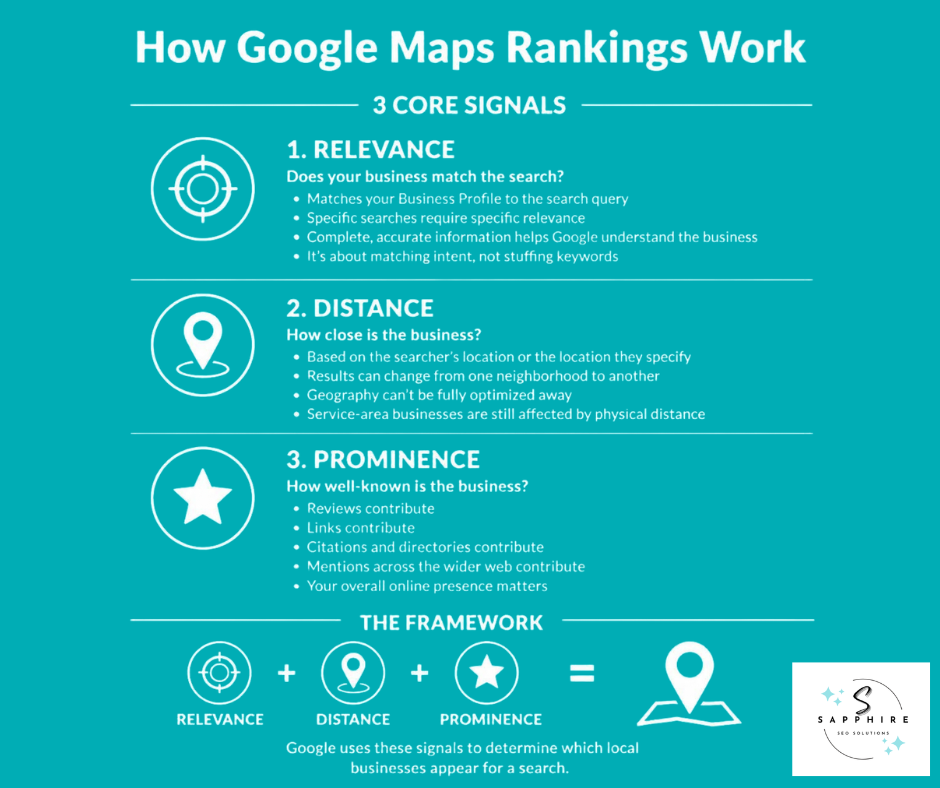
Google says local results come down to three things: relevance, distance, and prominence. Google's own support documentation actually now uses the word "popularity" in its summary line, then explains that idea in more depth under the heading "prominence." Same concept, two labels.
Relevance
Relevance is how closely your Business Profile matches what someone typed into the search bar. Search "plumber," and Google looks for plumbing businesses. Search "water heater repair" or "emergency plumber," and Google is looking for something more specific, and it wants to match that local intent as closely as it can. The more complete and detailed your business information is, the easier that matching job becomes. This isn't about repeating a keyword ten times. It's about actually being what the search is asking for.
Distance
Distance is exactly what it sounds like: how far your business sits from the person searching or from whatever location they typed in. This is why your Google Maps search results can look completely different in one neighborhood versus another just a few miles away.
And here's the part service-area businesses need to hear. You can't optimize your way around geography. A tree service based on the east side of town is never going to rank the same way on the west side, no matter how good the profile looks.
Prominence
Prominence is about how well-known your business is on Google and across the wider web. Reviews and links are two examples Google points to directly. But prominence isn't only about your profile. It reflects your Google Maps ranking and how you show up everywhere else online, from directories to news mentions to who's linking back to your site.
Start with the Searches That Matter to the Business
Before you change a single field on your profile, stop and ask a more basic question. What do you actually want to be found for?
Most businesses skip this step. They jump straight into optimizing their profile without ever mapping out the local keywords that lead to real jobs. That's backward. The work should start with the services that bring in your best customers, then move to figuring out how potential customers search for those exact things.
Not all searches are the same, though. It helps to break them apart:
Category searches ("landscaper," "plumber")
Service searches ("lawn installation," "drain cleaning")
Problem-based searches ("grass won't grow," "no hot water")
Urgent, high-intent searches ("emergency plumber," "same-day landscaping")
Location-modified searches ("landscaper near me," "plumber in [city]")
Branded searches (your business name directly)
Once you've got that list, look at what actually shows up in the local SERP and Maps results for those terms. That tells you what Google currently considers relevant and where the gaps are.
A landscaping company, for example, probably cares less about ranking for the single word "landscaping" and more about showing up for landscaper, landscaping company, landscape design, lawn installation, and retaining wall contractor. Those are the local queries that actual local customers type in right before they pick up the phone.
This map of relevant searches should shape everything that follows: your GBP categories, the services you list, the pages on your website, your local content, how you link pages together, and where you focus your authority-building efforts. Chasing volume for its own sake isn't the goal. Chasing the searches that turn into paying customers is.
Get the Google Business Profile Foundation Right
Before you worry about rankings, make sure the basics are actually right. A lot of visibility problems trace back to something simple in the profile itself, not some hidden algorithm issue.
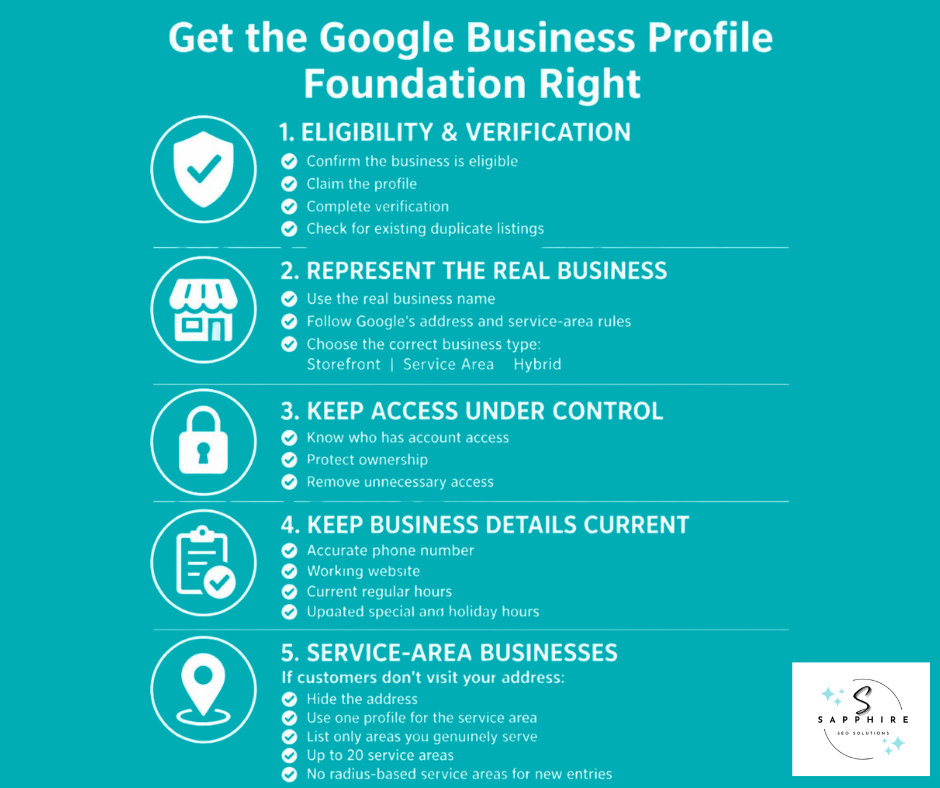
Start by confirming your business is eligible for a Google Business Profile in the first place, then claim and verify it. This sounds obvious, but plenty of businesses are still operating on an unclaimed or unverified listing without realizing it. Once you're in, use your real-world business information: the actual name your business operates under, not a version stuffed with keywords. Google requires businesses to represent themselves accurately, and it has specific rules for names, addresses, and service areas that exist precisely to stop that kind of gaming.
Keep control of your Google Business Profile account tight. Know who has access, and don't hand over ownership carelessly. While you're at it, check that there isn't already a duplicate business listing floating around for your company. Duplicates confuse Google and can quietly hurt the one profile you actually want ranking.
Get your business type right, too. Are you a storefront, a service area business, or a hybrid of both? This decision affects how your physical location appears, or doesn't. From there, keep your business details current: an accurate phone number, a working website link, and up-to-date regular and special business hours. A wrong number or outdated holiday hours might seem small, but it directly affects whether your business appears trustworthy to both Google and the person calling.
For service-area businesses, the rules work a little differently. If you don't serve customers at your business address, that address should be hidden. Generally, one profile is meant to cover your whole service area rather than several scattered listings. Your service areas should reflect where you genuinely do work, not where you'd like to rank. Google currently allows up to 20 service areas, and it no longer uses arbitrary radius settings for new ones. It's worth saying plainly: creating fake city profiles to "cover more ground" isn't a workaround. It's the kind of shortcut that tends to create bigger problems than it solves.
None of this is optimization, exactly. It's the foundation everything else sits on. Skip it, and nothing built on top holds up.
Choose the Right Primary and Additional Categories
Categories are how you tell Google, in the simplest possible terms, what your business actually is. It's not a marketing line. It's closer to filling out a form correctly than writing a pitch.
Start with your primary category. Pick the one that most accurately describes your core business, the thing you'd say if someone asked: "What do you do?" A coffee shop should choose "Coffee Shop," not something vaguer like "Cafe" or "Restaurant" that technically fits but misses the point.
From there, additional business categories can round out the picture, but only the ones that genuinely apply. A coffee shop that also sells pastries and roasts its own beans might reasonably add categories for those things. It shouldn't add a dozen loosely related categories just because they seem like they might help.
There's a useful distinction here. Categories describe what the business is, not everything the business offers. A plumbing company is a plumbing company, even though it also does drain cleaning, water heater installs, and emergency repairs. Those belong in your services, not stacked into your category list.
Google's own guidelines are direct about this: businesses should use as few categories as it takes to describe their core business, and categories shouldn't be used purely as keywords. So skip the urge to copy whatever your top-ranking competitor picked, and don't treat your business name as a place to squeeze in extra category-like terms either. Categories should reflect what's actually true about the business. That's it. Getting them right does more for you than any workaround ever will.
Want to know which GBP category is right for your business? Make sure to read our detailed guide on “How to Choose the Right Google Business Profile Categories” for more information.
Align Your Business Profile With the Services Customers Actually Search For
Your business profile can list the services you offer, with descriptions and, if you want, pricing. Google's own service-business documentation confirms this: service businesses can choose from suggested service types or add custom ones of their own. This is a real opportunity, but only if it's handled honestly.
Start by adding the services you genuinely provide, and put your most commercially important ones front and center. A plumbing company probably shouldn't treat "water heater repair," "drain cleaning," "sewer repair," and "emergency plumbing" as one blurry offering. Each of those pulls in a different kind of customer, often with a different level of urgency, so each deserves its own clear entry.
It helps to keep three things straight, because they're not the same:
A category describes what your business is.
A service describes what you actually do for customers.
A dedicated service page on your website explains that service in real depth.
The services on your business profile should match what's on your actual website. If a customer clicks through from Google expecting sewer repair and lands on a generic "our services" page with one vague sentence, that mismatch hurts trust on both ends, yours and Google's.
Write your service descriptions the way you'd explain them to a customer standing in front of you, not as a place to cram keywords. The goal is for potential customers and search systems alike to quickly understand what you do and where you serve customers. That's also where your business description comes in. It should sound like a business explaining itself, not a list pretending to be a paragraph.
One more thing worth saying clearly: your GBP service list is not a substitute for real service pages on your website. It supports them. It doesn't replace them.
Optimize the Website That Supports Your Google Maps Presence
Your Google Maps presence isn't built from your Business Profile alone. Google also pulls from publicly available web content, and that includes your official website. If your site is thin, outdated, or unclear about what you actually do, it's working against you in ways your profile can't fix by itself.
Start with the basics. Does your homepage make it obvious who you are, what you offer, and where you serve customers? A visitor, and Google, should be able to figure that out fast. Your business's contact information needs to be accurate and easy to find, too. Nothing buried, nothing outdated.
From there, build real pages around the services that actually matter to your business. This is where a lot of sites fall short. A single, generic "our services" page might feel efficient, but it rarely does justice to a business with several important offerings. A plumbing company with distinct services like water heater repair and sewer repair benefits from giving each one its own page, its own explanation, its own chance to show up for the right search.
Link those pages together with intention. Service pages, location pages, and supporting resources like blog content should connect to each other in ways that make sense to a reader, not just a crawler. And only build location pages where they add something real. Nobody needs fifty near-identical city pages that all say the same three sentences with the city name swapped out.
Make sure your important website content actually exists as real, readable text, not something buried in an image or a script Google can't parse. Confirm your pages can be crawled and indexed; Google Search Console is the tool for checking that. Structured data can help too, when it's used correctly. The key rule: your structured data should match what's actually visible on the page, not describe some aspirational version of your business.
Google's current AI-search guidance backs this up directly. It recommends crawlable pages, strong internal linking, content available in text form, a solid page experience, accurate structured data, and an up-to-date Business Profile, all working together.
None of this is separate from local SEO. Your website and your profile represent the same business entity, and search engines read them that way. When they reinforce each other, everything from your organic search results to your Google search results gets stronger, and you've got a real shot at learning how to rank higher on Google, not just tweaking one form and hoping.
Build Genuine Local Relevance
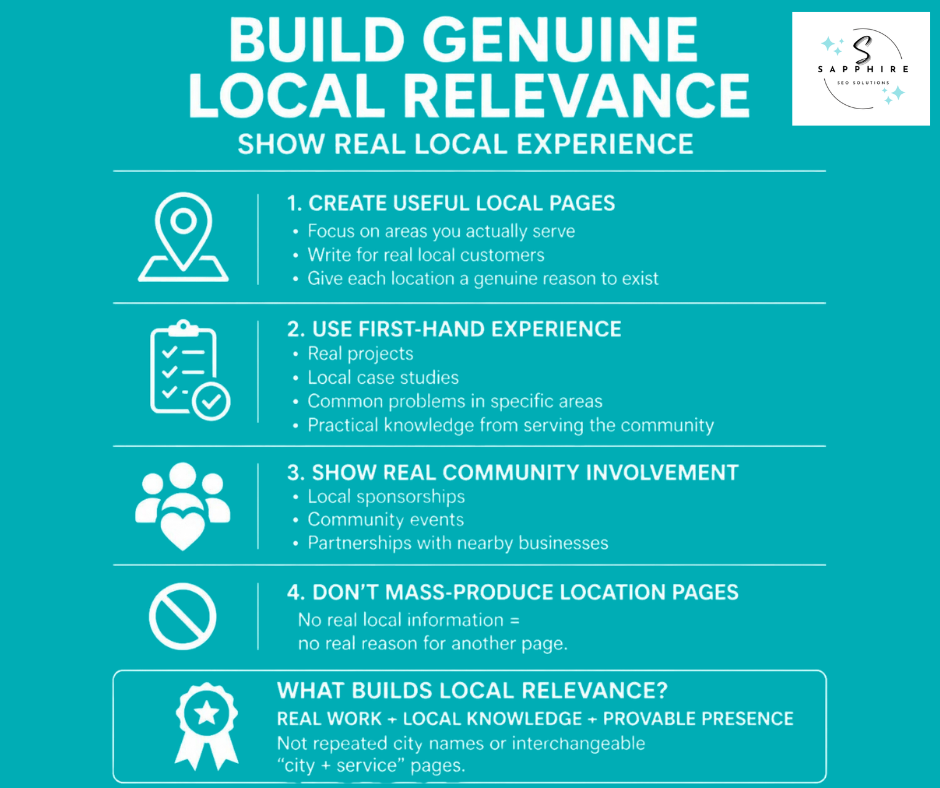
There's a lazy version of "local content" that's easy to spot: swap the city name into the same template fifty times and call it a strategy. Google's people-first guidance points the other way. It specifically calls out original information and first-hand expertise as what separates content that actually helps people from content built purely to rank.
So the better question isn't "how do I mention my city more?" It's "how do I show, with real detail, where and how this business actually operates?"
That starts with genuine local service pages, built around neighborhoods or service areas you actually work in, described the way you'd describe them to a customer on the phone. If you've completed real jobs in a community, write about them. Real project examples and case studies from the areas you serve do more for a reader than any generic intro paragraph ever could. If your team has genuine expertise with a problem that's common in a specific area, whether that's a soil issue in one part of town or an older housing stock with particular wiring quirks, that's worth writing about too.
Legitimate community involvement counts here as well. Sponsoring a local team, showing up at local events, partnering with other businesses in the area. Mention it where it's true, not as filler.
If you serve multiple locations, resist the urge to spin up a page for every one just because you can. Create a location page when there's something real to say about that market. Otherwise, you're just adding thin pages that dilute your site instead of strengthening it.
The underlying idea Google is pushing here matters beyond rankings, too. Specific, first-hand local experience gives search systems something original to work with. It's what actually helps a system understand the real relationship between your business, your services, and the geography you serve, which strengthens your business's local relevance far more than repeating a local area code or a city name ever will. Interchangeable "city plus service" text doesn't build local visibility. Real, provable local presence does.
Build Prominence Through Reviews, Reputation, and Relevant Authority
Prominence isn't something you can fake your way into. Google identifies reviews and links as examples of the information that feeds into it, but both only count for something when they're real.
Earn Genuine Reviews
Build a simple, repeatable process for asking. Reach out to real customers shortly after a genuine job, not months later when the experience has faded. Make it easy: Google's review link or a QR code posted at the counter removes most of the friction.
Google is direct about this. Businesses are allowed to request reviews, but they're not allowed to offer incentives for them. No discounts for a five-star rating, no gift cards, no "leave us a review and get 10% off." That rule applies whether the incentive is meant to earn a positive review or to talk a customer into revising a negative review.
Don't tell customers what to write, and don't only ask your happiest customers while skipping the ones who had a rough experience. Selectively soliciting reviews, sometimes called review gating, violates Google's policy too. The goal isn't racking up more reviews as fast as possible. It's building an honest profile that reflects how satisfied customers actually feel, warts and all.
Respond to Reviews
Reply professionally, every time. Thank people for positive feedback without turning every response into a keyword-stuffed paragraph. When a legitimate complaint shows up, address it directly instead of getting defensive. And it's worth knowing: a negative review doesn't disappear just because a business doesn't like it. Google doesn't remove reviews on request, only ones that violate its actual policies.
Build Broader Authority
Prominence stretches beyond your Google reviews, too. Google looks at what the rest of the web says about your business, so real-world relationships matter. Think about relevant local organizations, industry associations, local publications, genuine community involvement, and legitimate partnerships with other businesses in your area.
The goal is relevant websites linking to you or mentioning you because there's an actual reason to, not because you paid for a spot in a generic directory package. Local links and local backlinks from sources that make sense for your industry and area carry more weight than a pile of unrelated citations ever will. Not every mention is a ranking factor on its own. But taken together, they paint a picture of a business that's genuinely known and trusted in its community, which is exactly what prominence is meant to measure.
Use Photos and Videos to Strengthen the Profile and Convert Searchers
Once someone finds your profile, photos do a lot of the convincing. Google's own guidance backs this up: high-quality photos should help customers understand what a business actually offers, and that's the real point of them.
Upload real photography, not stock images. That means your storefront or location, your team, your equipment, your finished work. A contractor benefits from real before-and-after project photos. A retail business benefits from real product shots. A service business benefits from images that show the actual process customers can expect. If you have a physical space, show it honestly, inside and out.
Keep the collection current. A profile with five-year-old photos of a renovated storefront isn't helping anyone, least of all the customer trying to figure out if you're the right fit before they call or walk in.
Here's the important nuance, though. Photos primarily help customers evaluate your business and decide whether to reach out or generate real foot traffic to your location. They're not a shortcut where uploading more automatically means ranking higher. Skip the keyword-stuffed file names and irrelevant uploads meant only to make the profile "look active." As part of your broader Google Maps marketing, good photos build trust with the person looking at your profile. That's the actual job they're doing.
Use Other Business Profile Features Where They Help Customers
Your Business Profile has more tools available than most businesses ever touch. The right move isn't using all of them. It's using the ones that actually fit how your business operates.
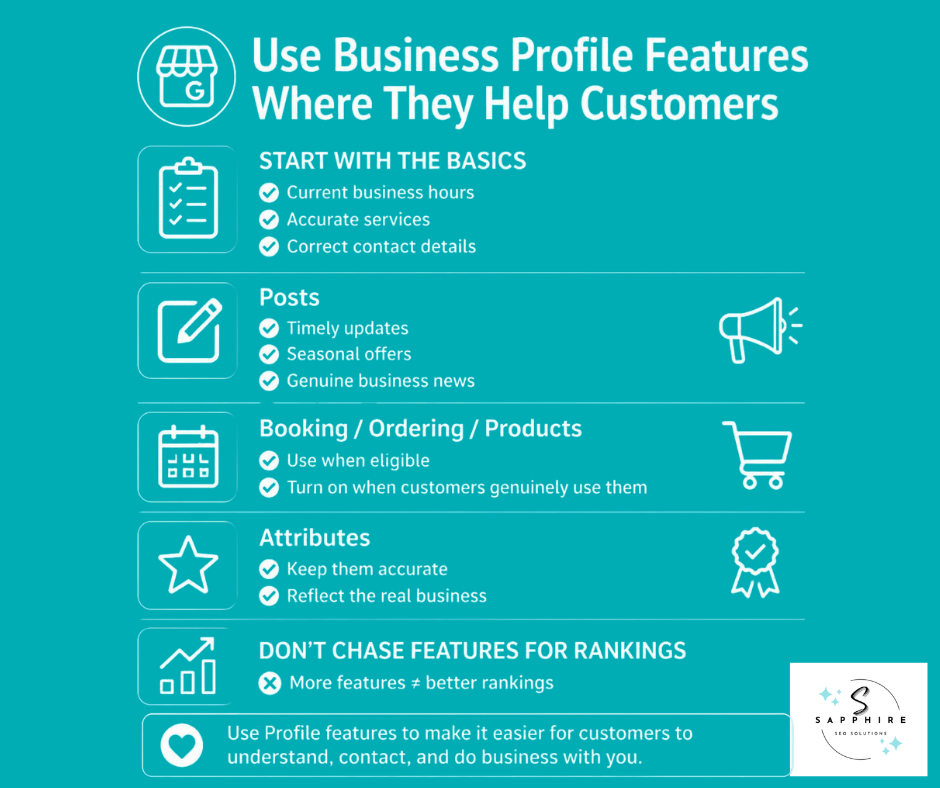
Keep the core information current first: hours, services, and your business's contact details. That foundation matters more than any extra feature layered on top.
From there, add what's genuinely useful. Posts work well when you have something timely to share, a seasonal offer, a real update, not filler written just to stay active. Booking, ordering, or product features are worth turning on if you're eligible and they match how customers actually work with you. Attributes should stay accurate and reflect reality, nothing more.
None of this is a ranking hack. Posting weekly won't move you up the Google Maps app results by itself, and skipping a feature your business doesn't need won't hold you back either. These tools exist to make the customer experience better. That's why Google Maps matters to your customers in the first place, and it's reason enough to use them well.
Earn Relevant Local Links and Mentions
More links isn't the goal. The right links are.
Google has said prominence can draw on information from across the web, and links are one example of that. But a hundred low-quality citations from directories nobody visits won't do what one genuine mention from a trusted local source will. Relevance beats volume here, every time.
Think about where your business actually shows up in the real world, then look for that same presence to show up online. Local news outlets sometimes cover community businesses directly, especially around a notable project or milestone. Industry organizations and trade associations often link to their members. Chambers of commerce make sense if you're genuinely involved, not just paying dues for a badge. Community organizations, local partnerships, supplier or manufacturer relationships, real sponsorships, and coverage of specific projects you've completed all fall into this same category. These are relationships that already exist. The link is just a reflection of that.
Relevant business directories still have a place, but the operative word is "relevant." A directory specific to your trade or your region carries more weight than a generic, low-quality listing site built purely to farm links. Skip the bulk submission services and paid link packages. They tend to produce exactly what you'd expect: a pile of unrelated, low-value mentions that don't reflect anything real about your business.
The better approach is slower but sturdier. Build actual relationships with local publications, local directories that matter to your industry, and other websites your customers actually trust. Local links and local backlinks earned that way tend to stick around, and they tend to mean something.
Diagnose Why Your Business Isn't Ranking Higher on Google Maps
Most guides hand every reader the same checklist, as if a business that's invisible on Maps and a business that ranks fine but never gets calls have the same problem. They don't. So instead of one more list, let's work through this the way an actual diagnosis works: symptom first, then cause.
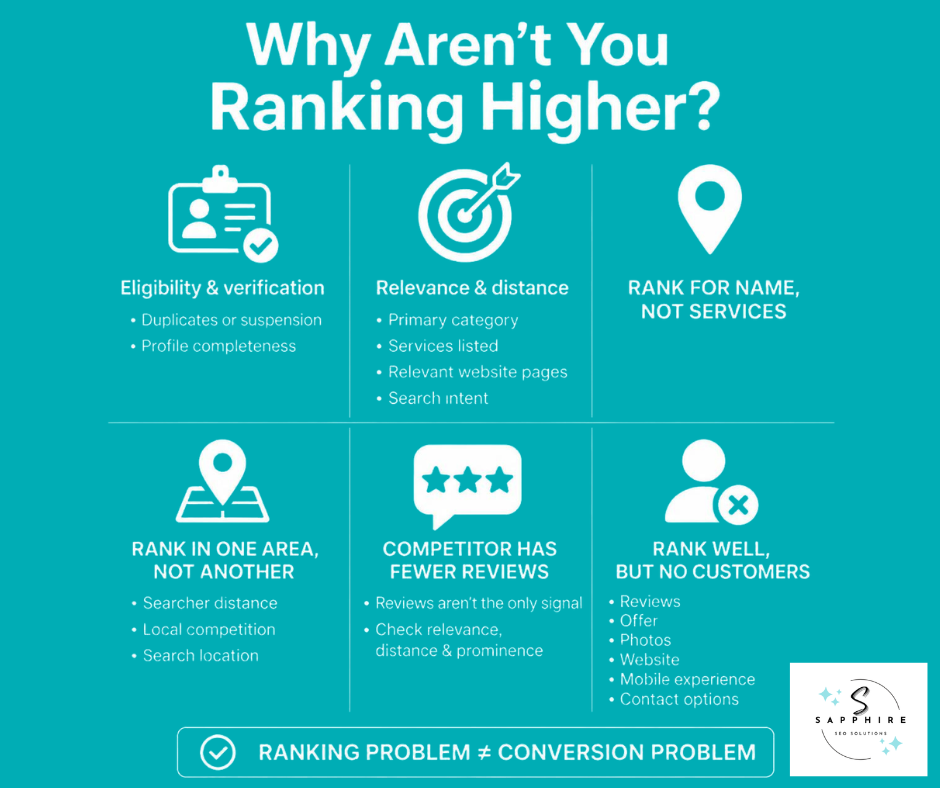
"I don't appear at all."
Start with the basics.
Is the business actually eligible for a listing?
Is the profile claimed and verified?
Check for a duplicate business listing competing against your real one, and check whether the profile has any suspensions or restrictions attached to it. From there, look at whether your business information is complete, whether it's relevant to the searches you care about, and whether there's even a reasonable geographic relationship between your business and the person searching.
"I rank for my business name but not my services."
This usually isn't a mystery. Look at your primary category first. Then check whether the services on your profile and the pages on your website actually cover what you're trying to rank for. Mismatched search intent is common here too. If nobody can tell what you actually do beyond your name, that's a relevance and local-relevance problem, not a technical glitch.
"I rank in one part of town but not another."
This one trips up a lot of business owners, and it's rarely a mistake. Distance plays a real role here, along with exactly where the searcher is standing and how they worded the search. Local competition varies block by block, too. There's no single universal position waiting for your business in the local pack. Two searches five minutes apart, by two different people, can pull up two different google map pack results, and that's normal, not broken.
"My competitor has fewer reviews but ranks above me."
Frustrating, but explainable. Review count is one input, not the whole system. Relevance still matters. Distance still matters. Prominence draws on a wider set of signals than reviews alone, including the broader web presence a business has built. Review quantity by itself can't account for every ranking gap you'll see.
"I rank well but don't get customers."
This is a different problem entirely, and it deserves a different kind of look. Shift from asking "why aren't I ranking" to "why isn't this visibility converting." Weak reviews, an unclear offer, poor photos, a confusing service list, a clunky website, a bad mobile experience, a hard-to-find contact button. Any of these can quietly undercut solid google maps visibility.
The key takeaway is this: a ranking problem and a conversion problem are not the same problem, and treating them as one usually means fixing neither. Real local visibility work starts with figuring out which one you actually have before you touch anything else, because that's what actually helps a business stand out and start turning higher Google rankings into real jobs.
Measure Google Maps Visibility by Business Outcomes
Checking your own ranking from your own phone tells you almost nothing. Google results shift based on who's searching and where they're standing, so one manual search from the owner's desk in the back office isn't a reliable signal of anything. Real measurement needs to look wider than that.
Track Visibility Properly
Focus on the non-branded local searches that actually matter to your business, the "service plus location" type queries a real customer would type, not just your business name. Pay attention to how results shift across different parts of your service area, since local visibility can vary block by block. Understanding why takes some of the mystery out of the numbers. Results change by location and by exact query wording, so a single average ranking figure will always be an oversimplification.
Use the Metrics Google Actually Gives You
Your Google Business Profile Insights dashboard tracks real interaction data: profile views, calls, website clicks, direction requests, and bookings where that applies to your business. These numbers show how people are engaging with your profile once they find it, which is a more honest signal than rankings alone.
Connect It to Business Outcomes
None of this matters unless it turns into something real. Visibility should eventually connect to qualified calls, leads, estimates, appointments, and sales. Think of it as a chain: search visibility leads to profile interaction, which leads to a qualified inquiry, which leads to an actual customer. Each link matters, and a break anywhere along that chain is worth investigating.
That said, more visibility in search results doesn't automatically mean proportionally more revenue. A jump in Google Maps visibility is a good sign, but it's one part of a longer chain, not a finish line. Treat impressions as a starting point, not a result in themselves, and be wary of anyone promising a fixed return based on a ranking number alone.
Google Maps SEO Mistakes That Can Backfire
Some shortcuts look tempting because they seem to work, at least for a little while. Most of them create more problems than they solve. Here's what tends to backfire and why.
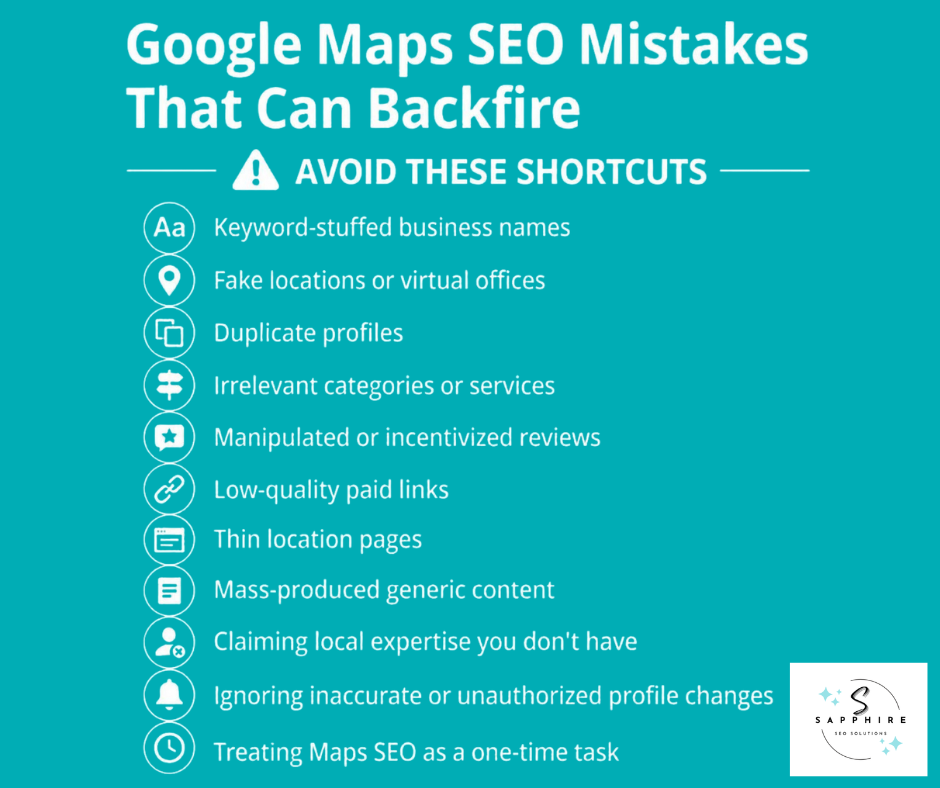
Stuffing keywords into your business name is one of the most common. Adding "Best Chicago Plumber 24/7" instead of your actual name feels like a shortcut to relevance. Google's guidelines explicitly prohibit this, along with inaccurate business representation, inappropriate addresses, and duplicate profiles. Fake locations and ineligible virtual offices fall into that same category. So does running more than one profile for the same business.
Category and service accuracy matter too. Loading up on irrelevant categories, or listing services you don't actually provide, muddies the very relevance signal you're trying to strengthen.
Reviews are another area where shortcuts show up often: review manipulation, incentivized reviews, or asking customers to include specific wording or phrases. All of these violate Google's review policies and put your entire profile at risk, not just the reviews themselves.
On the website side, buying low-quality links, publishing thin location pages with nothing real to say, and mass-producing generic content across dozens of pages all tend to look exactly like what they are: an attempt to game the system rather than build something useful. Claiming local expertise the business doesn't actually have falls into this same trap.
Two more habits are easy to overlook. Treating Maps optimization as a one-time project, done and forgotten, ignores how much a profile needs ongoing attention. And letting inaccurate information or unauthorized profile changes sit unaddressed quietly erodes the trust Google and customers place in the listing.
None of this means one small mistake gets a business shut down overnight. But shortcuts that create inaccurate or manipulative signals- anything that violates Google's guidelines around business details- tend to create real ranking, trust, or profile-management problems over time. The businesses that hold up best are the ones that skip the shortcuts entirely.
Google Maps SEO and AI Search: What Local Businesses Should Actually Know
AI Overviews and AI Mode get talked about like they run on a completely different set of rules. Mostly, they don't. Google has said plainly that these features rely on many of the same underlying fundamentals as regular Google search, and that there are no additional requirements or special optimizations needed to appear in them.
Here's the practical mechanic worth understanding: a page generally needs to be indexed and eligible to show up in normal organic search results before it can be pulled in as a supporting link in an AI-generated response. So the foundation is the same foundation you'd want anyway.
What actually helps? Keep your Business Profile information accurate and current. Make sure your site is crawlable, and that important website content exists in real text, not locked inside an image or a script. Use solid internal linking so both people and search engines can find their way between related pages. Provide original, useful information, and let real first-hand expertise show through, not recycled summaries of what everyone else has already written.
Make your business identity unmistakably clear, too: what you do, where you do it, what you know, and how that connects to what a customer actually needs. If you use structured data, keep it matching what's visibly on the page. Google has been direct that no special schema or separate machine-readable file is required for AI features to work.
The best mental model here isn't "how do I get ChatGPT to recommend me" or some list of secret AI SEO services tricks. It's simpler than that: make the business easy to understand, easy to verify, and useful enough to actually reference. That's a sturdier goal than chasing whatever this month's AI-visibility trend claims to be, and it's worth checking your own indexing status through Google Search Console rather than guessing.
AI visibility isn't a separate discipline requiring its own playbook. It's the same solid groundwork, applied consistently, doing double duty.
The Google Maps Ranking Checklist
You've got the strategy behind you. Here's the practical version, condensed into one working checklist you can actually run your profile against.
Google Maps Ranking Checklist
Nothing on this list is a magic switch on its own. Together, though, they add up to complete and accurate information working in your favor instead of against you. Run through it once, fix what's off, then come back to it every few months. It's not a one-time task. It's maintenance.
When Google Maps Optimization Becomes a Local SEO Job
With plenty of this guide, a business owner can genuinely handle it solo. Verifying the profile, correcting outdated information, adding legitimate services, uploading real photos, asking customers for reviews, replying to the ones that come in. None of that requires outside help. It just requires time and attention.
Where things tend to shift is scale and complexity. A competitive market, several services that each need their own visibility, geographic results that vary a lot across a service area, a website that isn't really built to support the services that matter most, or a business that hasn't yet figured out which searches are actually worth chasing. Reviews trickling in inconsistently. Listing problems that keep resurfacing. Or maybe the simplest signal of all: rankings look fine, but they're not translating into real leads. At that point, someone needs to be watching the whole picture, diagnosing what's actually going wrong, and prioritizing the work in the right order. That's a job, not a once-a-month task.
It helps to separate two things that often get lumped together.
Google Business Profile Management mostly focuses on the profile itself and its ongoing, customer-facing upkeep: information, photos, posts, reviews, day-to-day presence.
Local SEO goes further. It reaches into the website, service pages, location relevance, search intent, broader authority, review strategy, technical SEO, internal linking, and the ongoing measurement that ties it all together.
Neither one is something only an agency can touch, and there's no need for pressure tactics here. But once the work spans a real website strategy alongside profile management, most businesses find that having dedicated local seo services or focused Google Maps marketing support, rather than squeezing it in between jobs, is what actually moves the needle.
For more information, read our detailed guide on “How to Optimize Google Business Profile for Local SEO.”
What to Look for in a Google Business Profile or Local SEO Service
If you've read this far, you might already be weighing whether to bring in help. That's a reasonable place to land. A few of these tasks take real, ongoing time, and not every business owner has hours to spare on it. So before you sign anything, here's what a legitimate provider should be able to answer clearly.
Ask exactly what will be managed and how. Ask the following questions:
Who owns the Business Profile?
Who keeps access to it?
What specific changes will be made, and how will reviews be handled?
Does the work extend beyond the profile into actual local seo services, or does it stop at GBP fields?
If website work is included, what does that actually cover?
How will they measure performance, and how often will you get a real report, not just a screenshot of a ranking number?
Ask what happens if the profile gets suspended or edited incorrectly. A provider who's never thought about that hasn't managed enough profiles.
One point matters more than the rest. Google's own third-party policy requires that end customers retain ownership or co-ownership of their Business Profile at all times, and it prohibits changing or disabling profile features without the business owner's consent. If an agency wants full, exclusive control with you locked out, that's not standard practice. That's a red flag.
A few other warning signs worth watching for:
Guaranteed number-one rankings
Guaranteed Maps placement
Keyword-stuffed profile names
Fake locations
Purchased reviews
Vague or secretive ownership arrangements
No defined scope of work
Reporting that only shows impressions or rankings with nothing tied to real outcomes
Long-term contracts with no clear deliverables attached
Good Google Business Profile management services and good local SEO work look boring on paper. Clear scope, clear reporting, clear access. If a pitch sounds more like a promise than a plan, that's worth a second look before you sign.
How Sapphire SEO Solutions Can Help
Everything in this guide is something a business owner can do on their own, given enough time. Sapphire SEO Solutions exists for the businesses that would rather hand it to someone who does this work every day.
We start with a real audit: your Business Profile, your category and service strategy, your review process, and where your website is or isn't supporting the services that matter most to your business. From there, we build out Google Maps ranking work around actual local search analysis, not guesswork.
We don't optimize a Business Profile in isolation. We look at the searches you want to win, the signals that support those searches, the competition you're facing, and whether that visibility is actually producing qualified opportunities. That means local relevance work, local authority building, ongoing monitoring, and performance reporting that ties back to real outcomes, not just impressions.
If you're not sure where your business stands right now, our Google Business Profile Management services are a good place to start. If you need something broader, one that reaches into your website, your service pages, and your Google Maps marketing as a whole, our local SEO services cover that ground.
Either way, the goal stays the same: fewer guesses, more leads.

Frequently Asked Questions on Ranking Higher on Google Maps
How does Google decide which businesses rank higher on Google Maps?
Google weighs three things together: relevance, distance, and prominence. Relevance is how closely your Business Profile matches what someone actually searched for, which is why complete, accurate information matters so much. Distance is simply how far your business sits from the searcher or from the location they typed in. Prominence is a measure of how well-known your business is, drawing on signals like reviews and links from across the web, not just what's on your profile. None of these three works in isolation. Google combines them to decide, for that specific search, which business is the best match.
How long does it take to rank higher on Google Maps?
There's genuinely no universal answer here, and anyone who gives you a firm number is guessing. A business with a clean, verified profile and a decent website might see movement in weeks. A business untangling duplicate listings, thin service pages, and an inconsistent review history is looking at a longer runway. Your market's competitiveness plays a role too. A landscaper in a small town and a plumber in a dense metro area are working against completely different levels of competition, and that changes the timeline more than any tactic does.
Does my Google Business Profile affect Google Maps rankings?
It does, but it's a piece of the picture, not the whole picture. Your profile is often the clearest signal Google has about what your business is and does, so keeping it accurate and complete genuinely helps. That said, treating the profile as the entirety of your local SEO effort is a common mistake. Your website, your reviews, and your broader online presence all feed into the same ranking equation.
Does my website affect my Google Maps ranking?
Yes, and this surprises a lot of business owners. Google draws local information from publicly available web content, and that includes your official website, not just the fields you fill out in your Business Profile. A site that clearly explains who you are, what you do, and where you operate reinforces what your profile is telling Google. A thin or outdated site can quietly work against you, even if your profile itself looks fine.
How many reviews do I need to rank higher on Google Maps?
There's no magic number, and chasing one is usually the wrong move. Review count is one input among several, and it doesn't override relevance or distance. What tends to matter more is consistency: an authentic, steadily growing set of reviews that reflects real customer experiences, rather than a rushed sprint to hit some round number. A business with fifty reviews can lose out to one with twenty if the twenty-review business is more relevant to the search or closer to the customer.
Does adding keywords to my Business Profile name improve rankings?
No, and it can backfire. Google requires businesses to use the real-world name they operate under, the one on their signage and paperwork, not a version padded with extra service or location terms. Profiles that violate this guideline risk removal or restriction, which is a much bigger problem than whatever short-term visibility the keyword stuffing might have bought.
Can a service-area business rank on Google Maps?
Absolutely. Service-area businesses hide their physical address and list the areas they serve instead, and Google still ranks them using the same relevance, distance, and prominence framework as any other business. The realistic expectation is that distance still applies. A service-area business will generally rank strongest closest to its base of operations and gradually less so toward the outer edges of its listed service area, which is normal and not something to try to engineer around.
Can an SEO company guarantee a top Google Maps ranking?
No, and that's worth taking seriously. Google has stated directly that there's no way to request or pay for a better local ranking, and it keeps the specifics of its ranking system confidential to keep things fair across the board. Any company promising a guaranteed position, especially a specific numbered spot, is making a promise it has no real way to keep.