

How to Do Local Keyword Research - (A Local Business Guide)
A plumber pays for SEO, and a few months later the website has more visitors, but the phone stays quiet. It happens a lot, and it usually comes down to one thing. Nobody checked whether those searches came from people who needed a plumber this week.
That's the job of local keyword research. A keyword is just the words someone types into Google. Local keyword research is figuring out which of those words your local customers use when they need what you sell, and which ones are worth your time. It isn't about building the biggest list you can. A spreadsheet with 5,000 phrases is easy to make and hard to use.
Good research tells you:
what customers need
how they describe that need
where they want the service
what they plan to do (call, compare, or just read)
which searches are worth money to you
which page or listing should answer each search
Most keyword research for SEO advice stops at the list. For local businesses, the list is where the work starts. Those answers shape your service pages, location pages, blog content, the links between your own pages, your Google Business Profile (your free listing on Google Search and Maps), and which local SEO tasks come first. A good keyword strategy ties all of that together.
This guide shows how to do local keyword research in nine steps. One rule runs through every step. We're after qualified local demand, meaning nearby people who are ready to hire. Traffic alone doesn't pay anyone.
Key Takeaways
Start with the business, not the keyword tool. Your services, problems, and real service area come first.
A zero-volume keyword can still matter. Tools underreport local demand more often than they get it right.
The SERP shows intent better than any database. Keyword tools estimate demand; the search results show you the evidence.
Group keywords by shared intent, not shared words. Two similar-looking phrases can need two very different pages.
A city name doesn't prove local intent, and its absence doesn't rule it out. Google infers location either way.
One page per real need beats one page per keyword. Doorway-style location pages risk more than they earn.
Rankings are an input. Qualified leads are the goal. A page in position one that never gets a call failed.
The research that earns rankings also earns AI visibility. There's no separate keyword list to build for AI search.
What Is Local Keyword Research?
Local SEO keyword research is the work of finding the words people use when they need a business close to them, then deciding which of those words are worth going after. Broader keyword research asks what people search for. This kind asks what they search for when they want someone nearby.
Some of those words name a place. Many don't. That split gives you two groups.
Explicit local keywords include the location:
Plumber Austin
Dentist in Dallas
Roofing contractor Phoenix
Implicit local keywords leave it out:
Plumber
Dentist
Emergency electrician
Nobody typing "emergency electrician" adds a city, and they don't have to. Google says that when a searcher doesn't share where they are, it uses what it knows about their location. So a search with no city can still be a local search. That's local intent at work, either stated in the words (explicit) or inferred by Google (implicit).
The reverse is true, too. A city name doesn't prove someone wants to hire anybody. "Plumber Austin salary" is a career question. Words tell you what someone typed. Search intent is what they're trying to get done. So part of this research is learning how Google reads a search, and spotting city names is only the easy half.
Two kinds of results show up for these searches. Organic results are the regular website links. The Local Pack is the map with a short list of businesses. Both count as local search results, but they don't work the same way, and ranking on Maps is only one piece of the picture.
Google says local results are based primarily on relevance, distance, and prominence. Relevance is how well a Business Profile matches what someone is searching for. Distance is how far each business is from the searcher. Prominence is how well-known a business is, based partly on how many websites link to it and how many reviews it has. One more detail matters here. Google notes that a business farther away can rank higher than a closer one if it looks more likely to have what the searcher wants.
Step #1: Start with the Business, Not the Keyword Tool
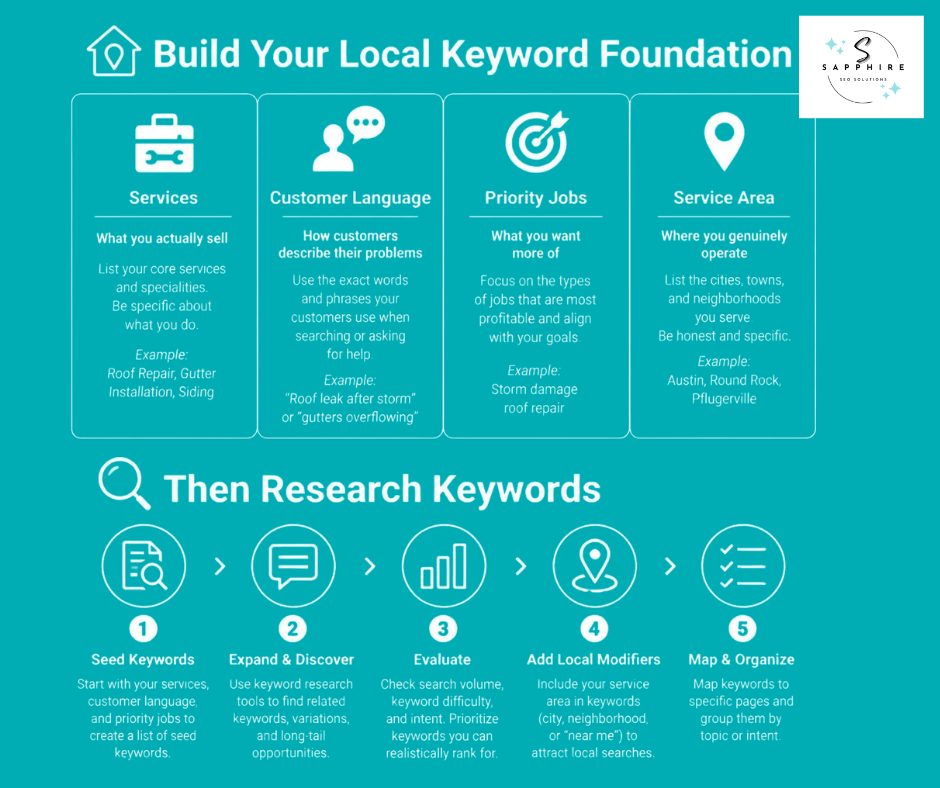
Most people open a tool first. It feels productive. You type in "plumber," get back 400 phrases, and start picking. But a tool can't tell which of your local services pay the bills, which ones you'd rather not sell, or which towns your trucks actually reach. You can. So the work starts with you.
List Every Service You Actually Offer
Write down everything:
Core services
Specialty work
Repairs
Installations
Replacements
Maintenance
Emergency calls
Anything that brings customers back on a schedule
Start with the high-value jobs. Then check the list against reality. Owners tend to describe the business by a job title, like "I'm a plumber," when the crew does far more than that. And the reverse happens, too. If you don't do the work, don't research it. Relevant keywords only stay relevant when they trace back to something you really sell.
Write Down the Problems, Not Just the Services
Customers rarely use trade language. They describe what's wrong.
You say "water heater repair." They say "water heater leaking."
You say "sewer line repair." They say "sewage smell in yard."
Same job. Different words. The exact words customers use are the ones worth collecting, and your own team already hears them. Pull them from customer calls, reviews, emails, sales conversations, technician notes, FAQs, and the questions your office staff answers every week. Keep that list handy, because later you'll compare it against real search behavior and see where the two match.
Who's asking matters, too. A homeowner with a flooded basement and a property manager booking yearly maintenance are both part of your target audience, but they don't need the same thing.
Know Which Jobs Matter Most
Not every job pays the same. Figure out which services earn the most, which earn the best profit, which ones you want more of, which you'd rather not promote, which have limited availability, and how emergency work compares with planned work. Then let that shape your target keywords. A phrase that brings in ten calls for a job you lose money on isn't a win.
Define Where You Genuinely Work
List your primary city, nearby communities, neighborhoods, counties, and any other area you serve for real. Skip a town just because a tool shows a big number next to it. If you can't show up there, those searchers are someone else's customers.
Google's rules for service area businesses make a handy guide. A Business Profile can list up to 20 service areas, chosen by city, postal code, or another type of area, and not by radius. Google also says the overall area shouldn't extend more than about 2 hours of driving time from where the business is based. So your business location shapes which places make sense to chase. Once you know them, you can look for relevant local keywords that pair the right service with a place you truly cover. Then, and only then, open the tool.
Step #2: Build Your Seed Keyword List
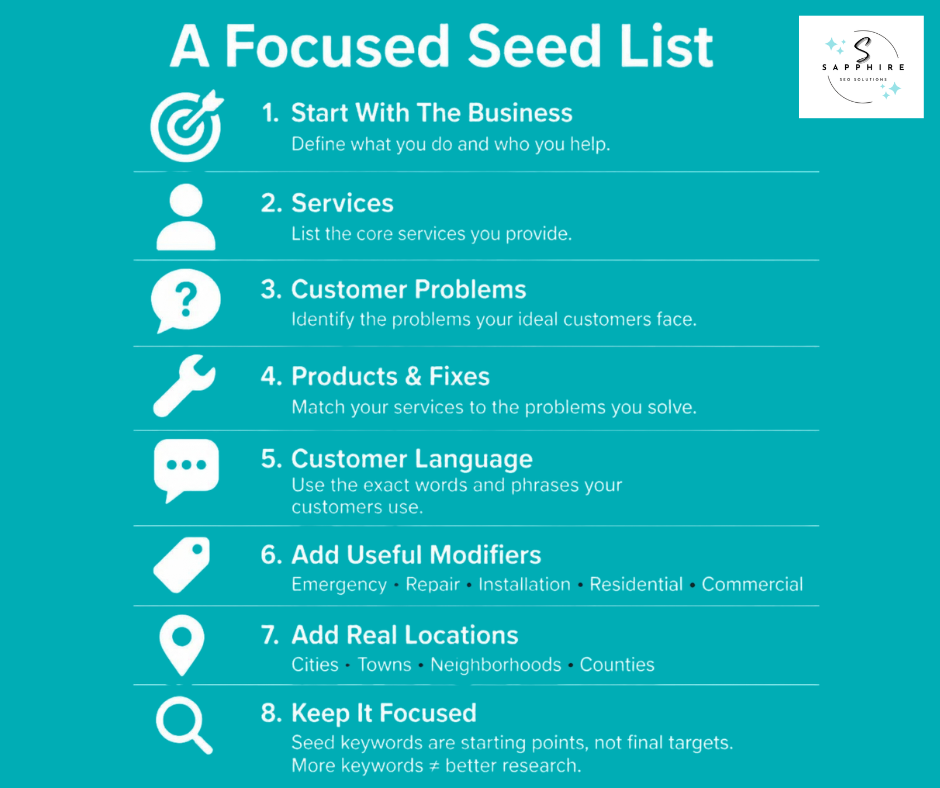
A seed keyword is a starting point. It's the word or phrase you hand to a research tool so the tool can go looking for more. It isn't necessarily something you'll end up targeting.
Good seeds come from the business itself. Pull them from:
Your business type
Your services
The problems customers call about
The products and fixes you offer
The words customers use to describe all of it
Say you're a plumber. Starting with only "plumber" gives you a narrow view. So start with a spread:
Plumber
Drain cleaning
Sewer repair
Water heater repair
Leak detection
Emergency plumbing
That first term is one of the broad industry keywords, the name the trade goes by. Keep it. But the rest are where the actual jobs live.
Next, think about words that change the job: emergency, same day, residential, commercial, repair, installation, replacement, inspection, specialist. These keyword modifiers narrow a seed down to a specific need. Treat them as clues, though, not as separate targets. "Water heater replacement" and "water heater installation" might be one search in the customer's mind. Add only the modifiers that match work you do, and skip words like "cheap" and "best" just because they're common.
Then add real places. A city, a town, a neighborhood, a county, or the name locals actually use for an area. But don't multiply yet. A plumber with 6 services, 12 towns, and 9 modifiers ends up with 648 combinations, and nobody has checked whether people search for any of them.
Tools pile on fast, too. In Ahrefs' own test, one seed, "mountain bike," produced 264,608 keywords. A slightly bigger set of six related seeds produced 519,830. Ahrefs points out that results are often only as good as the starting terms. Tools are great at handing you keyword ideas, and they never seem to run out. But a bigger keyword list isn't a better one.
At this stage, you aren't trying to find keywords to target. You're gathering a short set of starting points, each tied to a real service and a real place. The next steps will sort out which ones deserve attention.
Step #3: Find Local Keyword Ideas From Multiple Sources
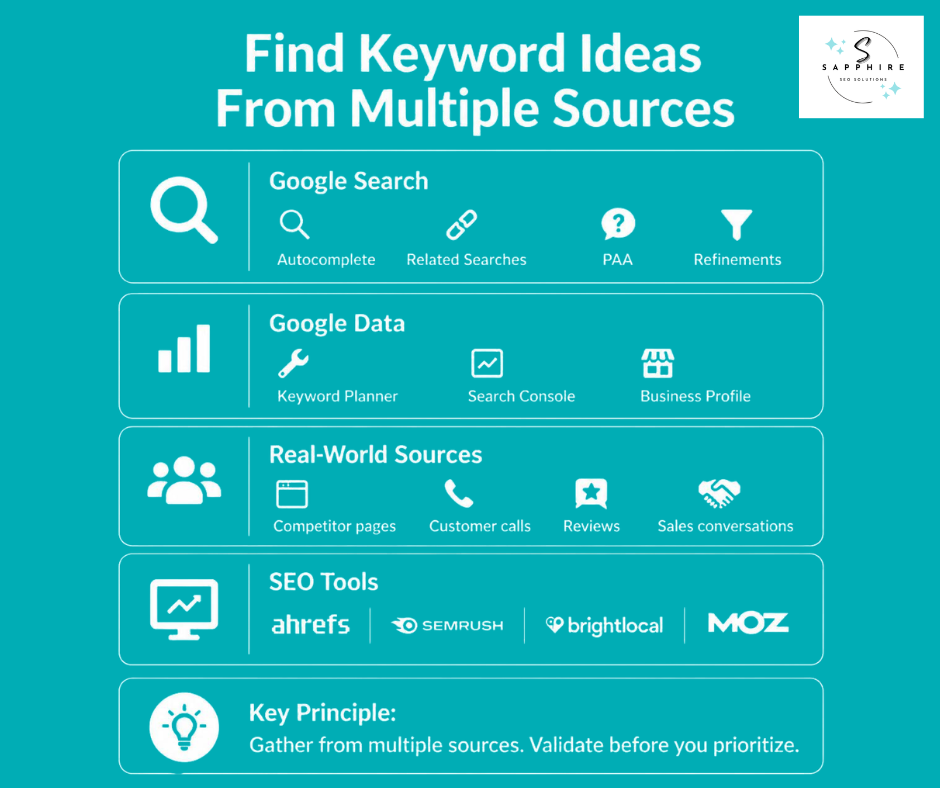
No single source tells you everything. Each one shows a different slice of what people search for, and each has blind spots. Keyword research tools are only one piece of the puzzle. So think of this stage as keyword discovery. You're gathering, not judging yet.
Google Search Itself
Start where your customers start. Type a service into Google and watch what happens:
The autocomplete predictions
The related searches at the bottom
The People Also Ask boxes
The search refinements
Google says autocomplete predictions reflect real searches that have been done on Google, and they can also be shaped by your location and previous searches. So try it in a private window and add a nearby town to the query. Google also notes that autocomplete doesn't simply display the most common queries on a given topic, which makes it a clue about wording, not a ranking of demand.
Google Keyword Planner
Google Keyword Planner is built for advertisers, but plenty of SEOs borrow it. Its "Discover New Keywords" option lets you enter words or websites related to your business and get new keyword ideas back. It's handy for spotting variations, comparing services against each other, and filtering by location.
The catch shows up in small markets. Ahrefs' local guide says the planner shows broad ranges, like 1K to 10K, instead of exact numbers, and that it groups keywords and shows a combined, rounded volume. For a small town, that's a blunt instrument. Use Keyword Planner to compare services roughly, not to count searches.
Google Search Console
If you already have a website, this one comes straight from Google. Google Search Console shows which queries brought people to your site, along with clicks, impressions, CTR, and average position. Impressions are how many times your site appeared in results. CTR is the click count divided by the impression count, so it's the share of appearances that turned into visits. The default view covers the past three months. Look for queries you never planned for, and for new ones that are just starting to show up.
Your Business Profile
Your Google Business Profile has its own report. In Performance, Searches shows the search terms people used to find your business. Google is clear on one point: you can't directly manage these queries. So read them as evidence of how people already find you, not as a list of keywords to control. The data updates at the start of each month and can take up to 5 days to show up.
Competitors and Your Own Customers
Competitor websites show how others in your market name their services, which locations they cover, how their pages are laid out, and where the gaps are. Your own customer data shows the same market from the other side: calls, reviews, forms, emails, and sales conversations. Put the two side by side. Where a competitor says nothing and your customers keep asking, there's usually something worth writing.
SEO Platforms
Ahrefs, Semrush, BrightLocal, and Moz can speed all of this up. Semrush's Keyword Magic Tool lets you choose a target location and see related keywords for it. Ahrefs offers a free tool that returns 20 related keywords and 20 related questions for every seed you enter. Semrush's free version gives you a limited number of broad match keyword suggestions without an account. Most SEO tools cost money past that point.
Whatever you use, treat its volume numbers as estimates. Your calls and your Search Console data show what actually happened.
Step #4: Determine Whether a Keyword Has Local Intent
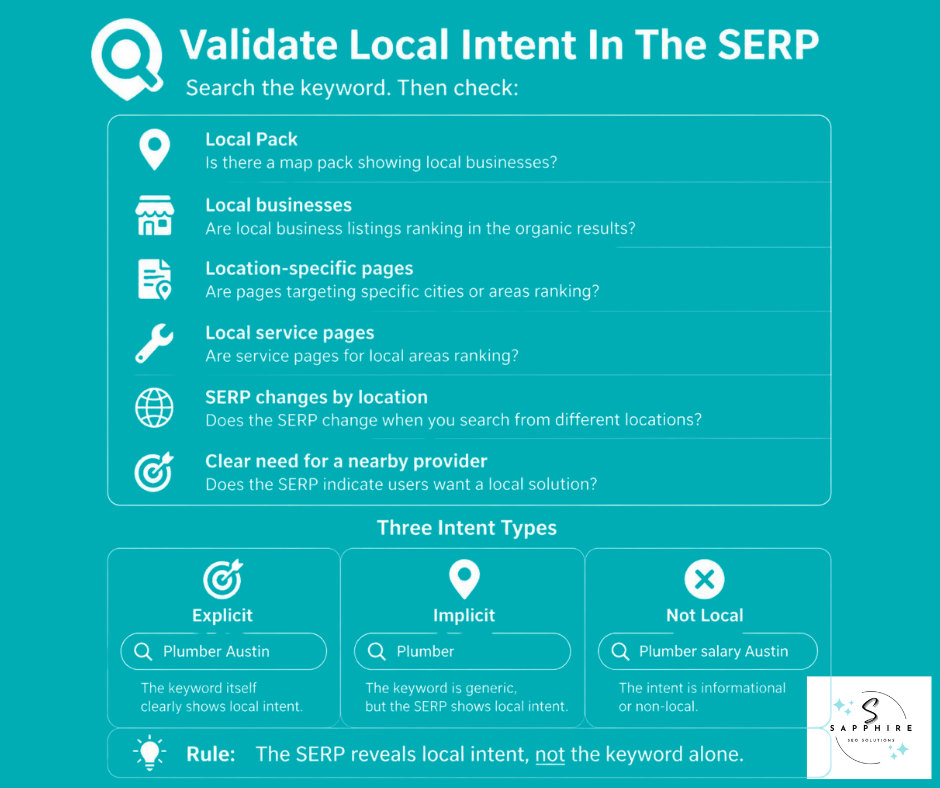
A city name in a search doesn't settle anything. Neither does the lack of one. The only real way to know if a keyword has local intent is to search it and look at what Google shows.
Search It and Read the Page
For every important keyword search, open a private browser window and type it in as a customer would. Then ask six questions:
Does Google show a Local Pack, the map with three business listings near the top?
Are local businesses ranking in the regular organic search results below it?
Do location-specific pages show up?
Do service pages from local companies appear?
Does the page change when you search it from a different city?
Does the searcher genuinely seem to want someone nearby, or just information?
Run this check on your own priority terms, and you'll start to see a pattern. Some search terms pull up a Local Pack every time. Others never do, no matter where you search from.
Explicit, Implicit, and Not Really Local
A search like "Plumber Austin" states the city outright. That's explicit local intent. "Plumber" on its own states nothing, but search engines still read it as a local need in most cases because Google can tell where the search is coming from and fill in the location itself. That's implicit local intent.
Then there's a third group. A local query can mention a service and still carry no real local intent. "Plumber salary Austin" has a city in it, but nobody typing that wants a truck at their door. "How does a water heater work" is about the service, but it's a question, not a request for a business nearby. A city in the query doesn't guarantee local intent. No city doesn't rule it out either. The SERP is what tells you, not the words alone.
One Keyword, Three Different Jobs
This distinction matters because a keyword can do more than one job, and rarely does all three at once:
It can be relevant to your Google search rankings.
It can work well as informational content.
It can be useful for understanding your market.
None of that makes it a strong keyword for winning local customers. "How much does a water heater cost" might bring in readers and build trust. It's not the same as "water heater replacement Round Rock," which brings in someone ready to book. Keep both in your research. Just don't confuse a page that informs with a page that converts.
What This Isn't
This check isn't about whether you show up in the Local Pack today. It's about whether the search itself carries local intent at all based on the searcher's location and what Google decides to show them for it. A keyword's presence in a Local Pack doesn't decide your Maps ranking on its own, and it's only one of the six signals above, not the whole test.
Step #5: Understand the Search Intent Behind Local Keywords
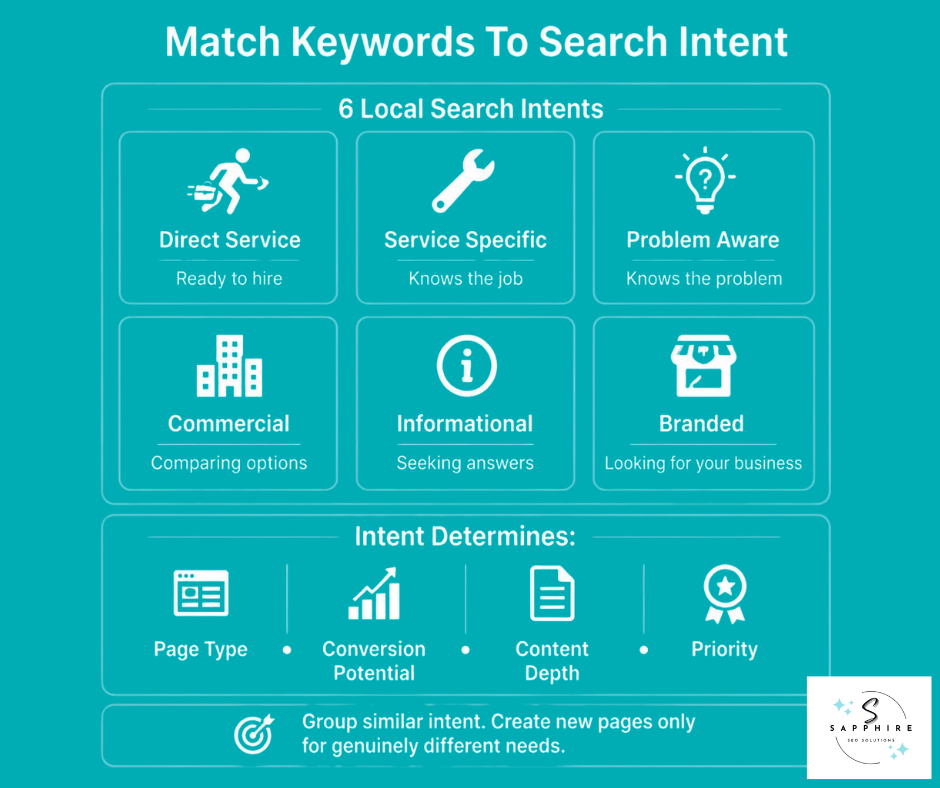
Local intent tells you if someone wants a business nearby. Search intent asks a different question: what are they actually trying to do? A keyword can pass the local test from section 6 and still fall into six very different buckets, and each one calls for a different response.
Direct-Service Intent. Someone needs help now, or close to it. "Emergency plumber," "dentist near me," "roof repair Dallas." These searchers are close to calling.
Service-Specific Intent. The searcher already knows the job. "Water heater replacement," "sewer line repair." They've named the fix, not just the symptom.
Problem-Aware Intent. They know something's wrong, not what it's called. "Water heater leaking," "AC not cooling." This is where the customer language from section 3 pays off. These words come from the moment before someone knows what to search for.
Commercial Investigation. They're comparing, not calling yet. "Best plumber," "roofing companies near me," "dentist reviews."
Informational. They want an answer, not a truck at the curb. "How much does roof repair cost," "how long does a water heater last."
Branded. They already know who you are. Your business name, your name plus "reviews," your name plus "phone number."
None of these six are the same keyword wearing a different outfit. Treating all of them as ready-to-buy misreads half your list, and writing off the informational ones as worthless misses the searchers still deciding who to call.
Intent shapes four things at once:
Page type: Direct-service and service-specific searches want a service page. Problem-aware searches often work better as a blog post that leads back to one. Branded searches usually just need your homepage or contact page to be easy to find.
Conversion potential: Direct-service and branded searches convert fastest. Commercial investigation converts, but only after the comparing is done. Informational searches convert slowest, and sometimes not at all on the first visit.
Content depth: A direct-service page can stay short and clear. A commercial-investigation page needs to earn the comparison, with real detail on pricing, process, and proof. An informational post needs to actually answer the question before it asks for anything.
Keyword priority: Direct-service and service-specific keywords usually come first. Commercial investigation follows close behind. Informational keywords still matter, mostly for the ground they cover and the trust they build, so weigh them by what they support, not by whether they convert on their own.
This is the heart of an effective keyword research process. Sorting by intent, not just by related keywords or shared wording, is what makes the difference between a scattered list and a working plan. When you identify relevant keywords for a service, separate the explicit keywords (the ones that name the service outright) from the ones that only imply it, and don't build a separate page for every small shade of meaning. Group the close ones together, and save the new page for a genuinely different intent.
Step #6: Analyze the SERP Before You Choose a Keyword
Every keyword tool gives you a number. None of them tell you what's actually sitting on page one. That's the part you have to check yourself, and it's the step most guides skip.
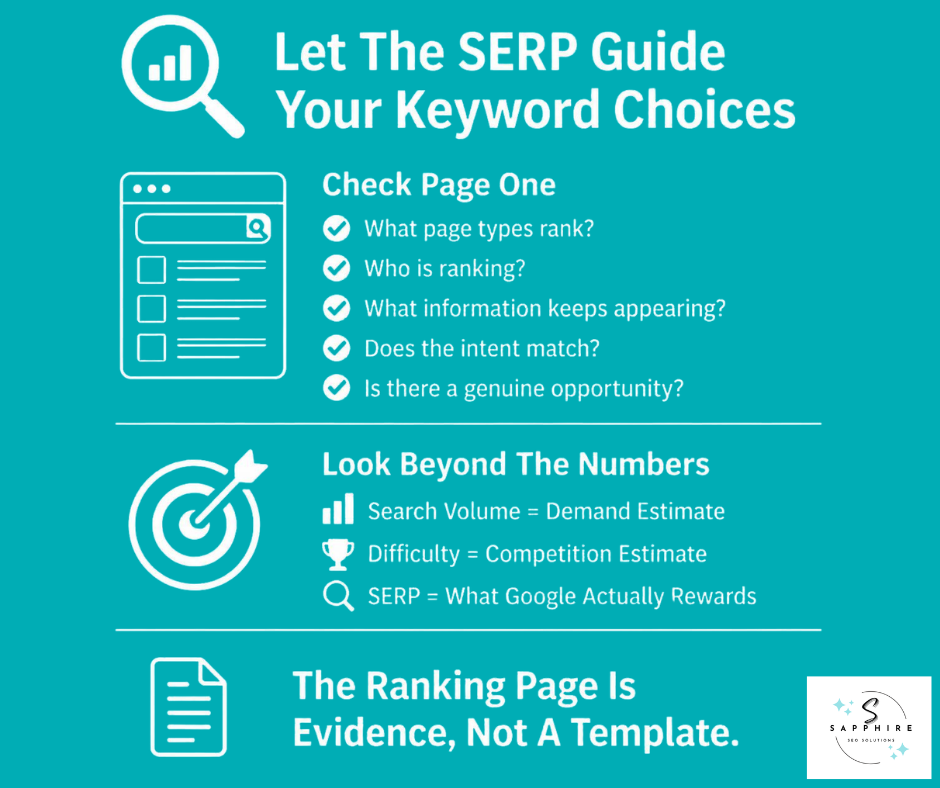
Look at What's Actually There
For every keyword that matters, search it and study the full search results page. Note what's mixed in: a Local Pack, organic listings, directories, review sites, service pages, location pages, informational articles, and anything else Google decided belonged there. This mix is your first clue. A page full of Yelp and Angi listings tells you something different than a page full of service pages from local companies.
Figure Out What Page Type Wins
Ask one question for each result: what kind of page does Google seem to think answers this best? A homepage, a service page, a combined service and location page, a location page on its own, a category page, or an informational article. If eight of the top ten results are service pages and two are blog posts, that's Google telling you what it expects. Building the wrong page type for the intent is one of the fastest ways to lose the ranking race before it starts.
Check That the Intent Actually Matches
Go back to what you learned in the previous section of this guide. Does what's ranking actually fit what the searcher wants? A page stuffed with company history when the searcher wanted pricing is a mismatch, even if it ranks. That gap is often where the opening sits.
Study the Competitors Who Are Actually There
Look past their domain authority. Check whether their service matches yours, whether they genuinely serve the area, what kind of business they are, and how deep their content goes on the topic. A national directory ranking above a local company doesn't mean the directory deserves the spot. It might just mean nobody local has built anything better yet.
Note What Keeps Showing Up
Scan the ranking pages for the same pieces of information again and again: the services offered, how the process works, some sense of pricing, the areas served, credentials, FAQs, proof like reviews or photos, and other details specific to the trade. That repetition is a map of what a searcher expects to find. Miss one of those pieces and your page reads thin next to the rest of the field.
Decide If There's a Real Opening
After all of that, ask the only question that matters: can this business build something more useful than what's already ranking? Sometimes the honest answer is no, not yet.
Numbers Help, But They Don't Decide Anything
Keyword search volume and search volume estimates from a keyword tool tell you how many people are searching. A keyword overview in most tools bundles that volume together with a difficulty score and a few related terms. Keyword difficulty scores are built mostly from one thing: the backlinks pointing at the pages already ranking, which Ahrefs counts by pulling the top 10 ranking pages and tallying how many websites link to each one. Semrush blends that with domain authority and SERP features. Neither one reads the content on the page or tells you whether the intent lines up.
That's the whole point of SERP analysis. Databases estimate demand. The search results page shows you what Google has already decided satisfies that demand. A low difficulty score doesn't guarantee an easy ranking, a low search volume doesn't rule out a valuable customer, and the highest-ranking page is a data point, not a template to copy. Keep an eye out for featured snippets, too. If one keyword pulls a snippet, that's often a sign the query rewards a clear, direct answer near the top of the page, something worth building toward rather than an accident to chase. Judge keyword rankings by what's actually on the page, not by the score sitting next to the keyword.
Step #7: Use Competitors to Find Gaps, Not to Copy Their Keywords
The plumber down the road isn't necessarily your real competition. Your real competition is whoever actually ranks for the searches you want. Sometimes that's the shop the owner has been rivals with for twenty years. Just as often, it's a directory site, a franchise three towns over, or a national brand nobody in the shop has ever mentioned. Start there, with who genuinely shows up, not who the owner names off the top of their head.
Once you know who's really ranking, look at what they're doing with four questions.
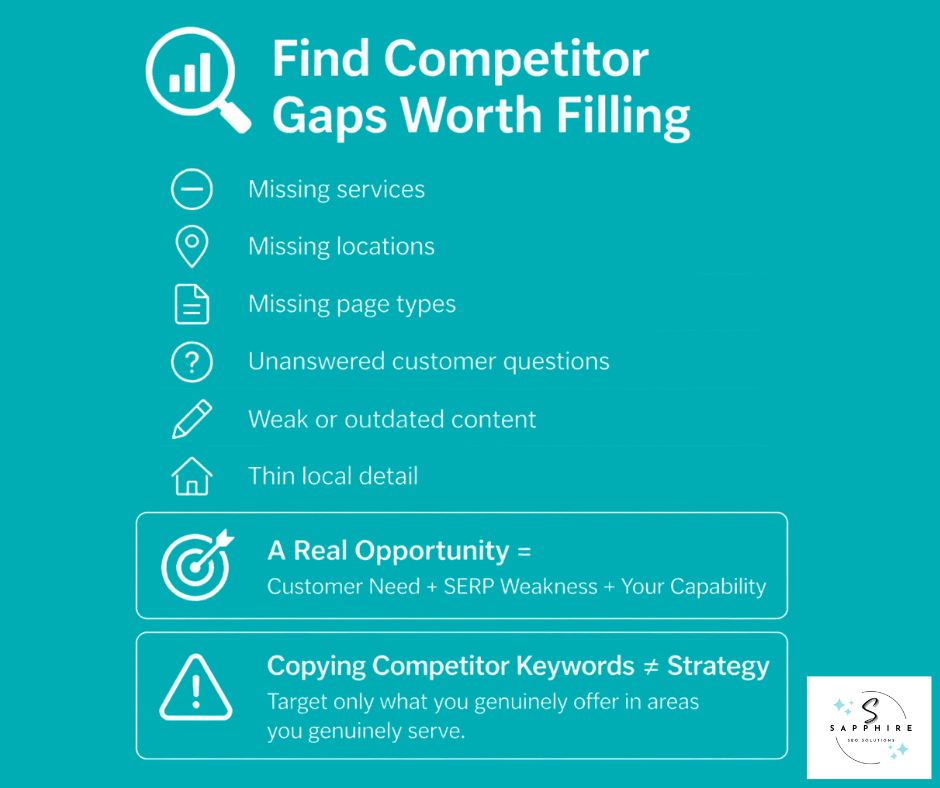
Do they cover services you also offer, but haven't built a page for? That's a keyword gap worth closing.
Do they legitimately serve towns you also cover, but haven't targeted? Same idea, applied to geography instead of service.
What page types are they running that you're missing? Look for service pages you don't have, location pages you don't have, pages of yours that are thinner than theirs, and pages on both sides that cover the same ground and compete with nobody but you.
What questions do their customers ask that their content never really answers? That gap is often easier to win than a missing page, since it just takes a better answer.
While you're at it, look for weak spots in what's currently ranking: generic content that could describe any city, thin local detail, information that's gone stale, a clunky page to use, service explanations that skip the details customers actually want, or no real proof anywhere on the page. A competitor ranking with a weak page isn't a wall. It's an opening.
Put it together, and you get a simple chain: a real customer need, a weakness in what's currently ranking for it, and a capability your business actually has. Where all three line up, you've found an opportunity.
This isn't about pulling a competitor's list and going after the same keywords just because they rank for them. A term only belongs on your list if it fits a service you truly offer, in a place you truly serve. And a page on a competitor's site doesn't automatically earn a matching page on yours. Some competitors, especially ones covering multiple locations, publish a page for every town within reach, whether or not each one holds up. Copying that habit fills your site with pages nobody needed. Their ranking proves the search exists. It doesn't prove the page was worth building, and it definitely doesn't mean copying their content will get you there.
Step #8: Group Keywords by Search Intent and SERP Similarity
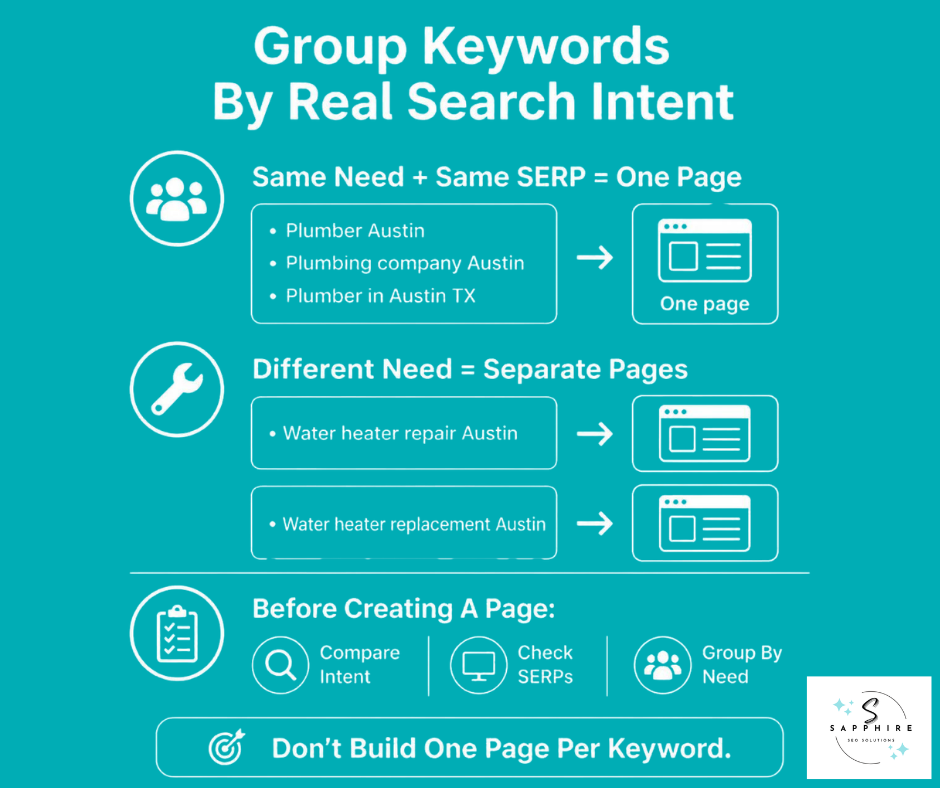
Once you have a list of keywords sorted by intent, the next move isn't to skim it for words that look alike. "Plumbing repair" and "plumbing company" share a word, but that doesn't mean they belong on the same page. Real grouping asks a different question: do these searches actually want the same thing?
Put keywords in the same group when they meet a few conditions. They express the same underlying need. The same page would genuinely satisfy all of them. The search results for each one look mostly the same. And your business can address the whole group with one solid page instead of several thin ones.
Take a plumber in Austin. These three likely belong together:
Plumber Austin
Plumbing company Austin
Plumber in Austin TX
Different wording, same searcher, same need. One page can carry all three.
These two probably don't:
Water heater repair Austin
Water heater replacement Austin
A repair and a replacement are different jobs with different pricing and a different conversation with the customer. Lumping them into one page usually means shortchanging both.
Let the Search Results Settle It
When you're not sure, check the pages already ranking for each version. If largely the same pages show up for both, that's real evidence one page can cover both searches. If the results look different- service pages in one, informational articles in the other- treat them as separate.
Why This Step Matters
Skip it, and a few things tend to go wrong. Two pages on your own site end up chasing the same primary keyword, splitting the ranking signals that would have gone to one strong page, a problem known as keyword cannibalization. You end up building pages nobody searched for. Your local pages turn thin because the content got spread across too many of them instead of concentrated where it counts. And the authority that should have built up behind one page gets scattered across three or four instead.
This step takes judgment, not a spreadsheet macro. A tool can cluster keywords by shared words in seconds, but it can't tell a repair from a replacement, and it won't catch two genuinely different services hiding under similar names. Review every cluster by eye, check the search results yourself, and never build one page per keyword just because the list is long. One page per real need, and nothing gets combined that doesn't belong together.
Step #9: Prioritize Keywords by Business Value
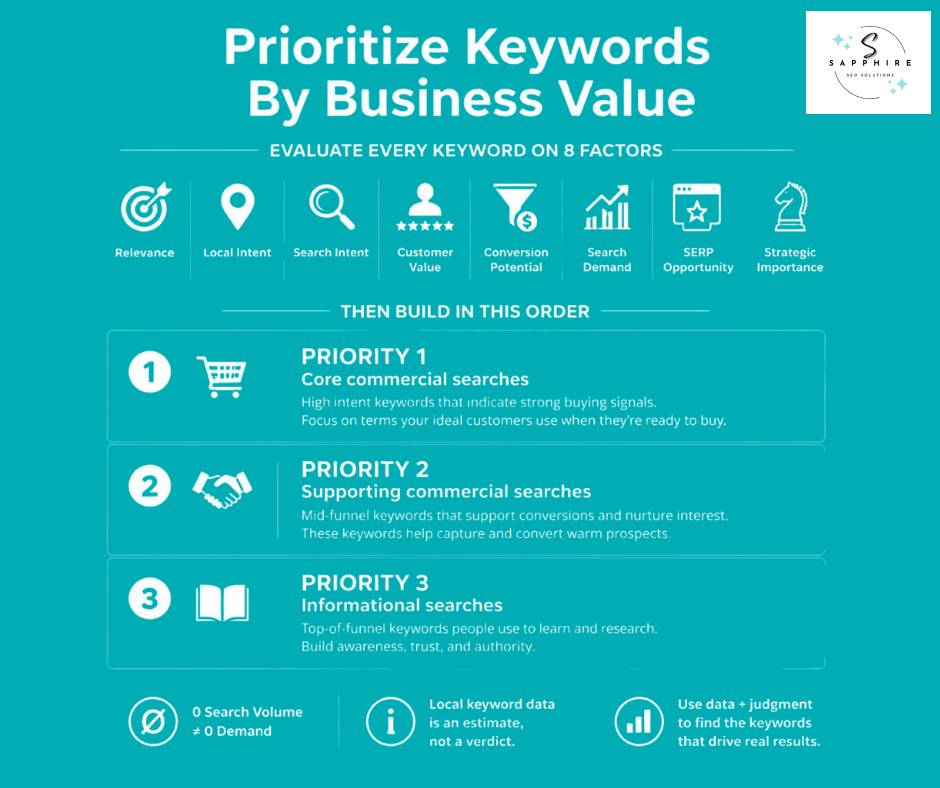
This is where the research turns into a real plan. Every keyword or cluster you've grouped needs to go through the same set of questions before it earns a spot on your roadmap.
Ask for each one:
Relevance - Does the business genuinely deliver what this search is asking for?
Local intent - Is there real evidence someone wants a provider nearby, not just information?
Search intent - Where is this searcher in the decision process, ready to call or still comparing?
Customer value - How much does this service or customer actually matter to the business?
Conversion potential - Could this search realistically lead to a call, a form, a booking, an estimate, or a purchase?
Search demand - Is there real evidence people search for this, even if a tool underreports it?
SERP opportunity - Looking at what's already ranking, can this business actually compete?
Strategic importance - Does going after this strengthen the site's overall structure, or is it a one-off?
Run every keyword or cluster through those eight questions, then sort what's left into three groups.
Priority 1: Core commercial opportunities. These are the searches closest to a paying customer. High relevance, real local intent, direct-service or service-specific intent, strong conversion potential. Build and refine these first.
Priority 2: Supporting commercial opportunities. Still tied to revenue, but a step removed. Commercial-investigation searches, secondary services, or areas with a smaller but genuine customer base.
Priority 3: Supporting informational opportunities. Content that answers real questions and builds trust, even when it won't convert on its own. Useful, but it comes after the pages that actually bring in calls.
Don't Throw Out a Real Service Because a Tool Shows Zero
Here's the trap. A keyword tool reports zero or near-zero volume for a legitimate service in your area, and it gets cut from the list. Local searches are exactly where this goes wrong most often. Keyword tools estimate demand from sampled data, and a term needs to cross a certain threshold before a tool will report a number for it at all. A small town searching for "sewer line repair" might never clear that bar, even though real people in that town search for it every month. Treat local search volume as a rough signal, not a verdict. If you know potential customers are out there searching, a flat zero from one tool isn't proof they aren't.
But that cuts both ways. Zero volume doesn't mean build the page anyway. Before you commit real time to a keyword with no measurable demand, it still needs to earn its place: a service the business genuinely offers, a location genuinely served, a real customer need behind the search, and a page that would actually be useful to someone who found it. A hunch isn't enough on its own.
This is also where you'll see the difference between busywork and a real strategy. Don't score keywords 1 to 100 and call it done. Don't sort by volume alone, and don't sort by Keyword Difficulty alone either. High volume doesn't automatically deserve the top spot, and zero volume doesn't automatically deserve one either. When you prioritize keywords this way, you end up with the best keywords for the business you actually have, not just the ones a spreadsheet ranked highest. That's what makes the rest of your local SEO efforts point at something real.
Map Keyword Clusters to the Right Pages
Every cluster you've grouped and prioritized needs a home. This is where the research turns into an actual site structure, and it's the step that separates a real local SEO strategy from a pile of keywords with nowhere to go.
Homepage
Reserve this for the broadest terms:
Your core business or category name
Your primary market
The general positioning you want every visitor to see first
It's the front door, not a place to cram every service.
Service Pages
Build a dedicated page for each high-value service, each one with a genuinely distinct search intent, and each major service category. If "water heater repair" and "water heater replacement" earned separate spots back in the previous section, this is where they turn into separate pages.
Location Pages
Build one only when four things are all true:
You genuinely serve that place
You have something real to say about working there
The SERP shows room for a page like this to compete
The page won't just repeat what another location page already says
A location page with nothing unique on it is a page in name only.
Service and Location Pages Combined
Create these when the pairing itself represents a real search opportunity, the SERP supports that kind of page, and you can genuinely say something specific to that service in that place. "Water heater replacement Round Rock" earns its own page when there's real demand for it and something honest to say about serving Round Rock specifically. Not every service and location combination clears that bar.
Blog and Resource Content
This is where the informational, problem-aware, and comparison searches go. Questions, problems, research, and anything meant to teach rather than sell belongs here, feeding traffic toward the commercial pages above it.
Check What Already Exists First
Before building anything, ask whether a page you already have satisfies the intent. A new page competing with your own is worse than no new page at all.
Build a Keyword-to-Page Map
Once you've sorted everything, put it in a table you can actually work from. Useful columns:
Keyword cluster
Intent
Location
SERP type
Existing URL (if one already covers it)
Target URL
Priority
This single document becomes your build list, your audit tool, and the thing that keeps two pages from quietly competing for the same search.
Know When Not to Build a Page
Skip a new page when the intent is already covered somewhere on your site, when it would read as nearly identical to a page you already have, when the location isn't genuinely served, when it wouldn't offer anything unique, or when the keyword is just a different way of wording something you've already built for.
This isn't just good practice. It's what keeps a site out of trouble. Google's spam policies name doorway abuse directly, describing multiple domains or pages aimed at specific regions or cities that funnel users to one page, and pages created to rank for specific, similar queries while providing little unique value of their own. One page per keyword, one page per ZIP code, or one page per neighborhood tends to build exactly that pattern by accident. So does swapping the city name into otherwise identical copy, or building a page purely because a competitor built one for that town. Every page on this map should earn its place because it serves a real search, in a place you actually work, with something real to say.
Turn Keyword Research into Useful Page Content
By now you know what page each keyword belongs on. What you haven't decided yet is what actually goes on it. That's where a lot of otherwise solid research falls apart because a mapped keyword tells you a page should exist, not what to fill it with.
Ask What the Page Needs, Not Just What to Write
For a commercial page, work through what the searcher genuinely needs before they'll trust you enough to call:
The services you offer
The problems that bring people to you
How the process actually works
The areas you serve
Any real qualifications
Honest pricing context
The questions people actually ask
Proof that you deliver
What sets you apart
Anything specific to working in that area
For informational content, the job is simpler. Answer the main question straight, cover the related questions that usually come with it, give enough context to be genuinely useful, and link over to the commercial page it supports.
Keywords Tell You What to Cover, Not What to Say
Keyword research tells you what information a page needs to have. It doesn't mean every phrase from your research has to show up on the page word for word. If your research surfaced "water heater leaking" as a real customer phrase, the page should address that problem. It doesn't need that exact string sitting in a sentence somewhere to prove it.
That distinction matters for the small technical pieces too. Google has said plainly that meta descriptions do not directly influence rankings. They still shape whether someone clicks your result over the one next to it, so write one that tells a real person what they'll find, not only the keywords stuffed together with no sentence holding them up.
The same goes for the rest of on-page optimization (on-page SEO). A page built around hitting a keyword count reads like it, and readers notice before Google does.
What to Skip
Here's what you should avoid:
Keyword stuffing - Repeating a phrase doesn't make the page more relevant; it makes it worse to read.
An H2 for every keyword on your list - Headings should follow the structure of the answer, not the shape of your spreadsheet.
A city name repeated in every other sentence - Say it where it's natural, and let the content itself prove the page is local.
Writing toward a keyword density target - There's no number to hit.
Adding a "related keyword" just because a tool suggested it, if it doesn't actually belong on the page.
Good keyword research narrows down what a page needs to say. Writing it well is a separate job, and it's the one that actually convinces someone to call.
Use Local Keyword Research to Inform Google Business Profile Strategy
Everything you've mapped so far can do more than fill out your website. The same research should shape your Google Business Profile, the free listing that shows up on Google Search and Maps.
Look back at your keyword and service list, and let it guide a few real decisions.
Which primary category actually matches how customers search for you?
Are there additional categories worth adding based on services you've confirmed people search for?
Does your listed services section reflect the terms your research turned up?
Does your website actually back up what your profile claims?
Are you describing your business the way customers describe it, not just the way your industry does?
Does your basic business information, hours, service areas, and contact details line up with what your research showed people expect to find?
Google is direct about how it ranks local listings. It says relevance is how well a Business Profile matches what someone is searching for, distance is how far each business is from the searcher, and prominence is how well-known a business is, shaped in part by links and reviews. Your keyword research feeds the first one. It tells you what "matches the search" actually means for your business, in your customers' own words.
Keyword research for your Google Business Profile doesn't mean stuffing keywords into your business name, tacking a city onto it, pushing customers to use certain phrases in their reviews, choosing a category that doesn't fit just because it ranks well, or padding your description with search terms. All of that reads as manipulation to Google, and often to the customer looking at your listing.
Also, the search terms your profile's Performance report shows are useful evidence of how people already find you. They aren't a lever you can pull directly.
Once your profile reflects real research instead of guesswork, the next steps live in three related guides:
Keyword research feeds all three, but it's one input among several in a working local SEO strategy, not the entire job.
Extend Local Keyword Research into AI Search
Everything you've built so far- the customer language, the mapped pages, the real answers to real questions- does more than earn rankings in classic search results. The same research helps AI search systems understand your business well enough to surface it. That's the honest way to frame this, not a separate playbook for beating a new algorithm.
Google's own guidance backs that up. It states plainly that the best practices for SEO remain relevant for AI features in Google Search, including AI Overviews and AI Mode, and that there are no additional requirements to appear in AI Overviews or AI Mode, nor other special optimizations necessary. There's no special schema to add, no separate checklist to chase.
Expand From Keywords to Questions
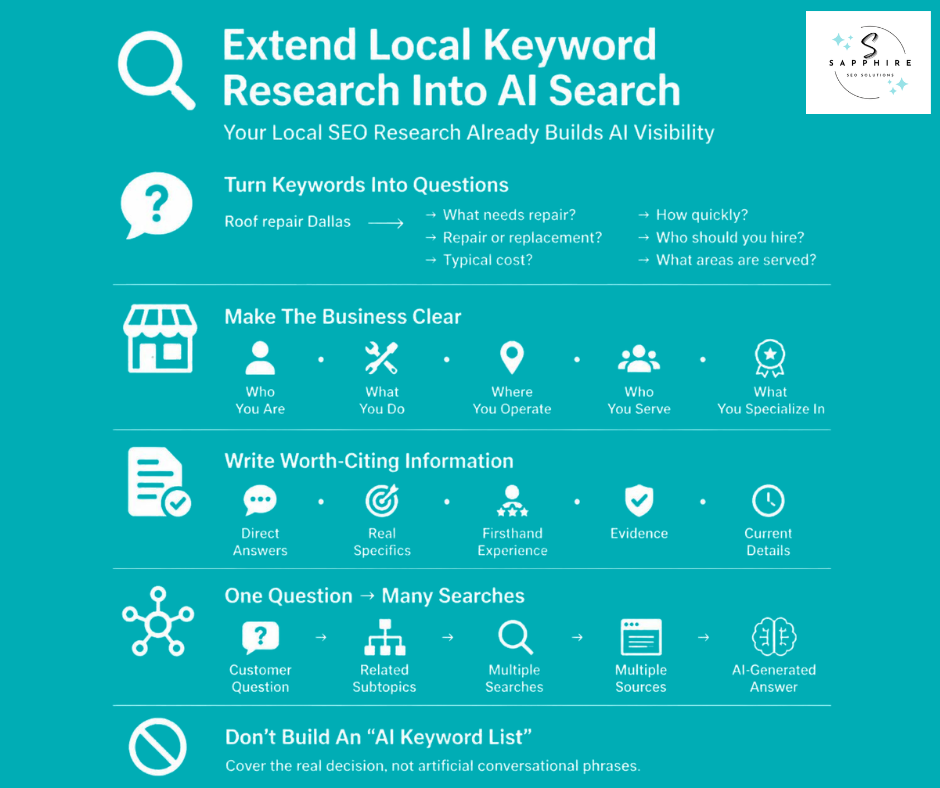
Take a keyword like "Roof repair Dallas" and pull out the real questions sitting behind it:
What roof problems actually need repair?
How much does it typically cost?
When does a roof need replacing instead of patching?
How fast can repairs get done?
How should someone choose a contractor?
What areas does the business actually serve?
Your keyword research already pointed you here. This step just follows the thread further.
Name the Details That Actually Help Someone Decide
Depending on the trade, that might mean service availability, service area, specialties, qualifications, years of experience, whether emergency service exists, warranty terms, how pricing works, and what working with the business is actually like. Only include what's real and something you could stand behind if someone checked.
Make It Obvious Who You Are
State clearly who the business is, what it does, where it operates, who it serves, and what it specializes in. This isn't a trick. It's just not leaving Google or an AI system to guess.
Write Things Worth Citing
Prioritize direct answers, real specifics, firsthand experience, information nobody else has already written a hundred times, actual evidence, clear attribution, and details that are current.
Understand Why One Question Becomes Many
Google says AI Overviews and AI Mode may use a "query fan-out" technique, issuing multiple related searches across subtopics and data sources, to develop a response. One conversational question from a customer can turn into several searches behind the scenes, covering the angles they didn't type out loud. That's another reason to research the whole decision a customer is making, not just the exact phrase they might type first.
Don't Build a Separate "AI Keyword List"
This isn't a new kind of keyword to chase. AI visibility doesn't come from stuffing conversational phrasings onto a page. It comes from a page genuinely covering the ground a real decision requires, the same ground your research already mapped out.
Turn Your Research into a Local SEO Action Plan
A spreadsheet full of prioritized keywords doesn't do anything on its own. Someone has to act on it, in a reasonable order. Here's what that order looks like.
Start with What You Already Have
Before building anything new, fix what's already live. Improve your existing commercial pages with the research you just did. Correct any keyword that's pointed at the wrong page. Resolve the cannibalization you may have found back in section 10, where two pages were quietly competing for the same search. And strengthen the service pages that are thin or outdated. This is almost always the fastest win, because the page already has some authority behind it. You're not starting from zero.
Then Build What's Missing
Once the existing pages are solid, move to what doesn't exist yet. Create the service pages your research showed were missing. Build the location pages that earned their place: genuine service area, real content, SERP support, not just a page for the sake of having one. Add supporting content for the informational searches you mapped earlier. And tighten your internal links so all of this actually connects, rather than sitting as isolated pages with no path between them.
Keep Watching After That
This part never really ends. Check Search Console regularly for what's changing. Check your Google Business Profile performance. Watch how your local visibility moves. Notice new queries as they show up, ones your research didn't catch the first time around. Update pages as things change. And reprioritize when the data tells you something on your list mattered less, or more, than you thought.
That's the whole cycle: Research, Implement, Measure, Learn, Refine. Then it starts again.
Keyword research isn't a project you finish once and file away. Search behavior shifts, competitors change what they're doing, and your own business grows into new services and new towns. The businesses that stay visible are the ones that keep working the loop, not the ones that ran it once and stopped.
How to Measure Whether Your Local Keyword Research Is Working
A spreadsheet full of mapped keywords means nothing until you can point to something that changed. This is where you check.
Search Visibility
Search Console is where this starts. It shows impressions, clicks, CTR, and average position, broken down by query and by page. Average position is worth using carefully. It's an impression-weighted average, calculated from the topmost position your site reached for each query, averaged across every impression in the period. That means the number moves for reasons that have nothing to do with your rankings dropping, like suddenly appearing for a batch of new long-tail searches that pull the average down even as your best pages hold steady. Watch the trend over weeks and months, and read it alongside impressions and clicks, rather than treating one day's number as a verdict.
Local Visibility
Where it applies, track how often you show up in the Local Pack, how you're doing on Maps, and whether performance is improving in the specific areas you're actually targeting.
What's Happening on Your Website
Rankings and clicks are only useful if they lead somewhere. Track calls, form submissions, bookings, quote requests, and whatever else counts as a real conversion for your business.
What's Happening on Your Profile
Your Google Business Profile has its own performance data, and it's worth checking alongside your website numbers. Google's current reporting for Business Profiles covers searches, views, and customer actions including calls, website clicks, requests for directions, and bookings where that feature applies to your business.
The Question That Actually Matters
After all of that, ask one thing: are we generating more qualified local opportunities than before? Rankings are an input. They're not the goal. A page sitting in position one that never gets a call did its job for Google and not for you. A lead worth pursuing that came from position six did the opposite.
Traffic isn't success on its own, and neither is a single keyword hitting position one. No one can promise that every improved ranking turns into revenue, and a lead that never should have called in the first place doesn't count just because it clicked through. Average position, in particular, is an average, not a precise read on where you stand. Treat every one of these numbers as a piece of the picture, and look at what they add up to together.
Common Local Keyword Research Mistakes
Sixteen show up more than any others. If a few of these sound familiar, that's normal. Most local businesses stumble into at least one before they find their footing.
Here are the most common local keyword research mistakes that many small businesses make:
Starting with a keyword tool instead of the business. The tool comes after you know your services, your problems, and your real service area, not before.
Choosing keywords by volume alone. A big number doesn't tell you whether the searcher wants to hire you.
Assuming every city plus service combination needs its own page. Most don't. Build one where the demand, the SERP, and your actual presence in that town all support it.
Ignoring implicit local intent. "Emergency electrician" carries local intent even with no city in it. Dismissing it because it lacks a place name misses real customers.
Treating "near me" as a phrase to stuff into copy. Google reads location from where the search happens. It doesn't need those two words repeated on the page to know you're local.
Ignoring customer language. "Water heater leaking" brings in the same customer as "water heater repair." Skip the customer's own words, and you skip half your audience.
Skipping SERP analysis. A keyword tool's numbers only estimate demand. The search results page shows you what's actually competing for that demand.
Copying competitor keyword lists. A term worth having on your list only earns its place if it matches something you genuinely offer, somewhere you genuinely serve.
Creating multiple pages for one intent. When the searches share a need and the SERPs overlap, one strong page beats two thin, competing ones.
Creating thin location pages. A page that only swaps the city name into a template gives Google, and the reader, nothing real to work with.
Confusing organic and Local Pack visibility. Ranking well in one doesn't guarantee anything in the other. They're two different games on the same page.
Treating GBP search queries as something you can directly control. They're evidence of how people already find you, not a dial you can turn.
Ignoring existing Search Console data. The queries and pages you already have are often the fastest research you'll ever do.
Writing content solely around keyword variations. A page built to hit phrases instead of answering a real question tends to read like it was.
Measuring traffic instead of qualified outcomes. More visitors means nothing on its own. More calls, forms, and bookings are the actual scoreboard.
Treating AI search as a separate keyword game. The same research that earns organic visibility is what helps AI systems understand and surface your business. It isn't a second list to build.
Local Keyword Research Checklist
Print this out, or keep it open in a second tab. Before you consider the job done, run through it.
Local Keyword Research Checklist
A few things this checklist won't ask you to do:
It won't ask you to hit a keyword density target, because there isn't one.
It won't ask for a minimum search volume before a keyword counts, since a real local need can matter with almost no measurable volume at all.
It won't tell you to add your city to every sentence. And checking a box here doesn't mean that step is a ranking factor on its own. It means you did the work a real local keyword research process asks for, in the order that makes it worth doing.
If you'd rather perform keyword research with someone checking this list alongside you, that's exactly where the next section picks up.
When Should You Hire a Local SEO Professional?
Everything in this guide is doable on your own. Plenty of small business owners work through it themselves, especially early on with one location and a handful of services. But there's a point where the work outgrows the time anyone in-house has to give it.
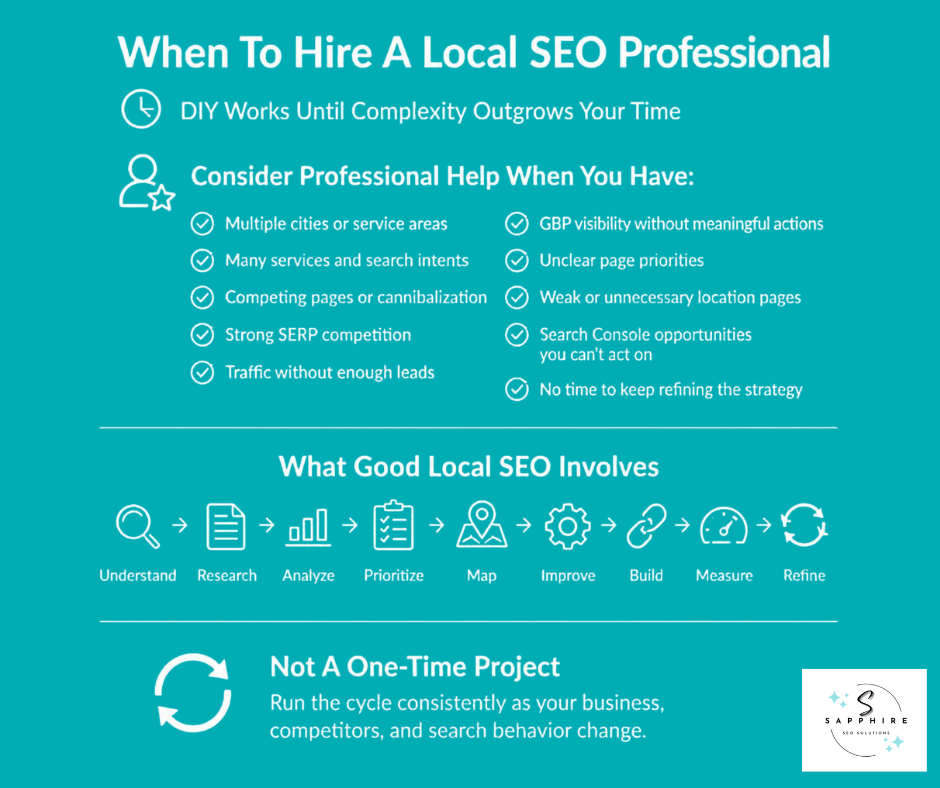
Local Keyword Research Gets Complicated When...
The business serves multiple cities, not just one.
There are many services to cover, each with its own intent and its own audience.
More than one page on the site seems to compete for the same search.
Competitors have a strong hold on the SERPs you want to enter.
The website gets traffic, but the phone doesn't ring to match it.
The Google Business Profile shows visibility, but few real actions come from it.
Nobody's sure which services actually deserve a dedicated page.
Location pages already exist, built without a clear reason behind each one.
Search Console keeps surfacing opportunities nobody has time to act on.
There's no time left over to keep researching and adjusting the strategy as things shift.
Any one of these is manageable alone. A few of them at once usually means the work needs more attention than it's getting.
What a Good Local SEO Service Should Actually Do
Real work here looks less like a checklist and more like the process this guide just walked through, applied consistently over time. That means understanding the business first, researching genuine local demand, analyzing the SERPs and the competitors actually ranking, prioritizing what matters most, mapping keywords to the right pages, strengthening what already exists, building only what's genuinely missing, improving the local presence tied to all of it, and then reviewing results and adjusting as the data comes in.
Done well, this isn't a one-time project. It's the same loop from earlier in this guide, run consistently instead of once.
If you'd rather have someone handle that loop and go after the right keywords for your business instead of guessing at them, explore Sapphire SEO Solutions' local SEO services.
Make Better SEO Decisions with Sapphire SEO Solutions!
A long keyword list was never the goal. What matters is the chain behind it: what customers actually need, the words they use to search for it, whether that search carries real local intent, what Google chooses to show for it, which of those opportunities are worth going after, which page should answer each one, and what the business does next because of all that.
That's the whole process, start to finish. Understand the business. Discover what people search for. Validate whether it's genuinely local. Analyze what's already ranking. Group the searches that share one intent. Prioritize by what actually matters to the business. Map each cluster to the right page. Implement it. Measure what happens, and go again.
A plumber, a roofer, a dentist, an HVAC company- the trade doesn't change the method. What changes is the customer language, the services, and the towns genuinely served. Get that part right, and the rest of local SEO has something real to stand on. This is where Sapphire SEO Solutions comes in. We know how to get your business appearing in local search results, and we have more than a decade of experience doing that for other small businesses, from local plumbers to electricians, law firms, and many more.
Get help with local SEO with our reliable local SEO services. Contact us to get in touch with an experienced SEO professional, and we'll assess your business, analyze your competitors, and tailor a plan that works for your business. Consultations are free!

Frequently Asked Questions on Local Keyword Research
What Is Local Keyword Research?
Local keyword research is the process of finding the terms people use to search for products or services in a particular market, then evaluating their local intent, business value, and the type of page or content that should address them.
How Do You Find Local Keywords for a Small Business?
Start with the business's actual services, customer problems, and language from calls, reviews, sales conversations, and other customer interactions. Then use Google Search, keyword research tools, Search Console, Business Profile data, and competitor research to expand and validate the list.
Do Local Keywords Always Need a City or Location Name?
No. Google can understand local intent even when a search doesn't include a location modifier. A search such as "emergency electrician" may have strong local intent depending on the search results and context, while "electrician Phoenix" makes the geographic intent explicit.
How Do You Know Whether a Keyword Has Local Search Intent?
Search the keyword and examine the results. Look for a Local Pack, local businesses ranking organically, location-specific pages, and other evidence that Google interprets the query as locally relevant. Comparing results from different locations can provide additional context.
How Important Is Search Volume for Local Keyword Research?
Search volume is useful, but it is only one signal. Local keyword tools often provide limited or estimated data, particularly for smaller cities, suburbs, and specific services. Relevance, search intent, customer value, and the actual local SERP also matter when deciding whether a keyword is worth pursuing.
Should You Target a Local Keyword With Low or Zero Search Volume?
Not necessarily, but low or zero reported volume should not automatically rule out a keyword. If the service is genuinely offered, the location is genuinely served, the search reflects a real customer need, and the opportunity makes business sense, the term may still be worth considering. Local practitioners frequently report that third-party tools can show little or no volume for terms that still generate local demand.
Should You Target "Near Me" Keywords?
You don't need to repeat "near me" throughout your website to target these searches. Instead, make the business, services, locations served, and other relevant information clear and accurate across your website and Business Profile, while validating the underlying local intent in the SERP.
How Do You Choose Which Local Keywords Are Worth Targeting?
Consider relevance, local intent, search intent, customer value, conversion potential, search demand, and SERP opportunity together. Search volume or keyword difficulty alone cannot tell you whether a local keyword is commercially worthwhile.
Should Every Keyword Have Its Own Page?
No. Group keywords that represent the same underlying need and produce substantially similar search results onto one strong page. Creating separate pages for minor keyword variations can lead to unnecessary pages, thin content, and keyword cannibalization.
Should You Create a Separate Page for Every Service and Location?
No. Create a separate page when the service-location combination represents a meaningful opportunity, the SERP supports a distinct result, and the business can provide genuinely useful information about serving that location. Not every city, suburb, or service combination needs its own page.
How Do You Use Google Search Results to Decide Which Keywords and Pages to Target?
Analyze what Google is already showing for the query, including the types of pages ranking, the search intent they appear to satisfy, the local signals they provide, and where useful information may be missing. The SERP helps determine both whether the keyword is worth targeting and what type of page may best satisfy the search.
How Can Google Search Console and Google Business Profile Data Help With Local Keyword Research?
Search Console can reveal the queries generating impressions and clicks for your website and the pages appearing for them. Business Profile Search data shows the search terms for which your profile appeared. Together, these sources can reveal real search behavior that may not appear clearly in third-party keyword tools. Google notes that Business Profile search queries cannot be directly managed.
How Can Local Keyword Research Support Visibility in AI Search?
Local keyword research can reveal the services, customer problems, questions, locations, and business attributes that people care about. Using those insights to create clear, useful, well-supported content can make it easier for search systems to understand the business and its relevance to more complex searches. Google says AI Overviews and AI Mode may use query fan-out to explore related searches and supporting sources.
Do You Need Different Keywords or Special SEO Tactics to Appear in AI Search?
No separate keyword strategy or special schema is required for Google's AI Overviews or AI Mode. Google says the same foundational SEO practices apply, including crawlability, internal linking, useful people-first content, textual information, and accurate Business Profile information. The opportunity is to use keyword research to understand the broader questions and needs behind local searches, rather than creating separate content for every possible AI query.