

How to Choose the Right Google Business Profile Categories
Picking a Google Business Profile category feels like it should take thirty seconds. Then you start typing, Google throws ten options at you that all sound almost right, and suddenly you're stuck wondering if "Plumber" is close enough or if you need something more specific.
Here's the short version. Your category tells Google, and your customers, what kind of business you actually run. Google has said flat out that the categories you select affect local ranking. So this matters. But that doesn't mean category selection is about hunting down some magic ranking keyword. Google's own guidance is simpler than that: pick a category that accurately represents your business, and be as specific as you can without stretching the truth.
You get one primary category and up to nine additional ones. That's the easy part.
The hard part is that most business owners mix up three different things:
What their business actually is
What it offers
What customers type into Google when they're looking for it
Those three things overlap, but they're not the same, and confusing them is how businesses end up with the wrong business category.
This guide walks through business identity, Google's category options, customer search relevance, your primary category, your additional categories, and how all of it fits into local SEO. That's how you land on the right category, in that order.
Key Takeaways
A category answers "what is this business," not "what does it offer" or "what do customers search."
Run every candidate through the "This business is a..." test before adding it.
Specific beats broad only when the specific option is still accurate. Accuracy always wins first.
Services, products, and attributes don't belong in the category field. Ever.
Use as few categories as possible. Ten slots isn't a target; it's a ceiling.
Competitor categories are evidence to check, not instructions to copy blindly.
Categories affect local ranking, but relevance, distance, and prominence decide the rest.
Change a category for a real business reason, never as a ranking experiment.
What Is a Google Business Profile Category?
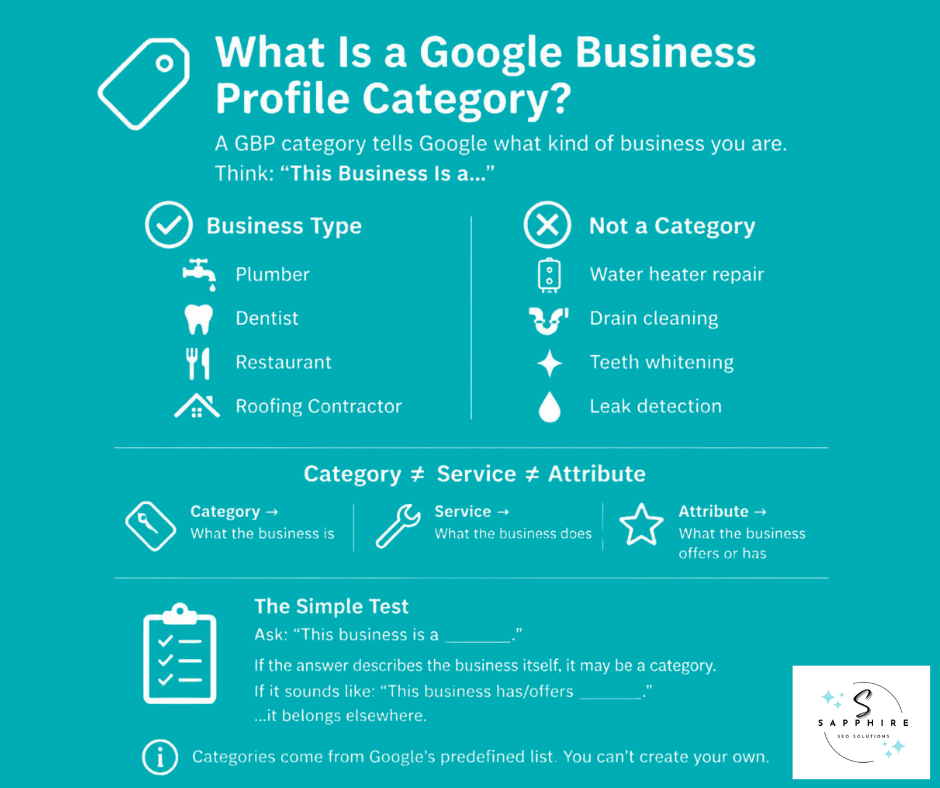
A Google business category is a label from Google's own predefined list. It tells Google, and anyone searching, what kind of business your profile represents. You don't get to invent one. If you type in something that doesn't match an existing option, Google won't create a custom entry just for you.
Google says Google categories exist to help businesses connect with customers who are searching for relevant products or services. That's the whole job. Not to stuff in a keyword. Not to list everything you sell. Just to answer one question honestly: what kind of business is this?
That's a different job than a lot of business owners expect. GBP categories aren't the same as your services, your products, or your attributes. A dentist's whitening treatment is a service. Wheelchair access is an attribute. Neither one belongs in the category field. And a category definitely isn't a keyword slot you fill to chase a search term.
The "This Business Is a..." Test
Google's own guidance points to a simple test. Ask whether a category completes the sentence "This business is a..." rather than "This business has..."
Take a plumber. The business is a plumber. Full stop. Now look at what that plumber actually does:
Water heater repair
Drain cleaning
Toilet repair
Leak detection
Those are things the business has, or does. They're real services, and customers care about them. But none of them describe what the business is. That distinction is the whole point of choosing a category.
Primary vs. Additional Google Business Profile Categories
Every location on your profile has one primary category. It's simply the first category you select, and it should represent your main business, full stop. Nothing else on the profile carries more weight in telling Google what you actually are.
Beyond that, you can select up to nine additional categories. That gives you ten slots total. But nine open slots isn't an invitation to fill all of them. It's just room, in case you genuinely need it.
Primary Category
Your primary category answers one question: what kind of business is this? It should be the most specific option available, as long as that option is still accurate. If "Nail salon" fits better than "Salon," use it. If it doesn't, don't force it just because it sounds more precise.
Additional Categories
Additional categories exist to describe other legitimate parts of your business, not to catalog everything you do. A dentist who also runs a walk-in emergency clinic might reasonably add that as an additional category. A plumber who repairs water heaters does not need "Water heater repair" listed as one because that's a service, not a business type.
Google is direct about this: use as few categories as possible to describe your overall core business. That's the actual guidance.
When you select categories for your profile, the goal isn't coverage. It's accuracy. Choose categories that describe what your business genuinely is and stop once you've done that, whether that's one category or four.
How to Choose the Right Primary Category
This is the part that actually matters. Everything else in this guide sets up the decision, but this is where you make it.
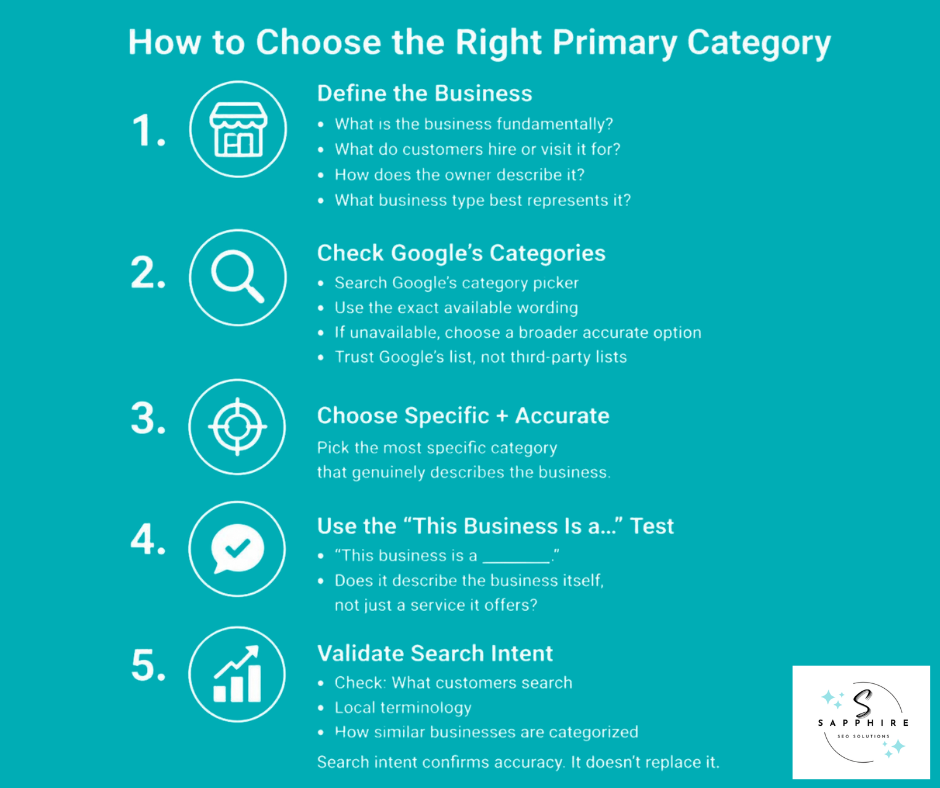
1. Define What the Business Actually Is
Before you touch a keyword tool or open the category picker, figure out what the business fundamentally is.
Look at the business's core commercial activity and ask yourself:
What do customers primarily hire or visit it for?
How is the business actually represented in the real world, on the door, on the invoice, in how the owner describes it to a stranger at a barbecue?
Is this genuinely one type of business, or does it operate across a few?
The key question to ask yourself:
If you had to describe this business in one business-type phrase, what would it be?
Don't answer with "whatever service makes the most money" or "whatever I want to rank for." Those might matter later. They shouldn't decide this.
2. Search Google's Available Categories
Once you know what the business is, go check whether Google agrees it exists as a category. Categories come from Google's own predefined list. You can't add to it and you can't rename one to fit better.
Start typing a few honest, legitimate descriptions of the business into the category field and watch what comes up. Pay close attention to the exact wording Google offers, because it often doesn't match the language on your own website. If the category you want isn't there, Google's guidance is to pick a broader category that still accurately describes the business rather than force a mismatch. And skip the third-party category spreadsheets floating around online. They're not Google's list. Google's dropdown is.
3. Choose the Most Specific Accurate Category
Once you've found your relevant categories, narrow to the most specific one that's still true. Google's own example says to choose "Nail salon" over "Salon" when nail services are actually the business.
But the rule has two parts, not one: specific category plus accurate. Not "as narrow as possible no matter what." A category that's razor-specific but doesn't really describe the business is a worse pick than a slightly broader category that's fully honest. Specificity is a tiebreaker between accurate options. It's not a reason to grab a category just because it happens to contain your target keyword.
4. Apply the "This Business Is a…" Test
Take each candidate and finish the sentence: "This business is a ______."
Then check it.
Does that describe the business itself, or something it offers?
Would a customer, hearing that phrase, recognize it as accurate?
Does it capture the whole business, not just one piece of it?
This isn't a grammar trick. It's the same standard Google already applies. Running your different primary categories through this test is often the fastest way to spot the one that's forcing itself to fit.
5. Validate the Choice Against Customer Search Intent
Once you have accurate candidates, check them against reality.
What are people actually searching for?
What terminology do customers use?
What do the local search results look like for those terms, and how are the businesses that show up there categorized?
This step is genuinely useful; it just isn't allowed to override accuracy. Search intent can confirm you've picked well among local businesses in the same space. It can't justify a category that doesn't describe the business, no matter how much search volume it's chasing. If you ever look for new categories to represent a business that's grown or changed, this same five-step process is the one to repeat.
How to Choose Additional Google Business Profile Categories
Once your primary category is locked in, the process for additional categories is smaller in scope, but it still deserves the same discipline.
Start from the primary category and ask what else the business genuinely is, not what else it does. A landscaping company that also runs an active nursery might legitimately add "Garden center" as an additional category because that's a real, separate business classification, not a service tacked onto the main one.
For every candidate, run the same check from the last section. Does this describe what the business is, or does it describe something the business offers? If it's the latter, drop it.
Categories that represent a single service don't belong here, and neither do categories that describe products, amenities, or attributes. Wi-Fi isn't a category. A gift-wrapping service isn't a category. Those things matter to customers, but they belong somewhere else on the profile, not in the category field.
It's also worth resisting the urge to copy whatever competitors have listed. A category showing up on three other local businesses' profiles doesn't make it correct for yours. It just means three other businesses made a choice, right or wrong.
Google's own guidance settles the question of how many to add: use as few categories as possible to describe the core business. Stop when the profile accurately represents what the business is. Not when you've filled every slot.
If the business operates across multiple locations, treat each profile on its own terms. A location that offers additional services the others don't might reasonably carry a different additional category. Sameness across locations isn't the goal. Accuracy at each one is.
Category vs. Service: Know the Difference
Take the plumber again. The primary category is Plumber. The services are:
Drain cleaning
Water heater repair
Leak detection
Toilet repair
None of those should become additional categories. They're real, and customers care about them, but they belong in the services section of the profile, not in the category field. Turning every service into a category doesn't describe the business more accurately. It just adds noise Google has explicitly asked businesses to avoid.
How to Research Google Business Profile Categories
Most advice on this topic starts and ends with "check your competitors." That's not research. That's copying, and copying someone else's mistake doesn't make it less of a mistake.
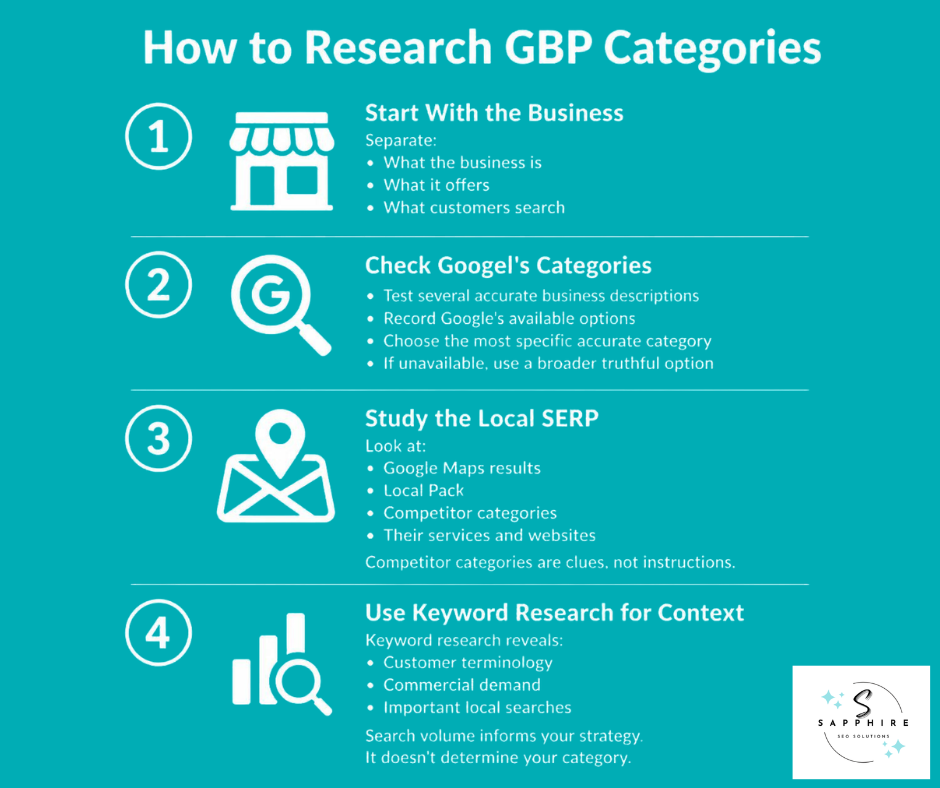
Start with the Business
Before you open a single search tool, make three lists. First, what the business actually is. Second, what it offers. Third, what customers type into Google when they're looking for it. Then set the three side by side and see where they overlap and where they don't.
This matters because those three things get treated as one thing constantly, and they're not. A roofer might offer emergency tarping, insurance claim help, and full re-roofs. Customers might search "roof leak repair near me." But the business is still, fundamentally, a roofer. That comparison is what keeps the next two steps honest.
Research Google's Available Options
Google's category list is larger, and stranger, than most people expect. There are categories for:
A fruit and vegetable store
A canoe and kayak rental service
A department of motor vehicles
A dress rental service
A social services organization
If Google has a category that is specific for renting kayaks, it almost certainly has one that fits your business.
So test it directly. Here’s what you should do:
Type several honest, legitimate descriptions of the business into the category field and write down exactly what Google returns.
Look for the most specific option that's still accurate.
If the precise phrase you had in mind doesn't exist, drop down to the closest general category that still tells the truth, rather than force a category that doesn't fit.
Study the Local SERP
Search the terms that matter most: core service searches, high-intent commercial searches, and industry-specific and local phrases. Look at who shows up in Google Maps results and in the broader local pack.
Then actually study those competing listings, not just their category. Look at their overall positioning, the services listed on their profile, and what their website says about the business.
Here's the qualification that matters most: a competitor's category is evidence worth investigating, not an instruction to follow. Competitors get their categories wrong constantly. Seeing five plumbers all listed under the wrong category just means five people made the same error, not that the error is correct.
Use Keyword Research for Context
Keyword research still earns its place here. It can tell you what customers actually call a service, which terms carry real commercial demand, and which searches should shape the broader local seo strategy around the business.
What it can't do is decide the category for you. Keyword demand and category accuracy are two different questions. A search term can have real, ranking-influencing search volume and still have nothing to do with what type of business you legally and factually are. Chasing the volume instead of the truth is how businesses end up with categories that hurt local visibility instead of helping it.
What If Google Doesn't Have the Exact Category You Need?
Sometimes you'll know exactly what your business is, and Google simply won't have a category for it. That happens more than people expect, and it's frustrating, but there's a straightforward way through it.
Start with what you can't do. You can't create your own category. Google's list is fixed, and typing in something that isn't on it won't work, no matter how accurately it describes your business.
What you can do is find the closest accurate option. Google's own guidance is direct on this point: if the specific category you want isn't available, choose a general category that still accurately describes your business. Not a random one. Not one that happens to contain a keyword you want to rank for. The closest one that's still true.
That distinction matters more than it sounds like it should. If you can't find "Self-service dog wash," don't reach for "Pet groomer" just because it shares a keyword with your ads. Reach for whatever broader category, like "Pet supply store" or "Animal grooming service," actually describes what happens at your business.
And resist the temptation to compensate somewhere else. Don't try to turn a service name into a category, and don't try to patch the gap by stuffing extra detail into your business name or description. Those fields have their own purpose, and using them to work around a missing category tends to cause more problems than it solves.
If you genuinely believe Google is missing a category your industry needs, there is a path for that. Google has a Business Profile Help Community where owners can raise the issue, though getting a new category added is a slow, manual process, not a quick fix you should count on for your current listing.
Common Google Business Profile Category Mistakes
Most category mistakes come from the same few habits. Here's what to watch for.
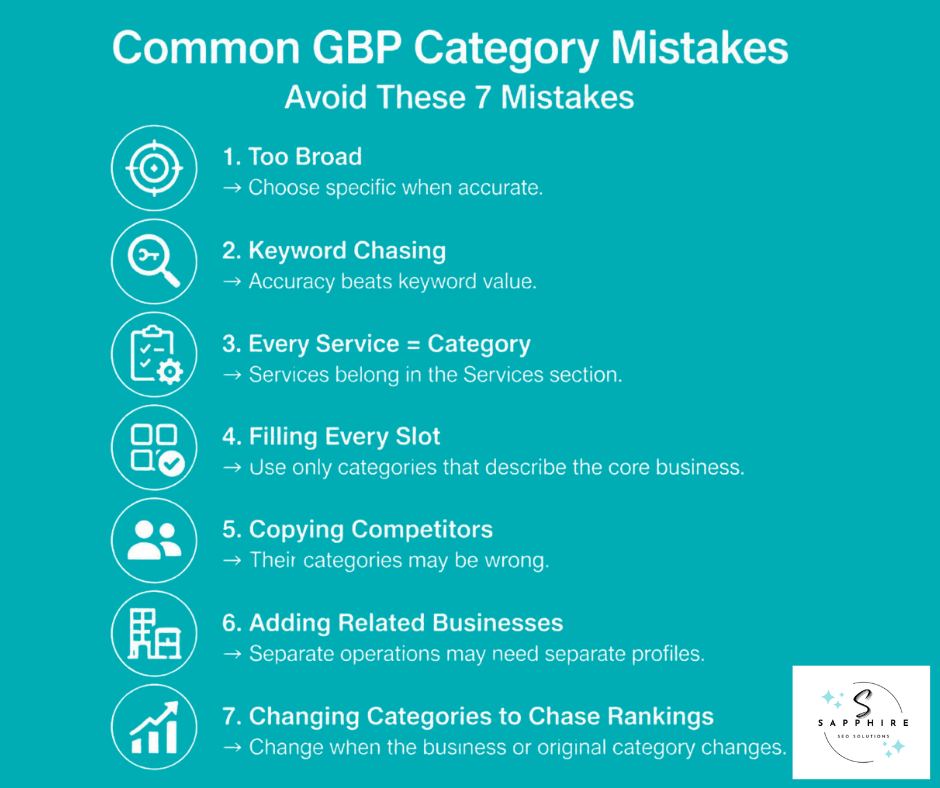
Choosing a Category That Is Too Broad
"Salon" feels safe. "Nail salon" is accurate if that's actually the business. Google's own example makes the point directly: pick the specific option when it exists and it's true, rather than settling for something vague that technically applies but tells customers less.
Choosing a Category Because It Contains a Valuable Keyword
A category that happens to include your target search term isn't automatically the right one. Accuracy comes first. If the category doesn't describe what the business is, the keyword inside it doesn't change that.
Turning Every Service Into a Category
Drain cleaning, water heater repair, leak detection. Real services, all of them. None of them are what a plumbing business is. Services belong in the services section of the profile. Categories describe the business itself.
Filling Every Available Category Slot
Ten slots doesn't mean ten categories. Google is explicit here: use as few categories as possible to describe the core business. A profile with two accurate categories almost always beats one with eight loosely related ones.
Copying a Competitor's Categories
Competitor research has real value, covered earlier in this guide. But a competitor's category choice is a data point to investigate, not a template to copy. Plenty of businesses are categorized incorrectly, and copying that mistake doesn't fix it.
Choosing a Category for a Related Business
If a department or service inside your business is actually run as its own independent operation, like a health club with a separately operated café, that department needs its own profile. Google specifically advises against adding its category to yours.
Changing the Category to Chase a Ranking
Swapping categories to see what sticks isn't a strategy. A category change should happen because the business changed, or because the original category was wrong. If nothing about the business is different, there's no real reason to touch it.
Do Google Business Profile Categories Affect Local SEO and Rankings?
Yes. Google says the categories you select affect local ranking. That's stated plainly in Google's own documentation. But category selection is one part of a larger system, not the whole system.
Google's local-ranking documentation says local results are based mainly on three things: relevance, distance, and prominence.
Categories and Relevance
Category feeds directly into the first of those three. It communicates what type of business the profile represents, and relevance is about how well that profile matches what someone actually searched for. Google's own guidance is to add complete and detailed business information so it can understand the business and match it to the right searches. Category is part of that picture. It's not the whole picture.
Categories Don't Work in Isolation
A category sits alongside everything else on the profile, and around it. Business information, services, website content, reviews, the links and mentions your business picks up across the web, your physical location, and overall prominence all factor into where a profile shows up. Category selection interacts with all of it. It doesn't override any of it.
Why the Right Category Doesn't Guarantee a Ranking
Getting the category right is worth doing well, and this guide has spent a lot of time on how. But it doesn't settle the other two factors Google weighs. Distance still matters, and there's no category that changes how far your business physically sits from the person searching. Prominence still matters too, built from reviews, mentions, and how well known the business actually is. The searcher's specific location and the exact query they typed also shape what they see.
So an accurate category is a real, necessary piece of the puzzle. It's not a placement in the Local Pack, and it was never going to be one on its own.
When Should You Change Your Google Business Profile Category?
A category isn't something you set once and forget forever, but it's also not something to fiddle with on a whim. Review it when there's an actual reason.
That reason usually falls into one of a few buckets. The business itself has materially changed. The current category no longer accurately describes what you do. The profile was set up wrong from the start, maybe by a previous provider who picked something inaccurate without much thought. A more specific, accurate category has since become available on Google's list. Or the fundamental business model has shifted, not just the services on top of it.
Any of those is worth a look. None of them means changing categories should be routine.
Don't Change It Just to Chase Rankings
A category change needs a real reason, one that comes from business reality, Google's available category options, and genuine customer or search relevance. "Let's see if this makes us rank higher" isn't a reason. It's a guess dressed up as a strategy, and it treats the category field like a lever to pull instead of a description that has to stay true.
If the business hasn't changed and the current category still accurately describes it, there's nothing to fix.
Review the Profile After Changing the Category
Once you do make a change, don't stop there. Go back through the rest of the profile and check that it still lines up: business information, services, description, and anything on the website that references what the business is. A new category that contradicts the description sitting three lines below it just creates confusion, for Google and for customers.
Google reviews profile edits before they go live, and changes to core fields like category can sometimes prompt a request to reverify the business. That's worth expecting going in, not something to be caught off guard by.
Google Business Profile Category Examples
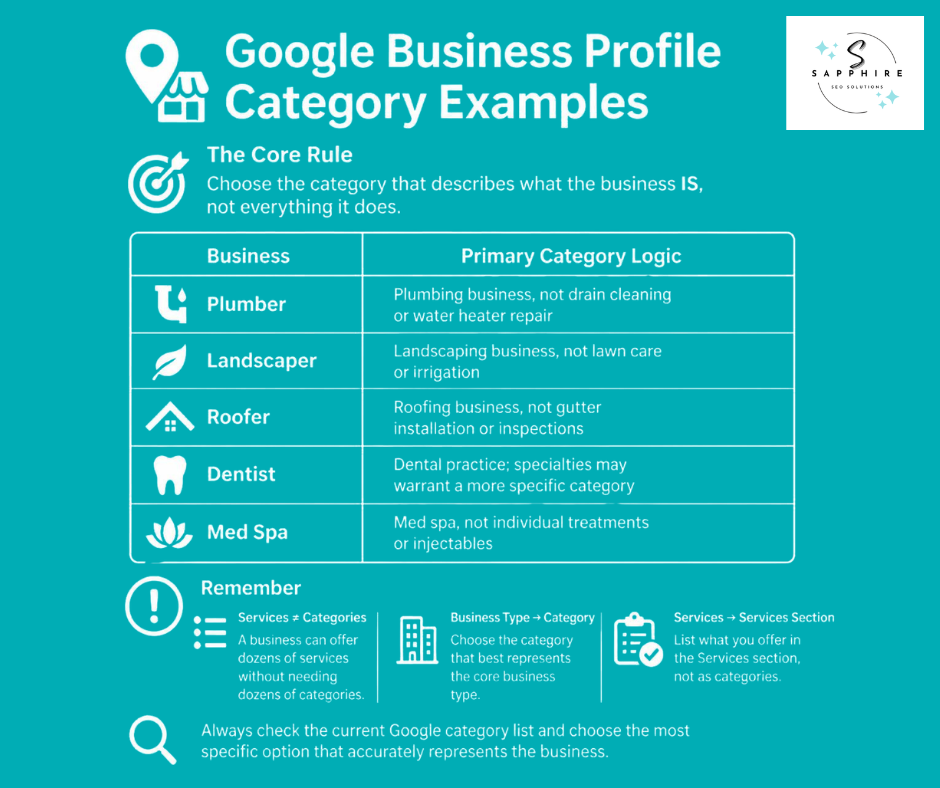
Here's the framework in action, across a few different businesses. None of these are the "correct" answer for every business of that type. They're here to show how the decision plays out.
Plumber
The business is a plumbing company. That's the primary category. Its services- water heater repair, drain cleaning, leak detection- don't belong in the category field. They belong in the services section. The lesson holds regardless of industry: services aren't automatically categories.
Landscaper
A landscaping company might offer lawn care, tree service, irrigation, and hardscaping under one roof. That's four services, not four categories. Unless one of those genuinely operates as a separate, distinct business line, the primary category stays "Landscaper," and the rest live in the services list. Multiple services don't automatically mean multiple business categories.
Roofer
The primary category is the roofing business itself. From there, additional categories only make sense if another legitimate business classification genuinely applies, not because "Gutter installation" or "Roof inspection" sound like they'd help. Run each candidate through the same test used throughout this guide before adding it.
Dentist
A general dentist's primary category is straightforward. Where it gets more interesting is a practice with a genuine specialty focus, where a more specific classification might apply. Either way, individual treatments like whitening or root canals stay out of the category field entirely.
Med Spa
A med spa might offer a long menu of treatments, injectables, laser work, and skin care. The category field still only needs to answer what the business is. A packed treatment list doesn't require a packed category list.
Other Businesses
The same logic scales across nearly anything.
A clothing store and a fabric manufacturer are different business types, even though both deal in fabric.
A grocery store carrying vegetable and fruit stock isn't the same as a produce processing operation.
A kayak store selling canoe gear, a pharmacy, a real estate agent, a law firm, an HVAC company, and an event venue are all businesses Google's list accounts for specifically, right alongside less common entries like a chamber of commerce, a housing department, a public safety department, or an electric vehicle dealer.
Even a Christian college or a Latter-day Saints church has its own accurate classification available. The list runs deep. The exercise is always the same: find what the business actually is, and check it against what Google currently offers, since the list does change over time.
Google Business Profile Category Checklist
Use this before you finalize any primary category or additional categories on a profile.
Google Business Profile Category Checklist
More Resources to Explore
Want to learn more about local SEO or managing your GBP? Read the following guides:
Your Google Business Profile Category Is Only One Part of Local SEO
Your category tells Google what your business is. Local SEO has to build the broader context around that business, the part a category alone was never designed to carry.
Think of it as a chain. Category establishes what the business is. Services describe what it actually offers. The website adds detailed context around both. Reviews and prominence build reputation and recognition. Location determines where the business genuinely serves customers. And a real local SEO strategy is what ties all of that together around the searches that matter commercially.
Google's own guidance backs this up. Local ranking is based mainly on relevance, distance, and prominence, and complete, accurate business information is what helps Google understand a business well enough to match it to the right searches. Category feeds into relevance. It doesn't touch the other two.
That's worth sitting with. If a category is wrong, fixing it matters, and everything in this guide is built to help with exactly that. But if the rest of the profile, the website, the services, the reviews, the broader local presence, isn't working together, changing one category won't close the gap on its own. Local search rankings come from all of it moving in the same direction, not from one field being correct.
Need help optimizing your Google Business Profile? Sapphire SEO Solutions can review your Business Profile, identify where it's falling short, and connect that work to a broader strategy built around the searches that actually bring in customers.
See how our Google Business Profile Management Services work, or look at our full Local SEO Services.
Alternatively, you can contact us to schedule a free consultation with an SEO expert to learn more about GBP categories and the one that suits your business today!

Frequently Asked Questions About Google Business Profile Categories
What is the best category for a Google Business Profile?
There isn't one. No single category is universally "best," because the right answer depends entirely on what the business actually is. The appropriate category is the most specific, accurate option available that genuinely represents the business, whether that's a repair shop, a computer desk store, or something as specific as a space history museum. Google's list covers a surprising range of business types, so the goal isn't finding the "best" category in general. It's finding the one that's true for this business.
How many categories can a Google Business Profile have?
One primary category, plus up to nine additional ones. That's ten total slots between primary and secondary categories, though most businesses need far fewer than that to describe themselves accurately.
Should I use all 10 Google Business Profile categories?
No. Google recommends using as few categories as possible to describe the core business, not filling every available slot. A profile with two accurate categories will represent the business more clearly to Google than one with ten loosely related ones.
Can I create my own Google Business Profile category?
No. Every category comes from Google's own predefined list. You can't invent a new one or submit custom wording, no matter how well it fits.
What's the difference between a primary and additional category?
The primary category is the single classification that best answers what kind of business this is overall. It carries the most weight on the profile. Additional, or secondary, categories describe other legitimate business types the company genuinely represents. They're optional, and they're not meant to double as a list of services.
Do Google Business Profile categories affect rankings?
Yes. Google explicitly says the categories selected affect local ranking. That said, category is one input among several, alongside distance and prominence, so it shapes search visibility without single-handedly deciding it.
Can I change my Google Business Profile category?
Yes. Categories can be edited directly through the Business Profile at any time. The change goes through Google's review process before it shows live, and it's worth doing for a real reason, like a business that's genuinely changed, rather than as an experiment.
What if Google doesn't have my exact business category?
Choose the closest accurate general category instead of forcing an unrelated one that happens to contain a keyword. Google's own guidance is direct about this: if the specific category doesn't exist, pick the general one that still tells the truth about the business.
How do I know if my category is actually working?
There's no dashboard that tells you a category is "working" in isolation. What you can do is check how the business shows up for the search queries that matter most, how it compares to local competitors in those results, and whether the businesses reaching potential customers for those same searches share a similar classification. None of that proves a category caused a result, but it's a reasonable way to sanity-check the choice against how people actually search on Google Search and Maps.