

How to Do Local SEO for Multiple Locations: A Complete Guide
Say you own a plumbing company with four shops. One gets a steady stream of calls. Another barely gets a ring. Same website, same brand, same owner. So what's going on?
That puzzle sits at the heart of how to do local seo for multiple locations. A quick definition first. Local SEO is the work of showing up when people nearby search for what you do. Local search engine optimization across several branches means doing that for each one separately, while keeping them tied to one brand.
Optimizing a single shop is fairly simple. Managing multiple locations is a different job. Every location has its own competitors, search demand, customers, and local reputation. Each sits at a different distance from the people searching. Each has its own level of authority in town, and its own openings. Google says local results are based mainly on relevance, distance, and prominence, and all three change from one address to the next.
That's the central challenge. Your brand needs to feel consistent, but your locations can't be copies of each other. Swapping a city name on a page and moving on isn't one of the local SEO strategies that works. Neither customers nor search engines get much from a page where only the city changed.
So this guide follows a set order: Understand, Prioritize, Research, Establish, Localize, Build Authority, Measure, Scale. Each step builds on the one before it.
One more thing before we start. The goal isn't traffic from every city on the map. It's qualified visibility in the markets that matter to your business. Because local SEO focuses on people ready to call or book, a smaller number of the right searches beats a big pile of the wrong ones. Many local businesses learn that the hard way.
Key Takeaways
Count only real locations. Serving another city, a virtual office, or a P.O. box doesn't create a new location.
Split SEO effort by opportunity, not evenly. Put the most work where a market can actually pay back.
Every town has its own search results. Check who's winning in each market before changing a single page or profile.
Build a page only where you have real local proof. Swapping city names creates doorway-style pages Google may rank lower.
Standardize the process, not the evidence. Photos, projects, and proof must come from each location.
Reviews are market research. Compare review volume, recency, and complaints across locations, and never offer incentives or script wording.
Judge each location by calls, leads, and revenue, not rankings. Rankings alone can look great while the phone stays quiet.
AI search runs on the same foundation as regular SEO. No special schema, llms.txt, or citation guarantees exist.
Does Your Business Actually Have Multiple SEO Locations?
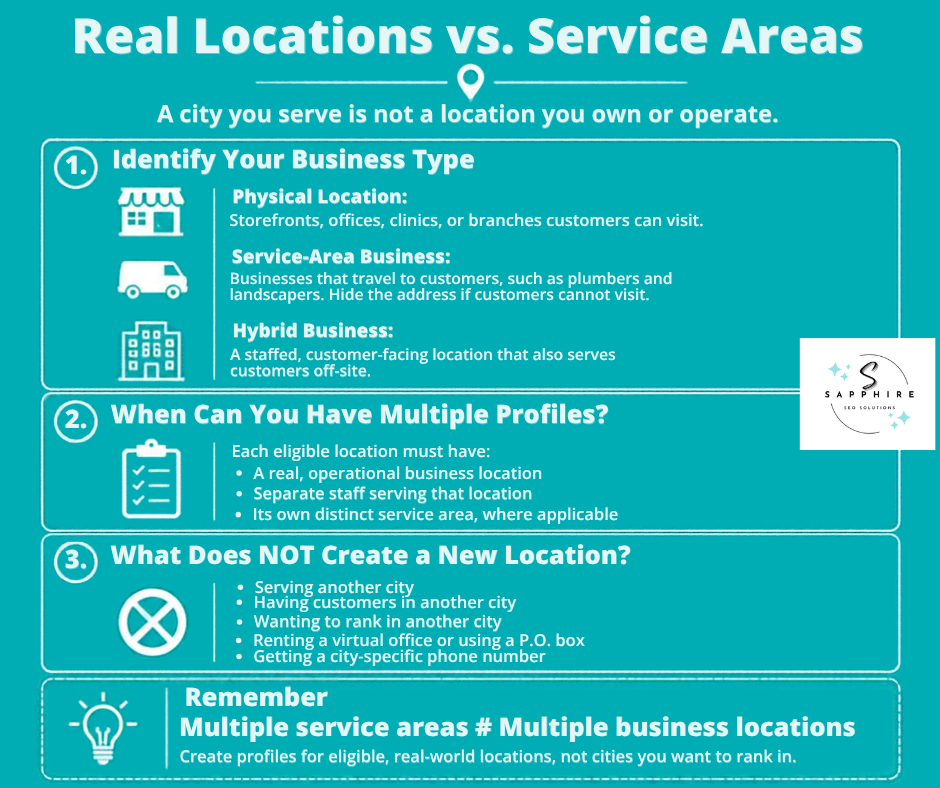
Before you build a page or claim a profile, answer one plain question. How many locations does your business really have? Not how many cities you serve. How many places can a customer visit, or a crew drive out from?
Google's rule is simple. A Business Profile is open to a business with a physical location customers can visit, or one that travels to customers where they are. Offices, storefronts, clinics, branches, practices, and facilities all fit the first group.
The second group is the service area business. Think of a plumber or a landscaper who goes to the customer. With no storefront and no clear signage, you're allowed one service-area Business Profile, and Google says to hide your address from customers. A plumber who works from a home address, for example, should clear it off the profile. If you hide it and don't enter any service areas, Google chooses a local area for you.
Hybrids land in between. An auto repair shop with a garage and a roadside service can show its storefront address and set a service area, but the location has to be staffed by your team and able to receive customers during its stated hours. Service areas have limits too. The boundaries shouldn't stretch farther than about 2 hours of driving time from where the business is based, though larger areas may suit some businesses.
So when do you get more than one profile? When you have different locations, with separate service areas and separate staff at each, Google allows one profile for each location. Real staff, real service areas, real operations.
Now the other side. None of these create a new location:
Serving another city
Wanting to rank in another city
Having customers who live in another city
Renting a virtual office (a rented physical address you don't operate from isn't eligible)
Using a P.O. box (P.O. boxes and mailboxes at remote locations aren't acceptable)
Getting a city-specific phone number (fine for a real location, but it doesn't create one)
Serving multiple areas doesn't make you a multi-location company. It makes you a company with a big territory.
Why does this matter in an SEO guide? Because Google asks you to create a profile for your actual, real-world location, and if it decides your business doesn't exist where you claim, it will disable the profile. It also says no more than one page per location, since extra profiles can cause problems with how your information shows on Maps and Search. A fake location brings verification trouble, a location page with nothing real to say, and customers who show up at an address with no shop. It also burns SEO hours you could have spent where they pay off.
Count the real ones first. Everything else in this guide builds on that number.
Audit Your Locations and Prioritize the Markets Worth Winning
Not every location deserves the same attention. Some already bring in local customers without much help. Others sit in strong markets but need real work. A few are in towns where the phone won't ring much no matter what you do. So before you spend anything to attract local customers, find out which is which.
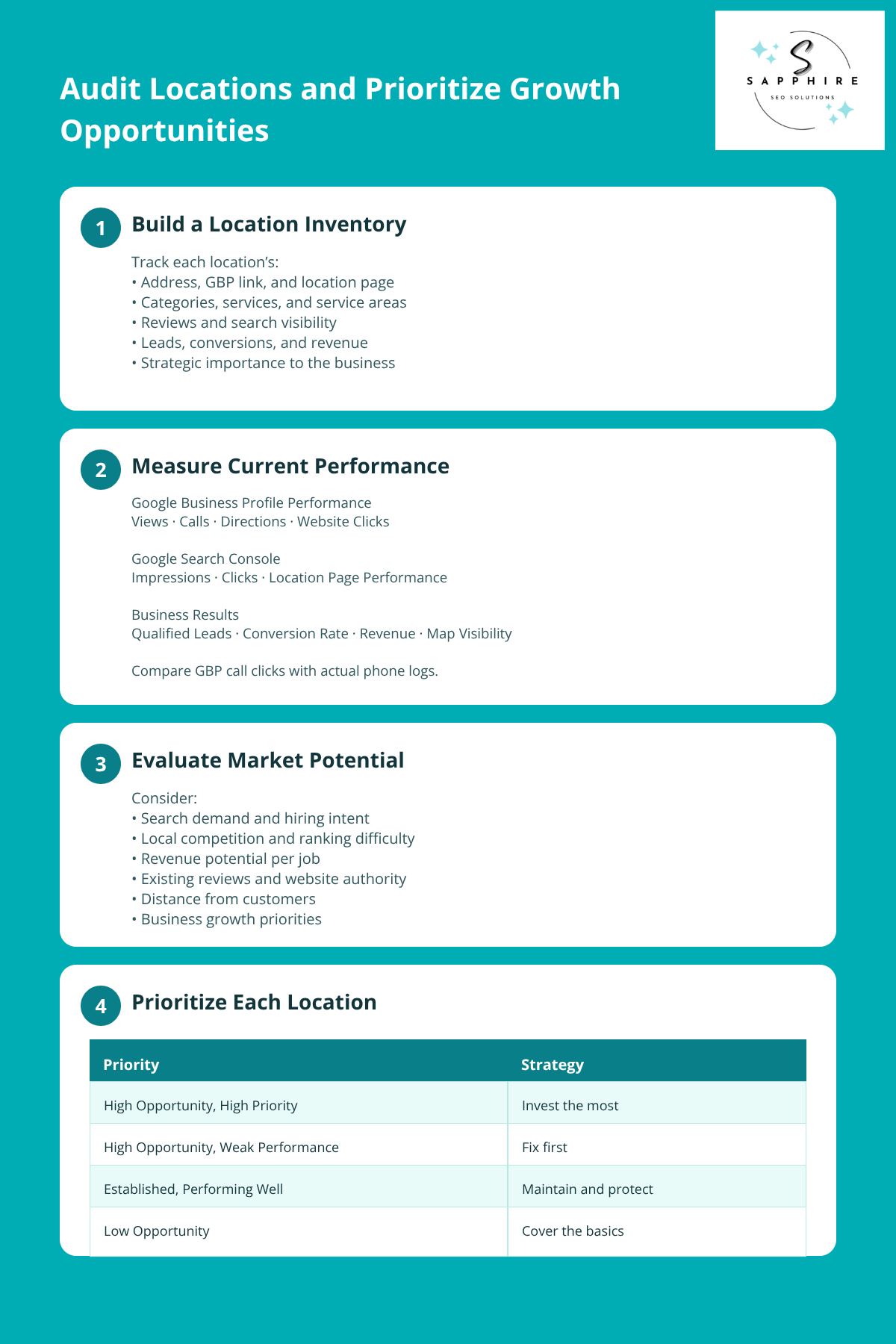
Start with a Location Inventory
Build one spreadsheet with one row per location. Here's what goes in it:
The basics: address, Google Business Profile link, location URL, phone, and hours
How it's listed: primary category, services, and service area
What it produces: reviews, current search visibility, leads, and revenue
Your call: how important the location is to the business
If you can't fill in a cell, that's a finding too.
See What Each One Is Doing
Google Business Profile has a Performance report that only covers verified profiles, and only metrics that apply to your business appear. Where available, it shows views, directions, calls, and website clicks. One catch. Calls count clicks on the call button, so calls made another way won't show up. Compare it with your own phone logs.
Then open Search Console, Google's free tool that shows how often your website appears in search and how often people click. Add a page filter, and you can look at one location page at a time. The default view covers the past three months. Google says to focus more on impressions and clicks than on position. Pair that with leads, conversion rate, review strength, and where you show up in the map results at the top of Google. Now you've got a fair read on your online visibility, location by location.
Size Up Each Market
Search demand matters. But so does what people searching actually want. Someone typing "emergency plumber" is closer to hiring than someone browsing. Then weigh:
Competition
Revenue per job
The authority you already have
What the business wants to do next
Distance counts too. Google looks at how far each business is from the customer who's searching, and prominence is based partly on how many websites link to your business and how many reviews you have. Two locations on one website can land in very different spots on both. Your target audience may change from town to town as well.
And the biggest city isn't automatically the best bet. A crowded one can cost more to win than a smaller town where your potential customers have few good options.
Sort the Locations
Skip the fancy scoring formulas. A simple sort works.
Opportunity Prioritization
| Group | What It Looks Like | What You Do |
|---|---|---|
|
High Opportunity, High Priority
|
Strong demand, real revenue, and room to win. | Gets the most work and budget. |
|
High Opportunity, Currently Weak
|
Good market, weak showing. | Fix first. Biggest upside. |
|
Established, Maintain
|
Already doing well. | Protect it without overspending. |
|
Low Opportunity, Deprioritize
|
Little demand or low revenue. | Handle the basics only. |
Spread the Effort by Opportunity
Don't split SEO work evenly. Hand it out by opportunity. Many businesses do the opposite, giving every location the same monthly hours, and then wonder why nothing moves. Put the effort where it can attract customers who'll actually pay, and increased visibility will show up where it counts.
Research the Local SERPs Before You Optimize Anything
A SERP is just the search results page, the screen Google shows after someone types in a search. Look at it for each priority location before you touch a single page or profile. Because until you see who's winning in a town, you can't know what your location there needs.
There's a catch, though. Google uses your location to show nearby results, even if you didn't include a location in your search. So what you see from your desk may not match what customers across town see. Add the city to your search, like "coffee shops in Chelsea." Then check the line at the bottom of the results. It shows how Google guessed your location, with labels like "From your device." Past searches can sway results too. Google says that after you search "coffee shops in Chelsea," a search for "nail salon" might show nail salons in Chelsea.
Search the Terms Your Customers Would Use
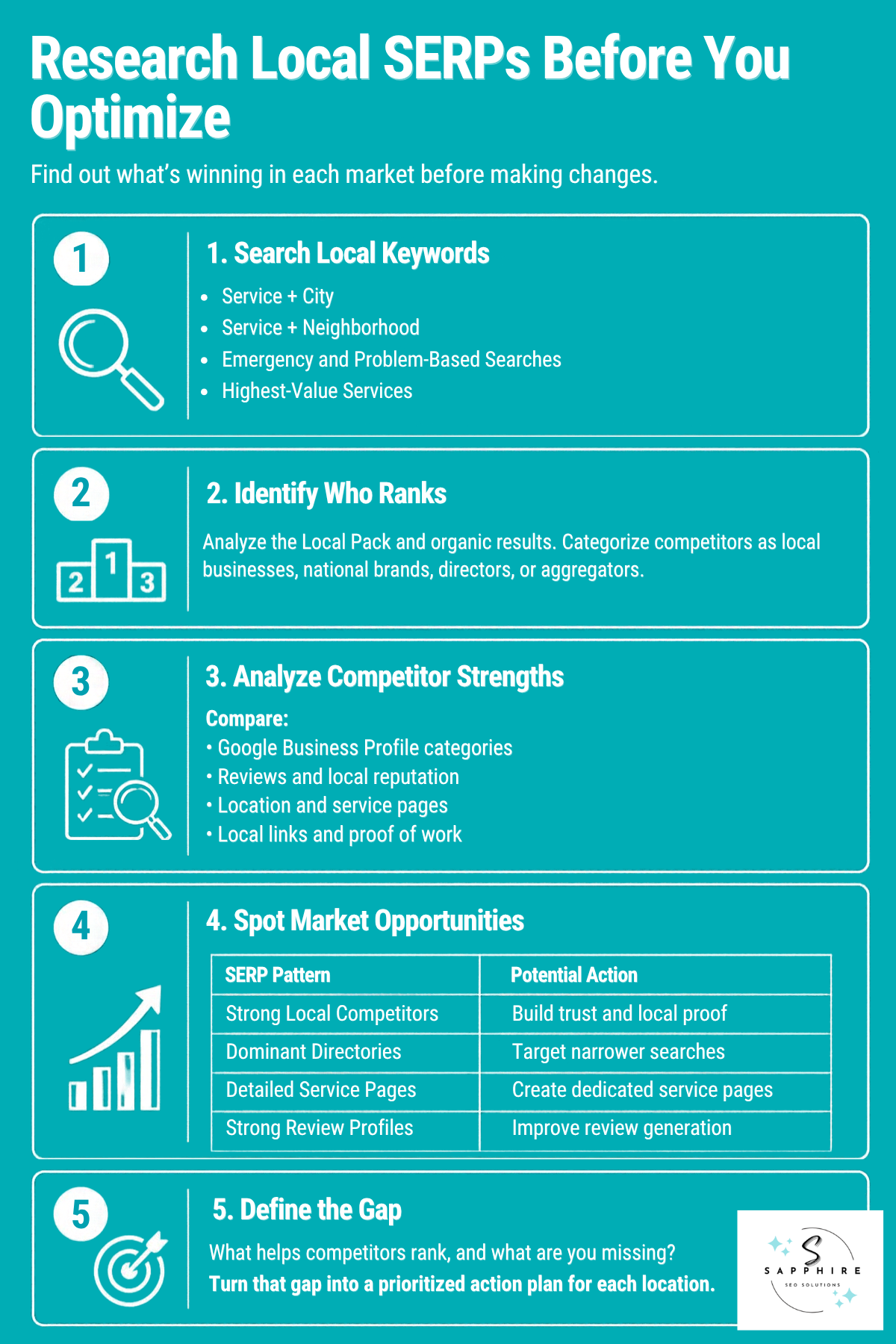
For each priority location, run searches like these. They're your search terms for this research, and the ones with a city or neighborhood in them are your location-specific keywords.
Service plus city, like "water heater repair Dallas"
Service plus neighborhood
Service plus "near me" (a spot check only, since results depend on where the searcher stands)
Emergency searches, like "emergency plumber"
Problem searches, like "no hot water"
Your highest-value services
Find Out Who Google Is Rewarding
On most of these searches, you'll see a map with a short list of businesses under it. That's the local pack, also called the map pack. It typically shows three businesses, though Google sometimes shows more or fewer. The map is drawn from Google Maps, and a "More places" link opens a longer list.
Then scroll down through the rest of the local search results. Sort every result into a bucket: local specialist, national brand, directory, or aggregator (a site that collects listings from many companies). Who's in the pack? Who's sitting just below it?
Compare What the Winners Have
Google lists relevance, distance, and popularity as the main ranking factors for local results, and says there's no way to request or pay for a better local ranking. So you can't buy the spot. But you can see what's behind it. Compare Business Profile strength, reviews, categories, location pages, service pages, local content, local links, proof of local work, and how easy it is to call or book. Jot down the relevant keywords the winners use naturally. Don't count their words or copy their pages, though. You're hunting for patterns, not a template.
Expect Every City to Look Different
Here’s a table that guides you on how to read the search results:
Reading the Search Results
| If the Results Are Packed With... | It May Mean... | What to Focus On |
|---|---|---|
|
Established Local Businesses
|
Trust and local proof carry the most weight. | Strengthen local credibility and evidence. |
|
Directories
|
Broad searches are crowded, so narrower ones may be easier. | Explore more specific service and location searches. |
|
Strong Service Pages
|
You need a detailed page for each key service. | Build useful, focused service pages. |
|
Businesses With Exceptionally Strong Reviews
|
Reviews are the first gap to close. | Prioritize a consistent, policy-compliant review strategy. |
Write an Opportunity Statement
For every priority location, answer one question in a sentence or two.
What appears to be helping the businesses that rank here, and what evidence does our business currently lack?
Something like this: the businesses in the pack have far more reviews and a page for each major job, while ours has a handful of reviews and one page covering everything. That sentence becomes the to-do list for the market. And it keeps your local keywords tied to what's really winning there, not to a guess.
Build and Optimize Google Business Profiles for Each Location
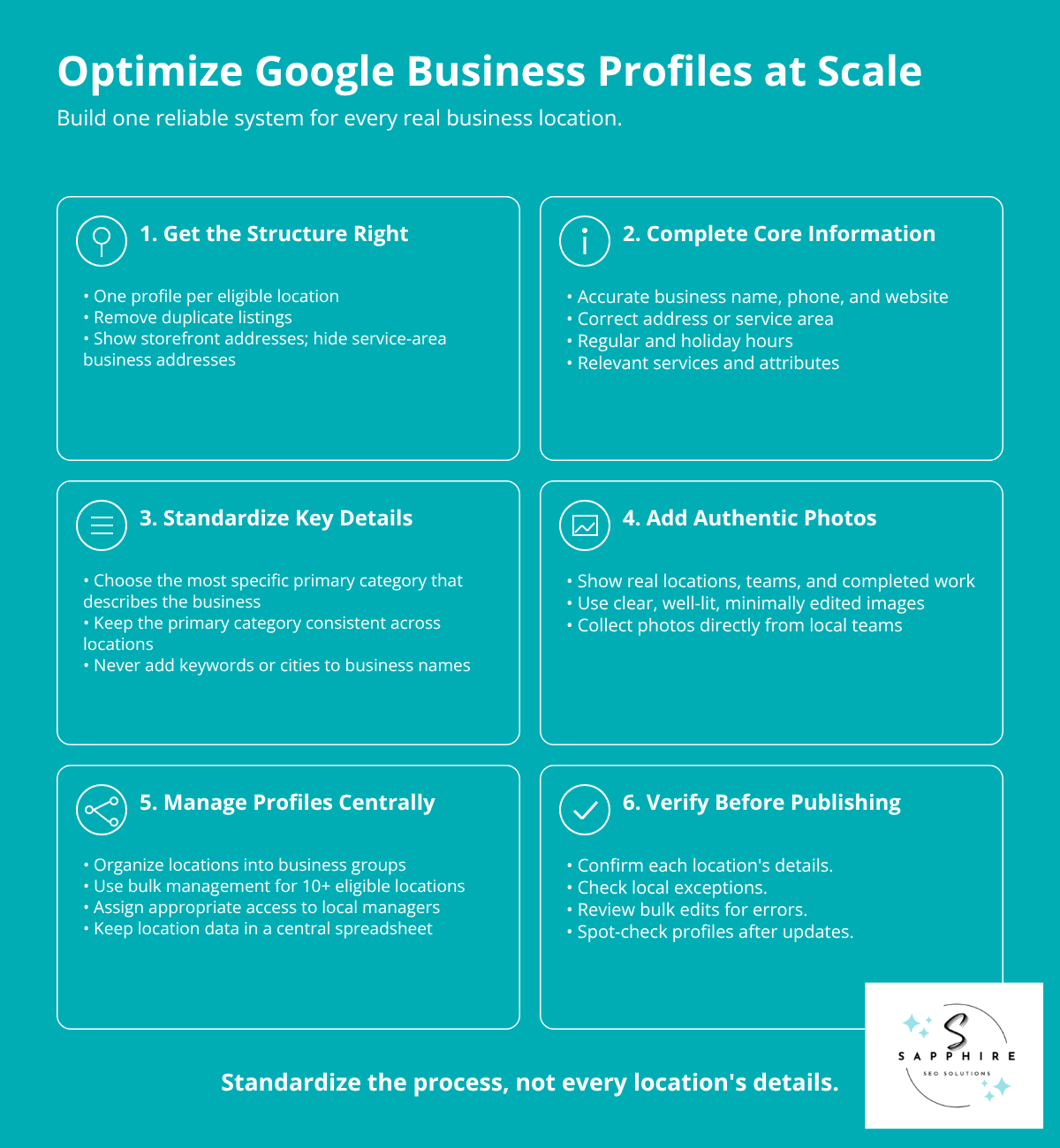
Setting up one Google Business Profile takes an afternoon. Keeping ten of them accurate, month after month, takes a system. So this section is less about filling in every field and more about running a set of profiles without letting any of them drift.
Get the Structure Right First
Each Google profile should match one genuine location. Google says not to create more than one page for each location of your business, whether in a single account or several. A second business listing for the same spot can muddy how your information shows up on Maps and Search. So hunt down duplicate listings early. Then match the setup to how the location really works. Storefronts show their address. Service-area locations hide it.
Fill in the Core Information
Google says businesses with complete and accurate business information are more likely to show up in local search results. More likely, though. Not guaranteed. Cover these:
Business name: Use the real-world name from your storefront, website, and stationery. Including unnecessary information in your business name isn't permitted, and it could get the profile suspended. So no keywords, and no city added to help you rank. Google also says all locations within the same country must share the same name, with two narrow exceptions.
Address or service area: Match how the location actually operates.
Phone and website: Google asks for a phone number that connects to the individual location, or a website that represents it. It prefers a local phone number over a central call center helpline number whenever possible.
Business hours: Your regular customer-facing hours, plus special hours for holidays and events.
Services and attributes: The details customers check before they call, like parking.
Choose the Primary Category Carefully
Your primary category says what the business is. Google's test is to pick categories that finish the sentence "This business IS a," not "this business HAS a." Use as few categories as possible, as specific as you can, while still representing your main business. And don't use categories solely as keywords. With multiple locations, there's one more rule. All locations of a business must share a primary category. So decide it once, centrally.
Add Photos That Show the Real Location
Photos appear only on a verified profile. Google wants high-quality photos, meaning in focus, well lit, and without significant alterations or excessive use of filters or AI, because the image should represent reality. Files can be JPG or PNG, between 10 KB and 5 MB. Service businesses should add at least three photos at work, showing the team doing different kinds of jobs. And with 10 or more locations, you can bulk upload photos. Your local crews are the best source, since they're the ones on the job.
Manage Many Profiles as One System
Start with a business group, which Google used to call a business account. With 10 or more locations, you can add, verify, and manage them in bulk. Build a spreadsheet of every location, upload it, then request bulk verification. One catch: uploading a spreadsheet doesn't send a verification request. And duplicate, suspended, or disabled profiles don't count toward the 10-profile minimum. Google also says it may de-verify accounts that don't actively manage their profiles.
Add the right owners and managers to the group so access stays tidy. Local managers can make quick fixes from the Google Maps app on their mobile devices, like a holiday hours change.
Check Before You Publish Across Locations
Bulk edits are fast. Mistakes spread just as fast. So before anything goes live:
Verify the information against what's true at each location.
Look for location-specific exceptions, like seasonal hours or a different phone number.
Confirm the change won't overwrite a legitimate local difference.
Spot-check a few profiles after the update.
Standardize the process. Don't make every profile identical.
Decide Which Locations Need Their Own Website Pages
Does every physical location need its own page? Usually, yes. A real place with real hours, a real team, and a real address gives customers plenty to look for. Location pages for multiple locations are the easiest way to put all of that in front of them. But a page for every location isn't the same as a page for every city you serve. And that's where many local businesses get into trouble.
So run one test. Would this page exist if Google didn't? Google's own self-check asks something close: would your audience find the content useful if they came directly to you? If a customer would want it, build it. If the only reason is to catch one more search, skip it.
Know What You're Building
Choosing the Right Page Type
| Page Type | What It Is | Verdict |
|---|---|---|
|
Location Page
|
A page for a real place customers visit or crews leave from. | Build it |
|
Service-Area Page
|
One page for the region a location serves. | Usually one per location |
|
City Landing Page
|
A page for a city you serve but have no location in. | Only with real local proof |
|
Service + Location Page
|
One service in one place, like water heater repair in Plano. | Worth it for high-value services |
|
Doorway-Like City Page
|
Near-copies that only change the city name. | Don't build |
Where Google Draws the Line
Google's spam policies define doorway abuse as pages created to rank for specific, similar searches that lead users to intermediate pages that aren't as useful as the final destination. Two of its examples fit multi-location sites: pages targeted at specific regions or cities that funnel users to one page, and substantially similar pages. Sites that break the policies may rank lower in results or not appear in results at all. Scaled content abuse is a close cousin. It covers many pages generated for the primary purpose of manipulating search rankings, no matter how it's created, including generative AI tools used to generate many pages without adding value.
What Earns a Dedicated Page
A genuine location almost always does. A service area or a city earns one only when you can show real local content, like a meaningful customer base, services that differ from your other locations, local staff, real operations, and proof from that area. No proof, no page.
What Goes on a Page That Deserves to Exist
Here’s what your page should have:
The basics: address, hours, phone, directions, and a clear way to call, book, or ask for a quote
What's offered there: the services available at that location and the areas it covers
Who's there: the local team, where it helps customers
Proof: local photos, recent projects, and customer reviews from that area
Answers: FAQs about that market
Differentiate with Facts, Not City Names
Swap Dallas for Houston or Austin, and you've changed nothing a customer cares about. Use what's really different instead:
Services
Team
Projects
Customers
Local conditions
Availability
Community involvement
Google asks whether content provides original information and demonstrates first-hand expertise. That's high-quality local content, and it's the only kind that holds up.
And forget word counts. Google asks whether you're writing to a particular word count because you've heard it has a preferred one. Its answer: "No, we don't." The same goes for the "change 30% of the text" idea. Google's doorway wording is about substantially similar pages. It doesn't name a percentage.
Fix the Pages You Already Have
Here’s how you should fix your existing pages:
Improve thin pages by adding real local proof.
Consolidate overlapping pages into one stronger page.
Redirect the old URLs. Google lists consolidating several pages into one as a legitimate redirect.
Remove pages with no purpose. For scaled content, Google says to exclude it from Search.
Keep any page that serves a legitimate purpose, even if it never ranks.
For a full walkthrough, see our [SEO Location Pages guide](add link). Fewer, better pages beat a hundred copies. That's how online visibility gets built in the towns that matter.
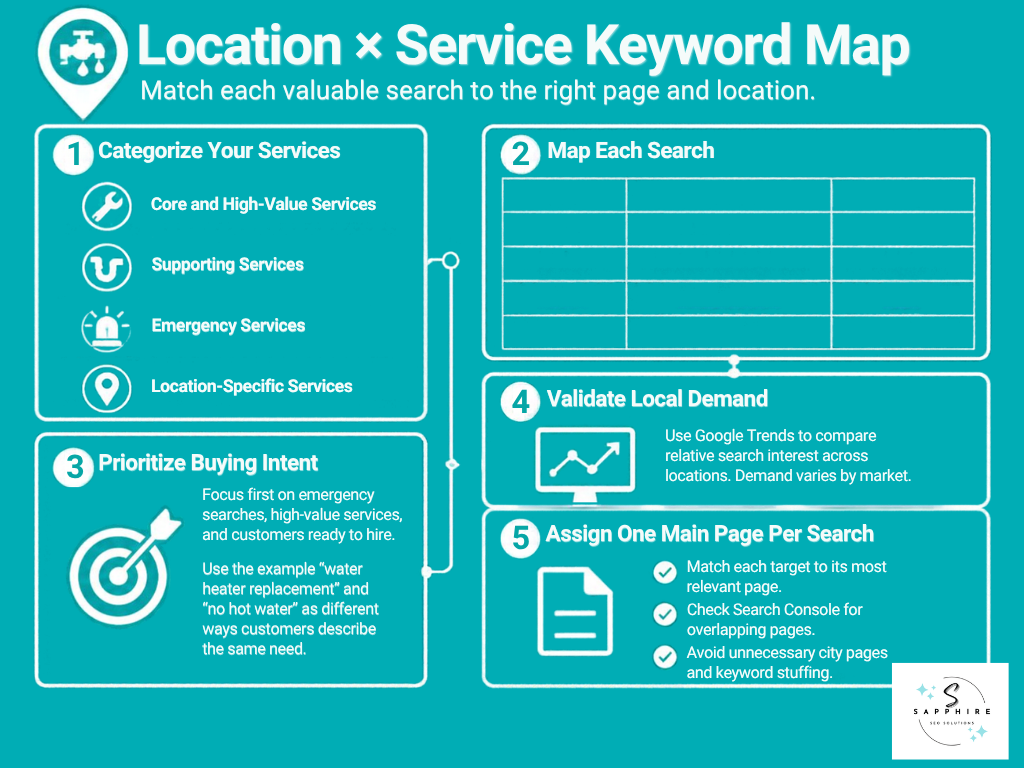
Build a Location × Service Keyword Map
A keyword map is a simple chart. It says which page goes after which search, in which place. Nothing fancy. And it keeps you from collecting thousands of keywords you'll never use (our [Local Keyword Research guide](add link) covers that side).
Start with what you actually sell:
Core services: the bread and butter
High-value services: the jobs that pay the most
Supporting services: smaller jobs that ride along with bigger ones
Emergency services: the calls that can't wait
Location-specific services: anything only one location offers
Then build a matrix with one row per location and service. Add the intent behind the search, your priority, and the page it should land on.
Location and Service Keyword Mapping
| Location | Service | Intent | Priority | Target Page |
|---|---|---|---|---|
| Dallas | Emergency plumbing | Hire | High | Dallas location page |
| Dallas | Water heater repair | Hire | High | Dallas water heater page |
| Plano | Drain cleaning | Hire | High | Plano location page |
| Plano | Sewer repair | Hire | Medium | Sewer repair service page |
Put Buying Searches First
Rank the rows by how close the searcher is to hiring. Service searches, emergency searches, and high-value problem searches come first. Someone typing "burst pipe" is a customer. Someone reading about how pipes work isn't, yet.
Your target audience doesn't search with one vocabulary, either. Google's SEO guide notes that people who know a topic well use different keywords than people who are new to it, with "charcuterie" versus "cheese board" as its example.
So a landlord might type "water heater replacement" while a homeowner types "no hot water." Write down the search terms both groups use. And skip exact-match rules because Google says its language matching systems can understand how your page relates to many queries, even if you don't explicitly use the exact terms.
Don't Assume One Demand Everywhere
Same business, different towns, different demand. Your service area isn't one market. To compare, try Google Trends. It doesn't give exact numbers. It indexes interest from 1 to 100, where 100 is the highest interest for the time and place you picked, and it can break results down by region, city, and in some countries, metro area.
Give Every Search One Page
Each target gets one main page. If two of your pages chase the same search, they compete with each other. SEO’s call that cannibalization. Google doesn't use the word, but it does say duplicate content isn't a spam violation. It can still be a confusing user experience when two pages hold the same information. Its fix is to redirect the non-preferred URLs to the page that best represents the information, or use a canonical tag if you can't redirect (a note in the page's code that names the main version). To spot the overlap, filter a query in Search Console and see which of your pages show up.
Also, "near me" isn't a page type. Google uses location to show nearby results even if you didn't include a location in your search, so there's nothing to build. And don't stack pages with city names. Google lists blocks of text that list cities and regions a page is trying to rank for as keyword stuffing, which is against its spam policies.
When every row has one job and one page, you've got a map you can actually follow.
Optimize Each Location for Relevance, Local Evidence and Conversion
Getting more traffic to a location page is only half the job. The other half is what happens next. A visitor lands, glances around, and decides in seconds whether you're the right company for the job in their town. So the page has to answer one question fast: is this the right business for the service I need, in this location?
Say It on the First Screen
A visitor should see:
Who you are
Where this location operates
What it offers
Who it serves
How to reach it
Get the Page Elements Right
Here’s what to do with every page element:
SEO Location Page Elements
| Element | What to Do |
|---|---|
|
Title
|
Google says titles should be descriptive and concise, distinct from page to page, and free of repeated words. Brand them briefly. |
|
H1
|
Make the main title the most prominent text on the page. Google suggests using the first visible H1 element. |
|
Headings
|
Write them for readers. Google says there's no ideal number of headings, and out-of-order headings don't matter to it. |
|
Internal Links
|
Use descriptive link text so people and Google know what's on the other side. |
|
Images
|
Place real local photos near the text they relate to, with short descriptive alt text. |
|
Contact Info
|
Use a phone number or website that connects to the individual location, not a central call center line. |
|
Structured Data
|
Code that labels your name, address, and hours so Google can read them. Mark up each location as a LocalBusiness, using the most specific sub-type that fits. |
Show Proof That's Actually Local
Anyone can write "serving Plano." Proof is harder to fake, and that's the point. Use local projects, the team that works there, credentials, case studies, and community involvement. Quote satisfied customers by first name and neighborhood, with permission. A quote from one of your happy customers beats a paragraph of claims.
Pull positive reviews from that location's own profile. Google says a mix of positive and negative feedback often feels more trustworthy, so don't scrub every critical one. And offering incentives in exchange for reviews is strictly prohibited.
Stock photos aren't local proof. Google's standard for profile photos is that the image should represent reality. Hold your site to the same bar. Real crews, real trucks, real jobs in that town.
Make It Easy to Act
Offer the path that fits the job. Emergency work needs a call button at the top. Scheduled work fits a form or a booking link. Quotes need a short request form. Storefronts need directions and hours. Your profile reports the same actions: calls are clicks on the call button, and directions count people who asked for directions. For storefronts, those directions requests hint at foot traffic. And a clear map with posted hours gives people what they need to show up, which can bring more foot traffic.
What to Skip
Don't repeat the city name until it sounds robotic. Google says excessively repeating the same words, even in variations, is keyword stuffing, and it lists blocks of text that list cities and regions as an example. No "best plumber in Dallas" in every heading, either. And dropping landmarks into the copy isn't local relevance. Proof is.
Rankings get a visit. A page like this turns it into a job, and it gives you more to work with than a local customer’s keyword list ever could.
Build the Internal Linking and Technical Foundation
Great location pages still go unseen if Google can't find them or can't tell how they fit together. So this part is about structure. Keep it compact.
Lay Out a Clear Hierarchy
Here’s what a clear hierarchy looks like:
Homepage → Locations hub → Individual location
Location → the services offered there
Service → the locations that offer it
State or region hubs, only if you have enough locations to need them
Link Pages to Each Other on Purpose
Internal links are links from one page on your site to another. Google says they help people and Google find their way around, and that good link text is descriptive, reasonably concise, and relevant. So "Dallas water heater repair" beats "click here." Google can generally only crawl a link that's an <a> element with an href attribute, which is just a standard HTML link.
Then check for orphans. An orphaned page is one nothing links to. Google says it can usually discover most of a site when every page you deem important can be reached through some form of navigation. And link building from other websites comes later in this guide. Internal links are the version you control today.
Run a Short Technical Check
Your technical check should include:
Short Technical Check
| Check | What to Look For |
|---|---|
| Robots.txt | It can stop Google from crawling a page, but it may not always prevent indexing. To keep a page out, use noindex. |
| Noindex and errors | Make sure no live location page carries a noindex tag or returns an error by accident. |
| Duplicate URLs | Two addresses for one page can confuse search engines. Redirect the extras, or use a canonical tag. |
| XML sitemap | A file listing the pages you want found. A well-linked site of about 500 pages or fewer might not need one. |
| Mobile | Google uses the mobile version of your content for indexing and ranking. Keep pages mobile-friendly, with the same content on both versions. |
| Meta descriptions | Google builds snippets primarily from page content, but sometimes uses meta descriptions when they describe the page better. Write a unique one per page. |
Add Structured Data with Honest Expectations
Structured data (schema markup) is code that labels your business details so Google can read them. Google says to define each local business location as a LocalBusiness type, using the most specific subtype possible. But it's not a shortcut. Google has said structured data by itself is not a generic ranking factor, and for AI search, it says structured data isn't required, and there's no special schema markup to add.
Build Reviews and Manage Location-Level Reputation
When a customer is choosing between two companies, online reviews often break the tie. BrightLocal's 2026 survey of 1,002 US adults found that 97% of consumers read reviews for local businesses. And Google says more reviews and positive ratings can help your business's local ranking. So every location needs its own review routine.
Set Up a Routine for Each Location
Managing online reviews across several locations works better as a habit than a rescue mission. Give each location an owner, and have them:
Check for new reviews every week
Ask customers while the job is still fresh
Make it easy to leave reviews, with Google's review link or a QR code
Reply to every review in a human voice
Write down what customers keep mentioning
Asking works. In BrightLocal's data, 83% of people asked to leave a review went on to leave one. Replies matter too. 80% of consumers say they're likely to use a business that responds to all of its reviews, but templated replies put off 50%. Google's advice is to keep replies short, simple, and conversational, not promotional.
Know the Rules Before You Ask
Google lets you ask for reviews that reflect a genuine experience. It doesn't let merchants offer incentives such as payment, discounts, or free goods or services. It also bans selectively soliciting positive reviews, pressuring customers to review while on the premises, and requesting that specific content be included. So no keyword scripts, and no "please mention our city." If Google finds fake or incentivized reviews, it can unpublish existing reviews for a set period or show a warning that fake reviews were removed.
Compare Your Locations
Line up review counts, ratings, and recent reviews side by side. BrightLocal found that:
47% of consumers won't use a business with fewer than 20 reviews
74% only care about reviews written in the last three months
31% will only use a business rated 4.5 stars or higher
So a location with a thin or stale profile has a real gap. Look for repeat complaints, too. And look for the location whose customers rave. Find out what that crew does differently, then copy the habit, not the reviews.
Read our guide on “The Role of Online Reviews in Local SEO Rankings” to learn more about the importance of online reviews for your local business.
Read Reviews Like Market Research
Reviews show:
Service gaps
The words customers use
Recurring problems
Hesitations
Operational trouble
Late arrivals point to scheduling, not SEO. A phrase customers repeat belongs on your location page. And reviews from returning customers show what earns repeat business. A positive online reputation gets built that way, one honest review at a time.
One last thing. Don't promise anyone that a set number of reviews will produce a ranking. Google says there's no way to request or pay for a better local ranking.
Build Local Authority and Business Consistency
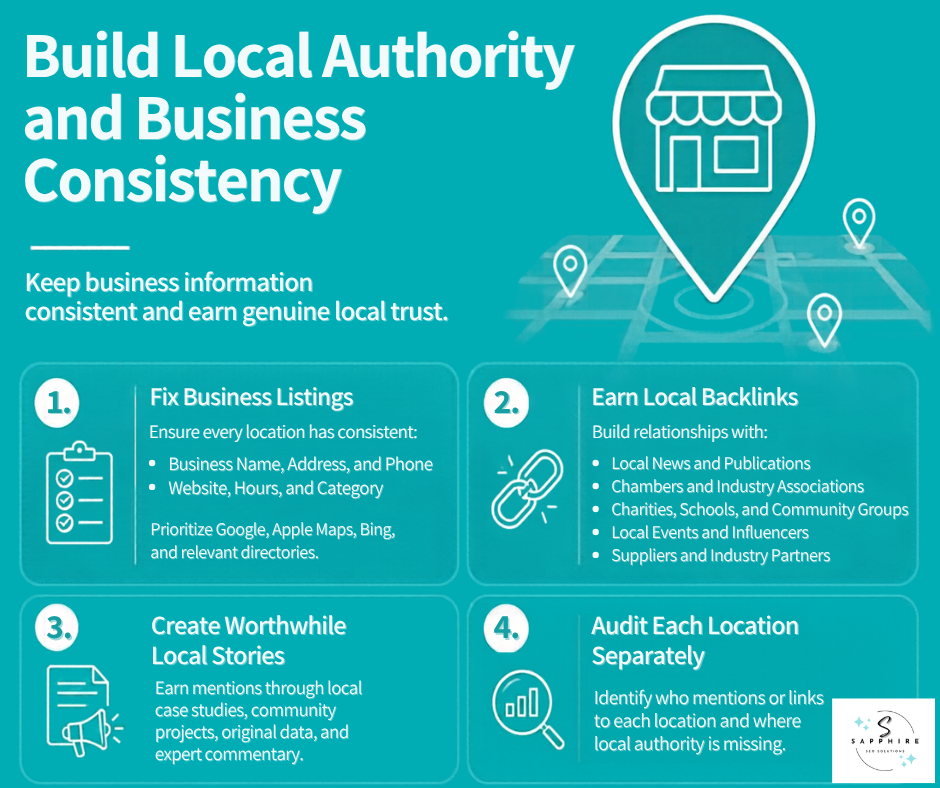
Two jobs here, and the order matters. First, make sure every site that lists your business tells the same story. Then give other sites a real reason to talk about you.
Start with Matching Facts
A local citation is any online listing or mention of your business name, address, and phone number. Google says its systems find details like a site's name, contact information, and social profiles that are publicly available on the web. So when one directory says Suite 4 and another says Unit B, someone has to guess. For every location, check the name, address, phone, website, hours, and category.
Then prioritize. Fix the big local sources first, meaning Google, Apple Maps, Bing, and the directories your customers actually use, before you touch other listings. Whitespark's 2026 survey of 47 local SEO experts ranked a website whose name, address, and phone match the Google profile 15th of 187 factors for the local pack. Citation quantity landed 110th. Those are expert opinions, not Google's data. And Google lists low-quality directory or bookmark site links as link spam. So skip the "submit to 100 directories" advice.
Earn Real Local Authority
A backlink is a link from another website to yours. Think of it as a referral. Google says prominence is partly based on how many websites link to your business, so local backlinks are worth the effort. To build local backlinks, start where your town already gathers:
Local news: Offer expert comment, or share local news tips your crews see first-hand. Whitespark suggests op-eds for smaller local newspapers.
Chambers and associations: Member pages and directories often link out.
Local community groups, charities, and school teams: Sponsorships put your name in front of neighbors.
Local events: Host one or sponsor one.
Local influencers: Bloggers and creators who've seen your work firsthand.
Suppliers and industry organizations: Many keep installer or dealer pages.
Build relationships first. The links follow. Just stay inside the lines. Google calls exchanging goods or services for links link spam, and it lists optimized anchor text in guest posts or press releases distributed on other sites too. Paid and sponsored links are allowed when they're qualified with rel="sponsored" or rel="nofollow".
Give People Something Worth Mentioning
Local case studies, community projects, local data, and expert commentary all earn mentions. A water heater company could track which neighborhoods call most after a cold snap, then share it. That's a story a reporter can use. Google also says seeking inauthentic "mentions" across the web isn't as helpful as it seems.
Think Location by Location
A strong national brand doesn't automatically carry weight in every town. Check each location on its own. Who mentions you there? Who links to you there? Where's the gap?
Optimize Multi-Location SEO for AI Search
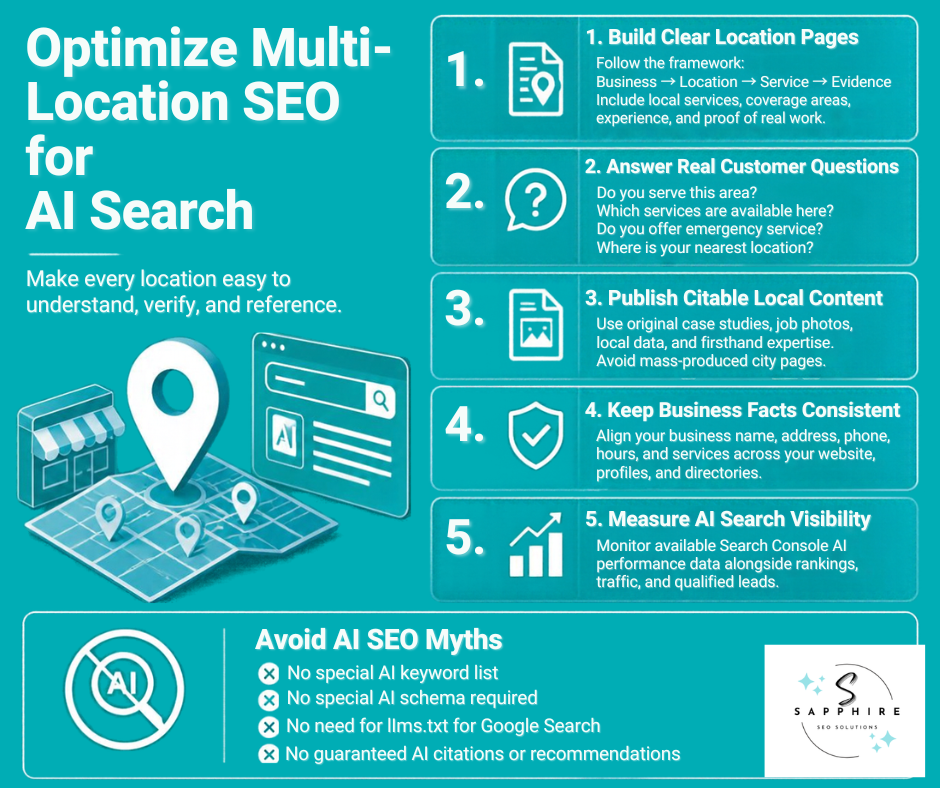
AI search isn't a separate game with its own rulebook. Google says its generative AI features are rooted in its core Search ranking and quality systems, so the work that earns search engine rankings is the same work that gets pages into AI answers. And people are using these tools.
BrightLocal's 2026 survey found that 45% of consumers use generative AI tools like ChatGPT for local business recommendations, up from 6% a year earlier. Google's guidance covers Google's own AI features, though. Other tools work differently, and nobody outside those companies knows exactly how.
How AI Features Find Your Pages
Google's AI Overviews and AI Mode may use query fan-out, which just means running several related searches at once to build one answer. Google's example: for "how to fix a lawn that's full of weeds," the system might also search "best herbicides for lawns" and "how to prevent weeds in lawn." So a question about sewer problems can pull in pages on repair costs, warning signs, and local availability. To show up at all, a page must be indexed and eligible to appear in Google Search with a snippet. And indexing and serving aren't guaranteed.
Spell Out the Chain on Every Location Page
Business → Location → Service → Evidence. Each location page should say who you are, where this location is, what it offers, which services are available there, and what proves it. Don't let a location lean on the homepage to explain itself. Then answer the questions customers really ask:
Do you serve Plano?
Does the Plano location do sewer repair?
Where's your nearest location?
Do you offer emergency service?
Which nearby areas do you cover?
How much experience do you have with this kind of job?
Plain words are enough. Google says AI systems understand synonyms and general meanings, so you don't have to capture every long-tail keyword variation.
Create Content Worth Citing
Google says unique, non-commodity content will likely matter more in the long run than anything else in its guide. It contrasts generic tip lists with a first-hand look inside a sewer line, the kind of piece that comes from a unique point of view. For you, that means job photos, local case studies, specific facts, and your crews' real experience. But don't mass-produce it. Google says creating separate content for every search variation primarily to manipulate rankings or generative AI responses violates its scaled content abuse spam policy. So no AI-generated city pages by the dozen.
Keep Your Facts Consistent Everywhere
Name, address, phone, hours, and services should agree across your website, Google Business Profile, directories, and local publications. Google says Business Profiles can help your services be visible in AI responses. And in Whitespark's 2026 expert survey, 3 of the top 5 AI search visibility factors were citation factors. That's expert opinion, not Google's data.
Measure What You Can
Since June 3, 2026, Search Console has a Generative AI performance report. Google says it shows impressions, meaning how often URLs from your site appeared in generative AI features, with dates viewable at hourly, daily, weekly, and monthly granularity. SEO publishers also report breakdowns by page, country, and device, with no clicks or queries, and a gradual rollout. Treat it as one more signal beside your usual search engine rankings and lead counts. Google also warns that no third-party tool has access to its internal ranking or AI systems.
What AI SEO Doesn't Mean
Here’s what AI SEO doesn’t mean:
No special "AI keyword" list
No special schema, because structured data isn't required, and there's no special schema markup to add
No llms.txt file, since Google says Google Search ignores them
No chopping content into tiny pieces
No guarantee of citations or recommendations
Measure What Each Location Is Actually Producing
Rankings are the easiest thing to screenshot. They're also the easiest thing to misread. A location can sit near the top of Google and still not ring the phone. Cost-effective marketing starts with knowing which location earns its keep, so measure in four layers, one location at a time.
SEO Measurement Layers
| Layer | What to Watch | Where to Look |
|---|---|---|
| Visibility | Organic rankings, Local Pack and Maps positions, branded and non-branded searches | Search Console, plus a rank tracker for map positions |
| Traffic | Visits to location pages, service pages, and landing pages | Search Console, Google Analytics |
| Actions | Calls, forms, bookings, quote requests, directions | Business Profile, Google Analytics, your phone logs |
| Outcomes | Leads, qualified leads, customers, revenue | Your own records |
Visibility and Traffic
In Search Console, add a page filter and look at one location page at a time. Google says to focus more on impressions and clicks than on position. Its branded queries filter then splits searches that include your company name from everything else. Google says non-branded queries show how new users find your content without any initial intent to go to your site. So non-branded searches are where a location earns new customers. The filter, Google adds, has no effect on how Google Search ranking works.
Actions
Business Profile's Performance report covers views, directions, calls, and website clicks for verified profiles. But Calls counts clicks on the call button, so check it against your phone logs. And you can link your profile to Google Analytics, which then receives data like calls, directions, bookings, and website clicks. You'll need an Owner or Manager role on the profile and an Administrator or Editor role on the Analytics property. Give each location its own local number too. Then you'll know whose phone rang.
Outcomes
Ask every location one question each month. Which calls and forms turned into paid jobs? A simple spreadsheet works fine. Rankings and clicks don't pay anyone's wages.
Diagnose, Don't Just Report
Here’s what you should be mindful of during diagnosis:
Strong rankings, weak leads → a page, offer, or service problem
High demand, weak visibility → an SEO opportunity, so put work here
Strong Maps presence, weak conversions → a profile, offer, or customer experience problem
Strong traffic, poor revenue → the wrong searches, or poor commercial targeting
If a number won't change a decision, drop it from the report.
Measure AI visibility on Its Own
Search Console's Generative AI performance report launched on June 3, 2026. Google says it shows impressions, meaning how often your URLs appeared in generative AI features. And Google warns that no third-party tool has access to its internal ranking or AI systems. So treat a vendor's "AI visibility score" as a rough guess, not a verdict.
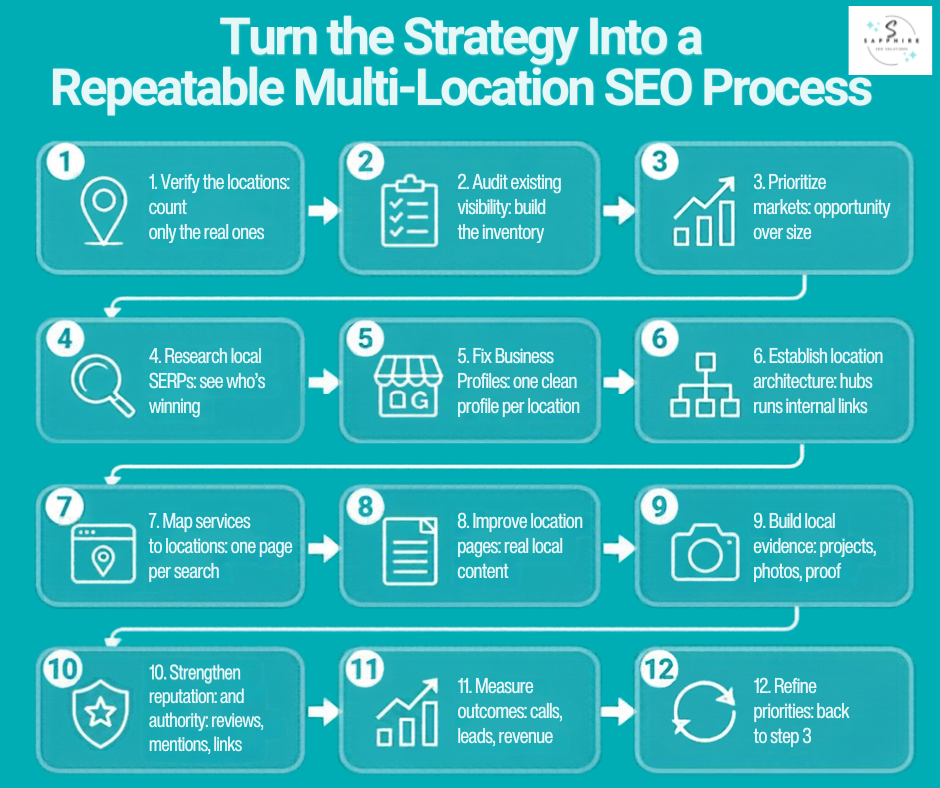
Turn the Strategy Into a Repeatable Multi-Location SEO Process
You've got the pieces now. A process keeps them from collecting dust. Each step below points back to a section above.
Verify the locations: count only the real ones
Audit existing visibility: build the inventory
Prioritize markets: opportunity over size
Research local SERPs: see who's winning
Fix Business Profiles: one clean profile per location
Establish location architecture: hubs and internal links
Map services to locations: one page per search
Improve location pages: real local content
Build local evidence: projects, photos, proof
Strengthen reputation and authority: reviews, mentions, links
Measure outcomes: calls, leads, revenue
Refine priorities: back to step 3
Step 12 sends you back to step 3, so the whole thing runs as a loop.
Split the Work Between Head Office and Each Location
Central Team vs. Local Team Responsibilities
| Central Team Owns | Each Location Owns |
|---|---|
| Strategy | Photos |
| Technical SEO | Projects |
| Standards | Community activity |
| Reporting | Customer insight |
| Governance (who can change what) | Local information |
| Templates | Local proof |
That split points to the operating principle. Standardize the process, not the evidence. Every location follows the same steps and the same templates. But a photo from the Plano crew can't stand in for the Dallas crew's work. Evidence has to come from the place it describes.
Set a Rhythm
Google says every change takes time to show up. Some changes might take effect in a few hours; others could take several months. It suggests you wait a few weeks to assess whether your work helped, and if you're not satisfied, try iterating. So run this in cycles. Each month, pull the numbers from Section 12, pick the weakest high-priority location, fix its biggest gap, and note what changed. Each quarter, re-rank your locations. That's where consistent effort pays off. Small, steady fixes across every market tend to beat one big push followed by silence.
Keep It as Small as the Business Is
With three locations, you don't need a thick manual. A shared spreadsheet, a monthly reminder, and one person who owns the loop will cover most of it. Google itself says that if you run a small local business, you can probably do much of the work yourself. Bigger networks need more structure, and Section 14 covers that. But the loop stays the same at any size, and consistent effort is what keeps it turning.
How to Scale Local SEO as You Add Locations
What works at two locations will creak at twelve. So the job changes as you grow. Here's how it shifts, by size.
1 to 3 Locations
Manual management can work here. A spreadsheet, a calendar reminder, and the fundamentals from this guide will carry you. But set up the system early. Fixing habits at ten locations costs a lot more than building them at three.
4 to 10 Locations
This is where standardizing starts to pay. Write the process down, build templates for location pages and profiles, and centralize reporting so you can compare locations side by side. It's also the time to rank your markets by opportunity, as in Section 2, because you can no longer give every location equal attention.
10 or More Locations
Google says businesses with 10 or more locations can add, verify, and manage them in bulk. You build a spreadsheet, upload it, and request bulk verification. A few catches. Uploading a spreadsheet doesn't send a verification request. Duplicate, suspended, or disabled profiles don't count toward the 10-profile minimum. And Google may de-verify accounts that don't actively manage their profiles. You can also bulk upload photos at this size. Governance, meaning who's allowed to change what, starts to matter. And location-level reporting stops being optional.
Large Networks
Focus on data consistency and quality control. Split the work between central and local teams, as in Section 13. Let automation handle repetitive admin, like pushing a holiday hours update to every profile. But keep a person on anything a customer will read. Google says automatically generating pages from feeds or using generative AI to produce large amounts of text without manual oversight or curation represents little to no effort. Automation can't supply local relevance.
Opening a New Location
Run the same launch checklist every time:
Confirm the location is real, with an actual address, staff, and operations.
Research the local competitors in the new market.
Create the Google Business Profile and get it verified. Photos and performance data only show on verified profiles.
Build the location page with real local information.
Link it from your locations hub and the relevant service pages.
Add genuine photos of the team and the space.
Start asking for reviews from day one.
Record baseline numbers on launch day, so you can see what changed.
And there's no magic number. Ten is where Google adds bulk tools, not where you suddenly need an agency. Time, competition, and how different your markets are matter more.
Common Multi-Location Local SEO Mistakes
Most of these mistakes show up as a symptom first. So start with what you're seeing, then work back to the cause. Not every one breaks a Google rule, either. Some just waste money.
Common Local SEO Mistakes and Fixes
| What You're Seeing | The Likely Mistake | The Fix |
|---|---|---|
| A profile gets suspended or won't verify | Listing a location that doesn't exist, making a second profile for one location, or treating a service area as a physical location. Google says it will disable the profile if your business doesn't exist where you claim, and it allows no more than one page per location. | List only real locations, one profile each |
| Location pages sit unseen | City pages built because a keyword exists, one page copied across dozens of cities, or AI-made pages by the dozen. Google's doorway policy names substantially similar pages, and sites that break it may rank lower or not appear at all. Scaled content abuse means many pages generated for the primary purpose of manipulating search rankings. | Build a page only where you have local proof |
| Locations compete with each other, or one market never moves | Identical keyword targets everywhere, and no look at each town's real search results | Research each market, then give every search one page |
| Plenty of reviews, flat calls | Treating review count as the whole strategy | Check recency, ratings, and replies, then compare locations |
| Lots of listings and links, no lift | Chasing low-quality citations, or building links with no local angle. Google lists low-quality directory or bookmark site links as link spam. | Match your core facts first, then earn real local mentions |
| A location page gets no visits | An orphaned page. Google says it can find a site's pages when every page you deem important can be reached through some form of navigation. | Link it from your hub and service pages |
| Great rankings, no leads | Judging by rankings alone. Google suggests focusing more on impressions and clicks than on position. | Track calls, leads, and revenue by location |
| A new tactic every month | Chasing AI-specific hacks. Google says there's no special schema markup to add, and Google Search ignores llms.txt files. | Improve real evidence and ordinary SEO |
If you spot several at once, fix them in this order: anything that could get a profile disabled, then the pages, then everything else.
When Should You Hire a Multi-Location Local SEO Agency?
Not everyone should. Google itself says if you run a small local business, you can probably do much of the work yourself. So start with an honest look at where you stand.
DIY can work when you have a few locations, manageable competition, services that are easy to explain, and someone in-house with time to check performance every month. If that's you, this guide is most of your plan.
Help starts to pay for itself when:
Your locations compete in tough markets
Results differ a lot from town to town, and nobody can say why
Profile management eats hours every week
Location pages need real strategy, not just templates
Business details don't match across the web
Reviews get handled whenever someone remembers
SEO keeps pulling attention away from running the business
You're opening locations and need a launch process you can repeat
Google says a great time to hire is when you're redesigning or launching a site. But good SEO can also help improve an existing site.
What a Good Provider Actually Does
A solid local seo specialist covers four jobs:
Plan: audit your locations, rank your markets, and research local search results and keywords
Build: manage profiles, set up location architecture, improve location pages, and fix technical issues
Prove: develop local evidence, shape your reputation, and build local authority
Report: track leads and revenue by location, then adjust priorities
Ask these before you sign:
How will you prioritize my locations?
How will you evaluate local competitors?
How will you keep location content from duplicating?
How will you measure leads, not just rankings?
How will you handle a new location?
What will you do differently in strong markets and weak ones?
How will you report results by location?
Google adds a few of its own. Ask what results to expect, in what timeframe, and how success is measured. Ask about experience in your industry and your city. And check business references.
Red Flags
No one can guarantee a #1 ranking on Google, and Google says to find someone else if an SEO guarantees first place. Be careful with any company that's secretive or won't clearly explain what it plans to do, because you're responsible for the actions of any company you hire. If someone offers an audit, Google says to grant only read access to Search Console. I'd walk away from promised AI citations or fixed link quotas, too.
Where We Come In
The goal is cost-effective marketing: hours and money go where a location can pay back. That's how we approach local SEO services at Sapphire SEO Solutions. We start with the audit and prioritization work from this guide, then report by location on calls, leads, and revenue.
Multi-Location Local SEO Checklist
Here's the whole guide on one page. Copy it into a spreadsheet, print it, or tape it up next to the phone. Run it once for each location, and mark what's true today, not what you plan to do.
A few notes before you start. Every item is something you can check yourself with a browser and a few free tools. To see whether a page is in Google, search for site: followed by your domain. Google says if you see results pointing to your site, you're in the index. To see a page the way Google does, use the URL Inspection Tool in Search Console.
And a ticked box isn't a ranking promise. Google's own SEO guide says there are no secrets that'll automatically rank your site first in Google. The list is there to catch gaps, nothing more.
The AI item says "where data is available" for a reason. Search Console's Generative AI performance report launched June 3, 2026, and SEO publishers report a gradual rollout, so you may not see it yet.
Expect a few empty boxes. That's normal. Pick the three that matter most for your busiest location, fix those, and come back next month. Section 13 explains the loop.
Multiple-Location SEO Checklist
Use this checklist to plan, implement, and measure SEO across multiple business locations. Check off each task as it is completed.
Business Foundation
0 of 5SERP Research
0 of 4Google Business Profiles
0 of 7Website
0 of 5Local Relevance
0 of 4Reputation and Authority
0 of 4Technical
0 of 5AI and Search Visibility
0 of 6Measurement
0 of 6More Resources on Local SEO to Explore
Want to learn more about local SEO and how you can improve your local business’s online presence? Check out the following guides:
Ready to Make Every Location Pull Its Weight?
Multi-location SEO comes down to a few honest questions. Which locations are real? Which markets are worth winning? And is each one bringing in calls? Answer those, and the rest gets a lot easier.
Sapphire SEO Solutions has been helping small businesses appear in local search results since 2007. If you'd rather hand this work to a team that does it every day, our local SEO services are a good place to start. We'll look at each location on its own and tell you where the work belongs.
If your locations are growing faster than your time to manage them, contact us to learn how our local SEO expert can help. Consultations are free!

Frequently Asked Questions About Local SEO for Multiple Locations
How do you do local SEO for multiple locations?
Local SEO for businesses with multiple locations follows one loop. Confirm which locations are real, rank your markets, research each market's search results, build profiles and pages, then measure. Run that loop, and you've got a multi-location SEO strategy.
Does every location need its own Google Business Profile?
For Google Business Profile multiple-location setups, Google allows one profile for each location when each has separate staff and service areas. A service-area business that doesn't serve customers at its address generally gets one profile for the area it serves.
How do you rank multiple locations on Google?
Knowing how to rank multiple locations starts with how Google judges local results, which is mainly relevance, distance, and popularity. Google says there's no way to request or pay for a better local ranking. So each location needs its own profile, page, reviews, and local mentions.
How do you optimize Google Business Profiles for multiple locations?
For a multi-location Google Business Profile setup, use your real-world name and one shared primary category across locations. Give each location its own local phone number, hours, and real photos, then manage them all from one business group.
Should every location target the same keywords?
No. Demand differs from town to town, so good multiple location SEO gives each market its own targets. Google Trends can compare interest across regions and cities.
How do you avoid duplicate content with multiple location pages?
Part of how to optimize multiple locations for SEO is filling every page with facts unique to that place. Google says duplicate content isn't a spam violation, but it lists substantially similar pages under doorway abuse. Redirect extras, or use a canonical tag.
How do you track local SEO performance for multiple locations?
Check each profile's Performance report, which shows views, directions, calls, and website clicks, plus Search Console's page filter. Then tie calls and forms to leads and revenue, location by location.
How do you manage local SEO for 10 or more locations?
Google lets businesses with 10 or more locations add, verify, and manage them in bulk. Pair that with templates, clear ownership, location-level reporting, and a person reviewing every customer-facing page.
How does multi-location SEO work for franchises?
Multi-location SEO for franchises treats each unit as its own real location, with its own profile and page. Google says locations in one country must share the same name, with two narrow exceptions, and one primary category. Local proof still has to come from each unit's own work.
How much does multi-location local SEO cost?
It depends on the number of locations, your competition, and the scope of work. Agency pricing guides for 2026 mostly show roughly $500 to $5,000 per month, and they disagree with each other. So ask for multi-location local SEO quotes tied to your actual markets.